Therapists using AI Session Assistant can generate AI‑powered Telehealth Notes from their one‑on‑one telehealth sessions. As part of the AI Session Assistant add‑on, AI Telehealth Notes automatically drafts clinically aligned progress note content once a note is created. Both the therapist and the client must provide consent before recording.
Interactive Walk-Through: AI Session Assistant (AI Telehealth Notes)
Explore AI Session Assistant: AI Telehealth Notes with our interactive tutorial. Click Next to start the guided steps. If the interactive content fails to load in your browser, access it by clicking the link.
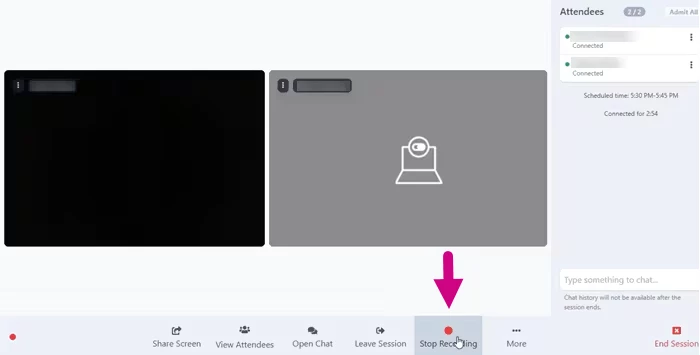
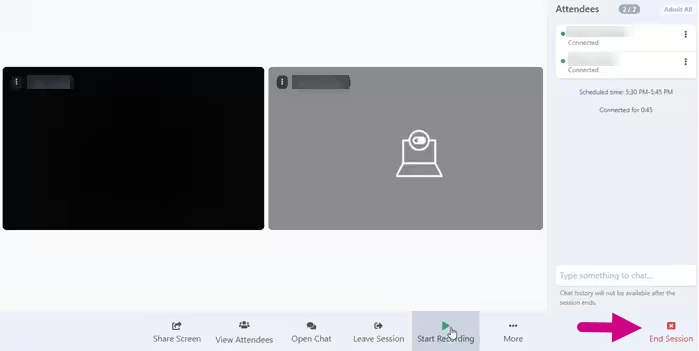
If you are using AI Telehealth Notes, you and your client must provide consent to record the session before it begins. A banner at the top of the screen will display to indicate that recording has started. You can stop and restart recording during the session as needed. When you stop recording, the banner at the top of the session will indicate that recording has stopped, but the session is still in progress. You must end the session before the recording can be processed and added to your progress note.
Begin the telehealth session with your client.
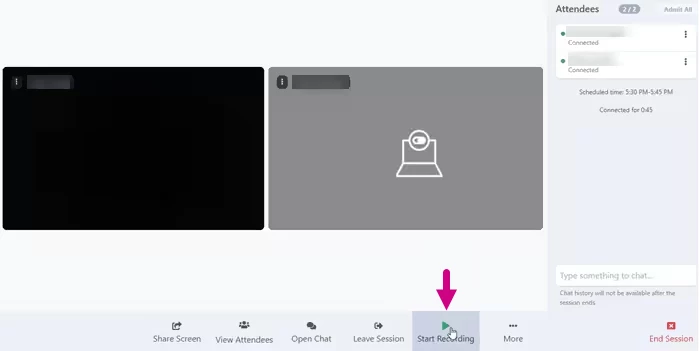
Click the Start Recording button at the bottom of the screen.
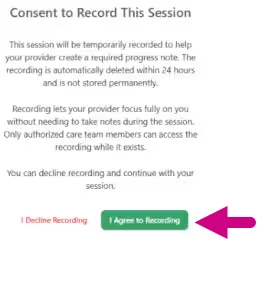
The client must click the I Agree to Recording button on the Consent to Record This Session screen. If the client clicks I Decline Recording, the session will not be recorded. A banner at the top indicates that you are waiting for the client to consent. After the client provides consent, the banner indicates that recording has started. A red banner displays if the client declines consent.
Waiting for Client Consent to Record:
Client Agreed and Recording has Started:
Client Declined:
Click the Stop Recording button at the bottom of the screen.
Click the End Session button to end the session and process the recording.
AI Session Assistant turns a recorded telehealth session into a SOAP-formatted session summary in minutes.
How it works:
The session is recorded with therapist and client consent.
AI Session Assistant processes the audio and automatically creates a SOAP-formatted session summary that you can pull into your system templates.
The clinician reviews, edits, and signs the note. AI does not finalize documentation.
Data handling:
Session recordings are deleted within 24 hours.
Transcripts are not stored.
How does AI Session Assistant save therapists time?
AI Session Assistant saves time by drafting a SOAP note draft right after the session so you can review instead of starting from scratch. Therapists using AI Session Assistant report saving 5 to 10 hours per week because they spend less time reconstructing session details later.
Does AI Session Assistant use my note templates?
AI Session Assistant works with templates that include the new AI field. It adds the session summary into that single field when you create your progress note. If your existing template does not include this field, you can add it or use the default template we provide.
What note formats does AI Session Assistant support?
AI Session Assistant currently creates a SOAP‑formatted session summary in one combined field. The summary includes Subjective, Objective, Assessment, and Plan sections. If your template uses separate fields for each part of SOAP, you can copy and paste the content into those fields as needed.
Do I have to use the AI-generated notes exactly as written?
No. The AI output is a SOAP-formatted session summary that you can edit. You are always responsible for the final note, and you can change any part before signing.
Privacy, Security & Compliance
Is AI Session Assistant HIPAA compliant?
Yes. AI Session Assistant is both HIPAA compliant and SOC 2 certified.
Data is encrypted in transit and at rest, governed by strict access controls, and processed under a signed Business Associate Agreement (BAA). Because it’s built into the system, you do not need to export data to a separate platform.
Does AI Session Assistant record therapy sessions?
Yes, AI Session Assistant requires the telehealth session to be recorded in order to generate the SOAP session summary. Recording requires consent from both the clinician and the client. Recordings are deleted within 24 hours, and transcripts are not stored.
Will my client data be used to train AI models?
No. Ensora Health never uses client Protected Health Information (PHI) to train AI models. Your data and your clients’ data are never sold, shared with third parties for commercial purposes, or used for algorithm development. This is a fixed policy, not an opt‑out setting.
Do I need client consent to use AI Session Assistant?
Yes. Both the therapist and the client need to give consent the first time a telehealth session is recorded for AI Session Assistant. Consent is only required once, and the system can store it in the client’s chart so they are not asked at every session. Once consent is stored, you can record future sessions without additional prompts.
If a client declines recording, you can document manually and still use other AI Session Assistant features like AI Case Summaries.
How does AI Session Assistant compare to third-party AI scribes on data privacy?
AI Session Assistant is built into the system, so session data stays within your EHR ecosystem
You don’t need to upload audio to a separate platform or manage a separate vendor workflow. Recordings are deleted within 24 hours, transcripts are not stored, and PHI is not used for AI training.
Working with AI Session Assistant
Is AI Session Assistant only for telehealth sessions?
Right now, AI Session Assistant works with recorded telehealth sessions conducted in the system. AI Case Summaries works for clients regardless of session type because it uses signed documentation already in the chart.
What if my client does not want to be recorded?
If a client declines session recording, you can still document the session manually in the system. AI Notes Enhancement can help improve notes you write yourself, and AI Case Summaries can generate structured overviews from existing signed documentation without using session recordings.
What is an AI Case Summary?
AI Case Summaries is an AI Session Assistant feature that creates a structured overview of a client’s clinical history and progress using signed notes, treatment plans, and signed assessment already in the system. It can help with session prep, supervision, consultations, and clinician handoffs. It works for all clients, including in‑person and telehealth.
How do I get started with AI Session Assistant?
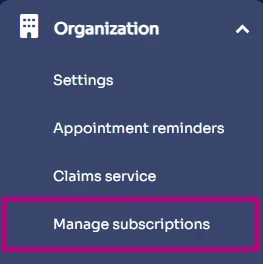
To start using AI Session Assistant, enable A Session Assistant in and complete consent setup.
Here’s all you need to do:
Enable AI Session Assistant in your account settings.
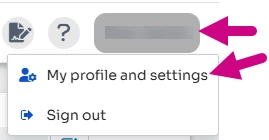
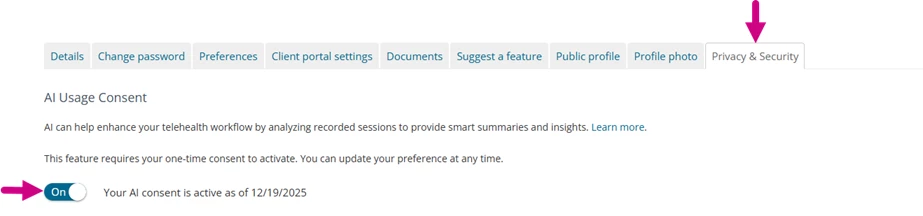
Record your own consent to use session recording in your clinician profile.
Confirm the client consent to record their telehealth session. Consent only needs to be given once if you store it in their chart.
Start the telehealth session and record it as usual.
After the recorded session ends, AI Session Assistant automatically creates the SOAP session summary content for you. When you create your progress note using a template that includes the AI field, the summary appears in that field for you to review and edit. The system creates the content, but you still create the note itself.