


SUBSCRIPTION REQUIRED: AI Case Summaries is a feature included in the AI Session Assistant add‑on.
To subscribe to AI Session Assistant please see the license instructions for your particular subscription plan here: Manage Your Subscription Plan & Add-Ons
This tool provides a dynamic, consolidated view of key case information to assist clinicians in understanding a client’s progress without navigating to multiple documents. Signed assessments, treatment plans, and progress notes are summarized for each case.
Jump to Section:
Generate a Case Summary
- In Client details, select the blue Cases folder button.

- Within the Case Notes section for the client, click the Case Info button within the Actions column to view the open case notes.

- Within the case details, there is a blue sparkle Generate Case Summary button.
NOTE: The Generate Case Summary button will only be enabled if at least one signed document (assessment, treatment plan, or progress note) is available.

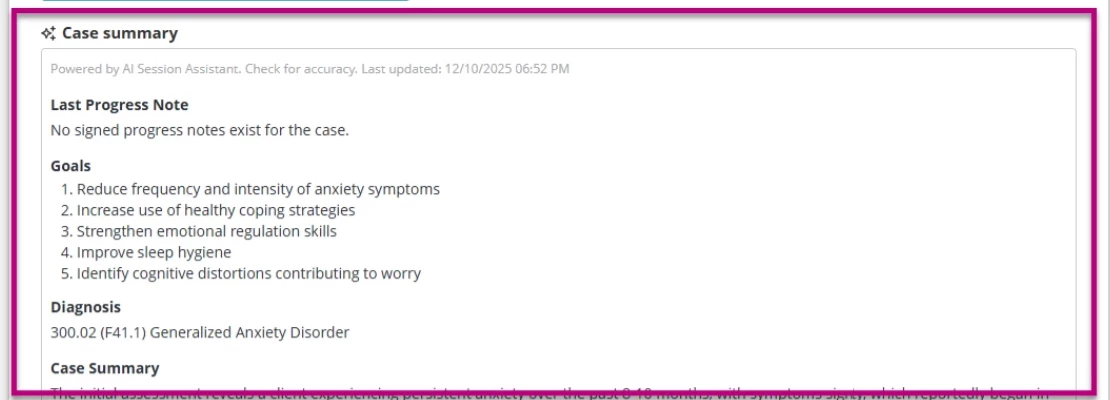
- The case summary will generate and display below the case details. It includes the most recent progress note, associated goals, diagnostic codes, and a formal summary.
Interactive Walk-Through: AI Case Summaries
Explore AI Case Summaries with our interactive tutorial. Click Next to start the guided steps. If the interactive content fails to load in your browser, access it by clicking the link.
https://therapybrands.storylane.io/share/case_summaries