PERMISSIONS REQUIRED: You must have Administrator Permissions or higher.
You can upload an Organization Logo that will display/print on your Intake Forms, TheraNest Notes, and all Ensora Billing Documents. Your logo will not be displayed on Dynamic Forms.
Logo Tips:
- Your logo file must be a gif, bmp, png, or jpeg.
- Your logo file cannot be larger than 10 MB.
- Your logo should be AT LEAST 24px in height.
- We do not recommend uploading a logo that includes a photograph of a place or person.
Jump to Section:
Upload or Change Logo
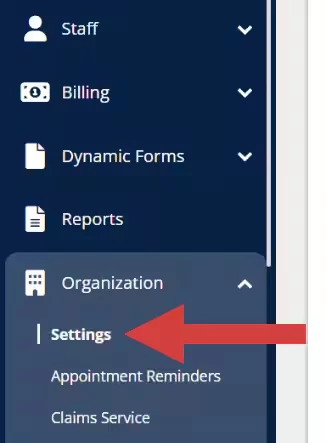
- Click Organization in the navigation bar, then select Settings from the drop-down. The Profile tab defaults open.
- Scroll down to Upload a Logo section.
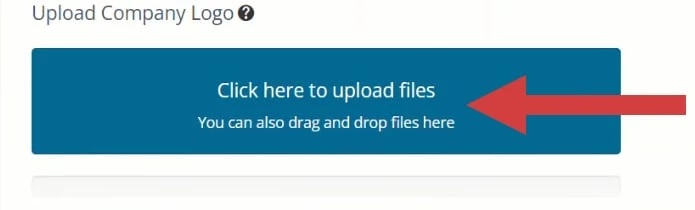
- Click to upload your logo, or drag and drop your file.
- Click Save Changes in the top right.

- Repeat these steps to change your logo.
Remove Logo
- Click Organization in the navigation bar, then select Settings from the drop-down. The Profile tab defaults open.
- Scroll down to Upload a Logo section.
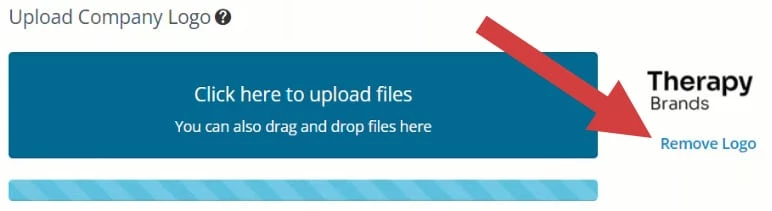
- Click Remove Logo.
- Click Save Changes in the top right.