PERMISSIONS REQUIRED: You must have Administrator Permissions or higher.
As an Administrator you can set the default Place of Service for all Staff on all Invoices and Notes.
NOTE: The 02 or 10 Place of Service for Telehealth Appointments will override the Default billing place of service when Automatically Set Telehealth session place of service on invoice & progress notes is selected. The place of service can be changed in the appointment settings. See Location, Place of Service & Location Groups for more information.
The invoice must be linked to an appointment in order for the Default Place of Service to populate on the invoice. If the appointment is not linked Office (11) will populate as the default regardless of the Organization Setting.
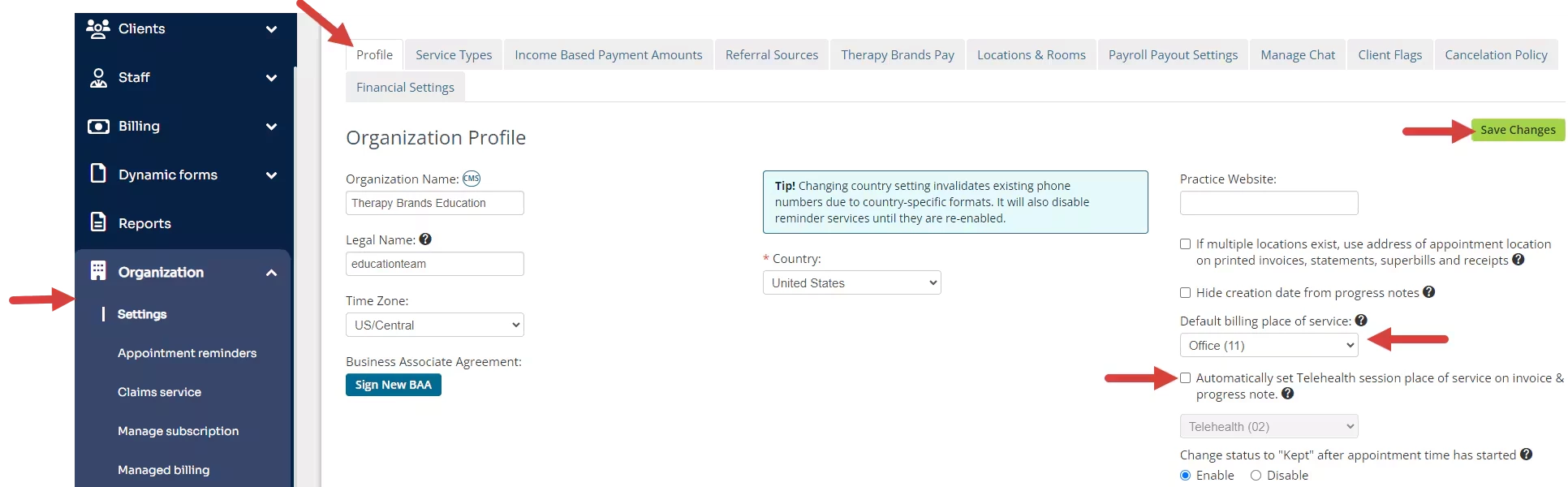
- Click Organization and Settings in the navigation bar. The Profile tab opens.
- Click the Default billing place of service drop-down and select desired Place of Service.
- Select Automatically Set Telehealth session place of service on invoice & progress notes.
- Click Save Changes.