



The Reports section provides a comprehensive, subject‑based view of operational, financial, clinical, and growth data, allowing you insight and solutions. With reports spanning appointments, billing, clients, cases, demographics, referrals, and claims data, users can identify and address issues proactively.
Some common reports include the Missing Progress Notes report which displays Kept appointments for which no Progress Notes have yet been entered, and the Progress Note Signature report which displays all Progress Notes created during a date range and shows whether or not they have been signed. These are just two examples of reports that can give you quick actionable information and quick ways to fix issues before they delay your billing.
NOTE: PDF or CSV report downloads may continue in the background if processing takes more than a few seconds. You can continue working while the file generates. When the download is ready, you will receive both an email and an in‑app notification with a link to retrieve the file.
Open Reports
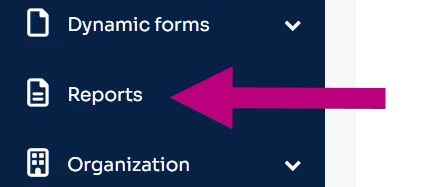
- Click Reports on the side navigation menu.
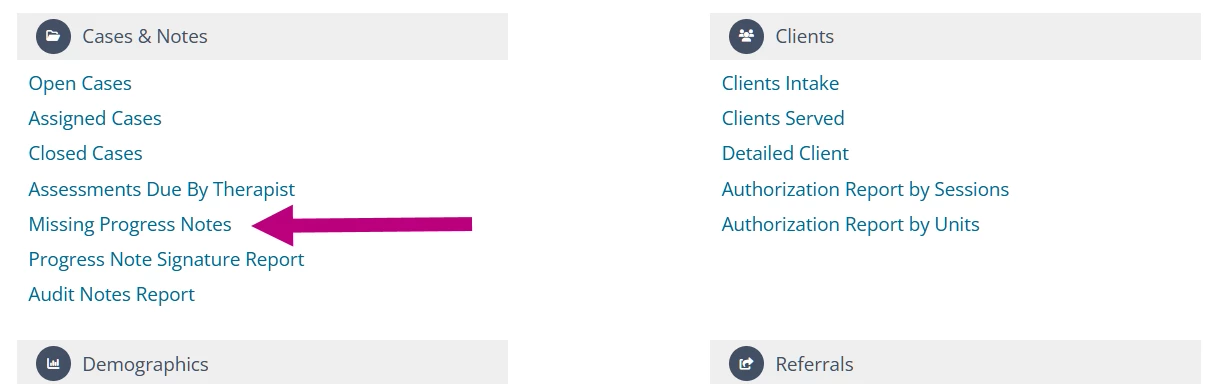
- Click the title of the report you want to work with.
- Set your parameters and click Run Report.
Appointments Reports
- Canceled & Rescheduled Appointments Report - Displays all Clients who have had a cancelled or rescheduled Appointment in the date range selected.
- No Show Appointments Report - Shows all Clients who have Not Shown up for an Appointment in the date range selected.
- Session Unit Reports - Shows the number of Sessions scheduled for the Date Range set.
- Group Attendance Report - Displays all Group Appointments (and attendance status) for scheduled groups within the specified date range.
- Detailed Attendance Report - Displays all Appointments (and their attendance status) a Client or Staff Member has scheduled within the specified date range.
- Attendance by Service Type Report - Displays the Attendance Rate of each Service Type.
- Retention Rate Report - Used to know how well a Therapist (and Practice) is retaining Clients over time.
- Appointments History Breakdown - Provides a visual breakdown of Appointment History for your Organization based on Kept, Rescheduled, No Show, Cancelled, or Late Cancel Appointments.
Billing Reports
- Daily Billing Report - Displays the per-day billing totals from all Kept/Invoiced Appointments and accepted payments.
- Invoice Aging Report - Displays those Invoices with an unpaid balance. It allows you to quickly identify outstanding balances older than 30/60/90/120+ days since the Invoice Date.
- Service Billing Report - Shows how much revenue is generated by a particular service type. This report pulls in data based on invoice date and payment date at the same time.
- Staff Billing Report - Show amounts Staff Members have billed and collected for their Services within a specified date range
- Write-Off Report - Displays Write-Offs that occurred in a certain Date Range and it can be filtered by Client and Staff Member.
- Payment Report - Displays the summary of all Client/Insurance Payments and Write-Offs for Invoiced Services for each Client within the specified date range.
- Payment Methods Report - Displays a breakdown of revenue sources (credit card, cash, check, or insurance) for individual Payments on all Invoiced Services.
- Payroll by Rendering Provider Report - Based on Payments applied and distributed to Invoice Service Dates.
- Payroll Data Export Report - Displays all payments collected in the specified payment date range for services performed by the Appointment Staff.
- Vantage Payments Report - Displays all Client Payments made in the system that are tied to credit card transactions.
- Invoice History Report- Provides a visual breakdown of your Daily Invoice History in the last 30 days and your Total Outstanding Invoices.
- Submitted Claims Report - Reconcile your invoices and see the total number of submitted claims during a given date range.
- Externally Submitted Claims Report - Used to reconcile your invoices and see the total number of externally submitted claims during a given date range.
Case & Notes Reports
- Open Cases Report - Displays open Cases in set Date Range.
- Assigned Cases Report - Displays Staff Assigned to Case in set Date Range.
- Closed Cases Report - Displays Cases Closed during set Date Range.
- Assessments Due by Therapist Report - Displays all Cases that are missing a Client Assessment in the set Date Range.
- Missing Progress Notes Report - Displays Kept Appointments for which no Progress Notes have yet been entered.
- Progress Note Signature Report - Displays all Progress Notes created during date range defined.
- Audit Notes Report - Displays all of the signed progress notes linked to an appointment with a service date in the timeframe selected.
Clients Reports
- Clients Intake Report - Displays all Client Intakes that occurred during your set Date Range.
- Clients Served Report - Displays Clients and what Service Type was used on an Appointment for them.
- Detailed Client Report - Displays Intake Date, Client Service Types, Staff Member Assigned and Last Appointment Date.
- Authorization Reports for Sessions & Units - Displays information on authorizations that fall within the given date range, their session/unit allocation, and utilization percentages.
Demographics Reports
- Demographic Analytics Report - Displays Active Clients who fit into selected Demographics.
- Demographic Snapshot - Provides a great visual for seeing the demographics of your client population.
Referrals Reports
- Referrers - Displays the Referral information for the set Date Range
- Referral Source Analytics Report - Displays which Referral is the most valuable to your Organization based on revenue, no shows and/or cancellations.
- Top 5 Referral Sources Report - Displays a visual break down of your top 5 referral sources.
Advanced Reporting
- Claims Activity Report - Shows all events for in-progress claims.
- Managed Billing Payments Reconciliation Report - Shows payments that were posted by the RCM team and are subject to RCM monthly fees.