


NOTE: If your started your TheraNest subscription after August 28, 2024, you will not see an option to enable/disable Advanced Availability. This is default for all newer clients.
Advanced Availability allows you to specify the services you are available for scheduling at specific times and locations. Once enabled, you need to add your availability from the Schedule before appointments can be scheduled with you. You can add single availability blocks and repeating availability blocks. See the Advanced Availability Overview for more information.
Enable Advanced Availability
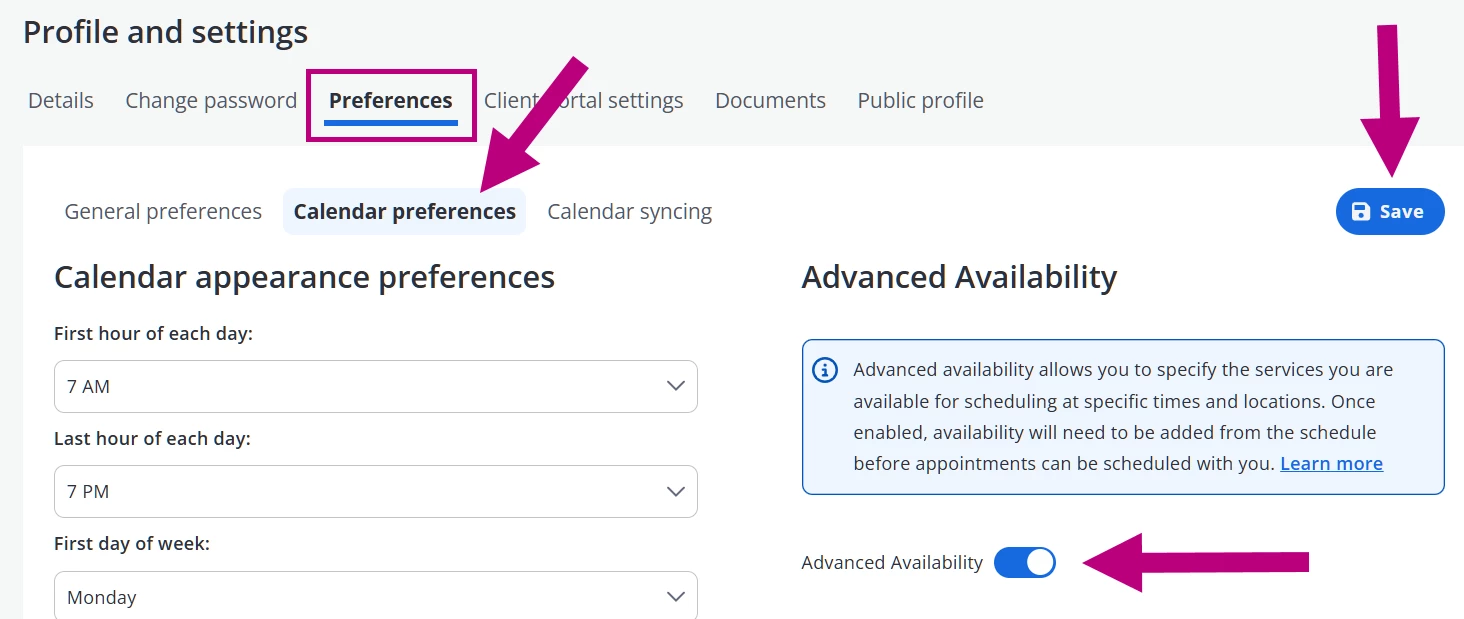
- Click your Name in the top right corner, and select My profile and settings.
- Click the Preferences tab.

- Click the Calendar preferences tab.
- Turn Advanced Availability toggle to On.
- Click Continue on the pop-up to enable Advanced Availability.
- Click Save on the page when finished making changes.
IMPORTANT: Enabling Advanced Availability will remove your current Standard availability. See Set Calendar Availability for more information.
NOTE: If you're subscribed to the Client Portal, your Client Portal settings will also be removed. Availability will need to be added from the Schedule before appointments can be scheduled with you.