


The Client Referral Program is not available to all clinics at this time.
The Client Referral Program allows new clients seeking therapy to request an appointment with a therapist based on their calendar availability. When a therapist joins the client referral program, they will designate payers as referral sources. By creating a public profile, the therapist allows these payers to share their information and availability, enabling individuals seeking therapy to request an appointment directly through the insurance portal.
After a staff member is added to the Client Referral Program, their public profile will need to be completed to help prospective clients learn about them and the service they offer. The public profile can be completed by the therapist or by an admin user.
Referral appointment requests can be approved or declined under the Unconfirmed Appointments tab on the schedule.
Jump to Section:
Add and Manage Staff in the Client Referral Program
Org Admins can add staff to the Client Referral Program, edit staff referral sources, and deactivate staff. Once a therapist has been added to the client referral program, they will get an email instructing them to fill out their public profile and set their availability for referral appointments.
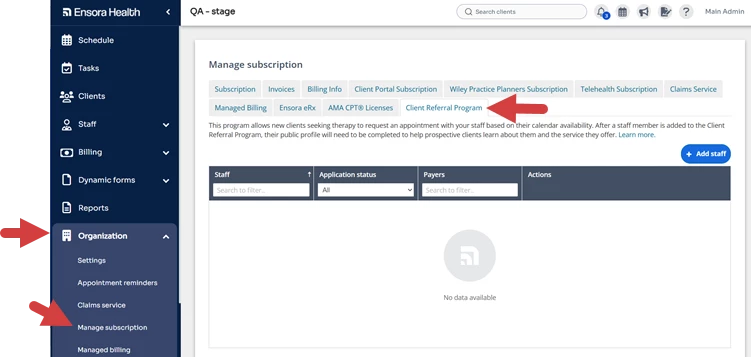
- Click the Organization tab on the Navigation Bar.
- Click Manage Subscription.
- Click the Client Referral Program Tab.
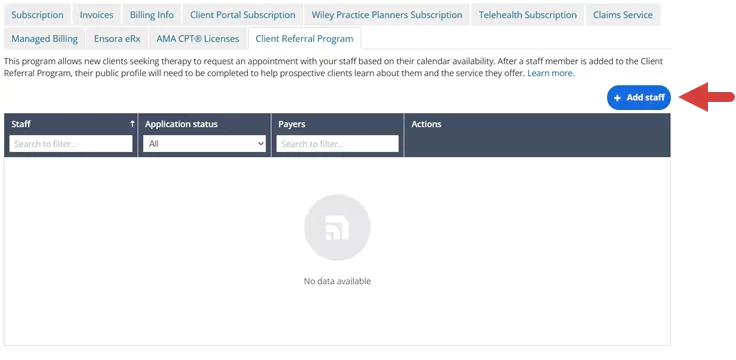
- Click the Add Staff button.
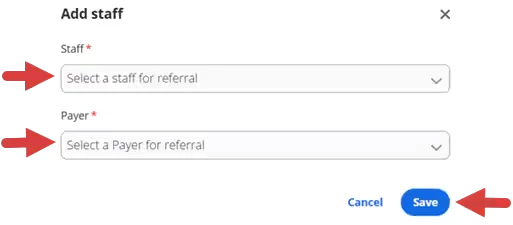
- Click the Staff dropdown to select a therapist to add to the client referral program.
- Click the Payer dropdown to select payers that the therapist can receive referrals from.
- Click Save.
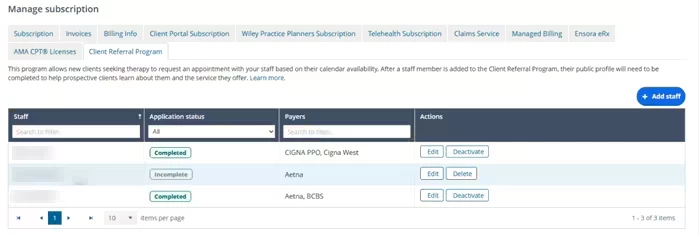
- Staff members display in the Client Referral Program Grid.
- Click the column header fields to filter the list by Staff, Application Status or Payers.
- The Application Status column indicates if the therapist has completed their public profile.
- Completed: The therapist has completed and submitted their public profile.
- Incomplete: The therapist has not completed and submitted their public profile.
- Click the Edit button to edit the payer referral sources.
- Click the Delete button to remove the therapist before their application status is complete.
- Click the Deactivate button remove the therapist from the Client Referral Program. Once a therapist is deactivated, they can not be reactivated from within the system.
Complete a Public Profile
Required information in the public profile can be completed by a therapist or admin user at any time. Once the therapist is added to the Client Referral Program in Organization Settings, they can complete and submit their Public Profile.
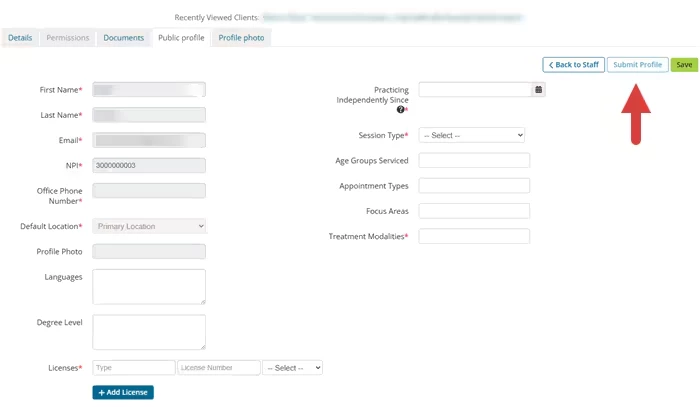
NOTE: The First Name, Last Name, Email, NPI, Office Phone Number, Default Location and Profile Photo pull from other areas in the application and can not be edited in the public profile. Fields with a red asterisk are required to submit the public profile. Some of the optional fields are only available to the therapist the profile belongs to.
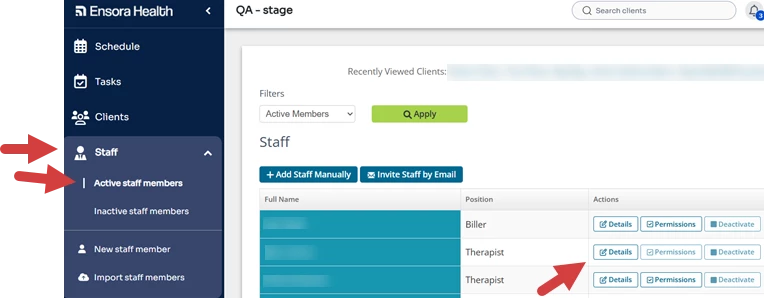
- Click the Staff tab on the Navigation Bar.
- Click Active Staff Members.
- Locate the therapist and click Details.
- Click the Public Profile tab.
- Complete all required fields and enter any other information you want listed in the public profile.
- Click Submit Profile.
- Click Save to save the information without submitting the profile. If there is no Submit Profile option, this means that an Admin user needs to add the therapist to the Staff Referral Program.
- Click Save to save the information without submitting the profile. If there is no Submit Profile option, this means that an Admin user needs to add the therapist to the Staff Referral Program.
Create Referral Appointment Availability
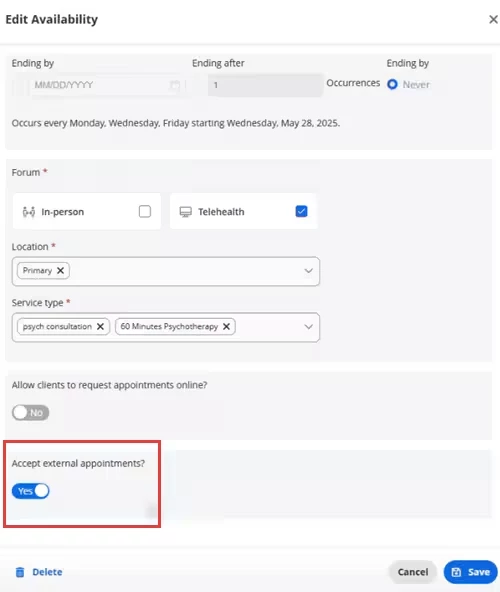
When you are added the staff referral program, a new toggle will appear in your availability blocks for accepting external appointments. When you set this toggle to Yes, you are able to receive referral appointments during that time period.
- Add or Open the Availability Block on the Schedule.
- Learn More: Enable Advanced Availability
- Learn More: Add Availability Blocks
- Set the Accept External Appointments toggle to Yes.
Confirm or Decline a Referral Appointment Request
Referral Appointment Requests will be listed under the Unconfirmed Appointments tab in the Schedule with the referral source listed along with other request details. The Source column will list the referring payer, or indicate that the request came via the client portal.
Staff has 48 hours to confirm or decline the appointment. If no action is taken after 48 hours, the unconfirmed appointment will be removed and the client will be notified. If an appointment is confirmed, the client will receive an email and become an active client in the system.
- Click Confirm to schedule the appointment.
- Click Decline to decline the appointment.
NOTE: Once an appointment is confirmed or declined, there is no way to undo this action.
