PERMISSIONS REQUIRED: You must have Administrator Permissions or higher.
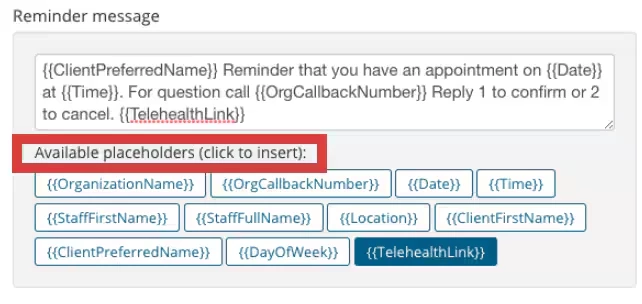
Telehealth Session links can be added to both Text and Email Appointment Reminders. If Appointments are not Telehealth sessions, no link will appear.
Important Things To Note:
- Email Reminders are free to send.
- Text Reminders are nominal fee per text per 160 characters. Spaces count.
One message will be sent per 160 characters. Example: Your message ends up being 180 characters. 2 text messages will be sent with a fee for each message. - A nominal fee is charged for both Reminders sent to Clients, and their responses back to you.
Add Telehealth Link to Reminders
- Click Organization in your primary navigation bar.
- Click Appointment Reminders in side navigation.
- Click Text or Email tab.
- Edit and adjust your Reminder text as desired so it makes sense where the Telehealth link should appear.
- In the Message click so the cursor appears where you want the Telehealth Link to appear.
- Click the {{Telehealthlink}} placeholder button to insert.
- Click Save.
The Telehealth Link from the appointment window will appear where the placeholder does.