


This is a great article to bookmark for reference as you work through the Enrollment Process. For Clearinghouse help, please call 800-840-9152, Ext. 107 for assistance.
What is a clearinghouse and why is enrollment needed?
The easiest way to understand what a Clearinghouse is and the role it plays in processing your claims and generating revenue for your practice is to see it as a middleman. The clearinghouse picks up electronic claim files (EDI) from your Practice Management Software and forwards them to your respective payer(s) for processing. It then allows the payer to send ERAs (electronic remittance advice or electronic EOBs) through the clearinghouse and back into your Practice Management Software for ease of posting denials and payments.
Enrollment is a process that lets your Payers know that you will be submitting electronic Claims (EDI) and receiving ERAs through that specific clearinghouse. It is important to note that Enrollment is NOT the same as getting credentialed with a Payer.
You must be credentialed with each payer you want to submit claims electronically to and receive ERAs back from prior to enrolling for EDI and ERA through your designated clearinghouse.
Keywords & Abbreviations:
While working through the Enrollment Process, you may come across some keywords and abbreviations that are unfamiliar. Please reference the list below:
- EDI (Electronic Data Interchange): This can also be referred to as 837s. This is simply the electronic version of a claim that is sent to the payer for processing.
- ERA (Electronic Remittance Advice): This can also be referred to as 835s. This is an electronic version of a paper explanation of benefits you receive from the payer once a claim has processed. This will outline any denial or payment information received from the payer.
- Payer ID: This is typically a 5-digit number for electronic claims submission. Payer IDs are usually located on the back of the insurance card under the mailing address.
After you have created your initial enrollment, you can add additional enrollments to ensure any new payers and/or new providers can be billable on claims.
Before you begin, ensure that you have done the following:
- Check the NPPES NPI Registry to ensure you are entering the correct NPI and Provider Information.
- Gather all information needed for the Enrollment Process.
- Check if your Payers require Enrollment
IMPORTANT: If the Payer does not require enrollment, you can immediately begin submitting Claims to them.
Step 1: Enroll Providers with Payers
To submit Claims in the system using your integrated clearinghouse, you will need to enroll with each of your Payers.
- Click Organization in primary navigation bar.
- Click Claims Service in side menu.
- Select NPI Type, either Individual or Group.
- Choose your provider.
- Click to launch the Enrollment Wizard.
- Complete the Enrollment Wizard in a new window to submit a new enrollment request.

Step 2: Process your Enrollments
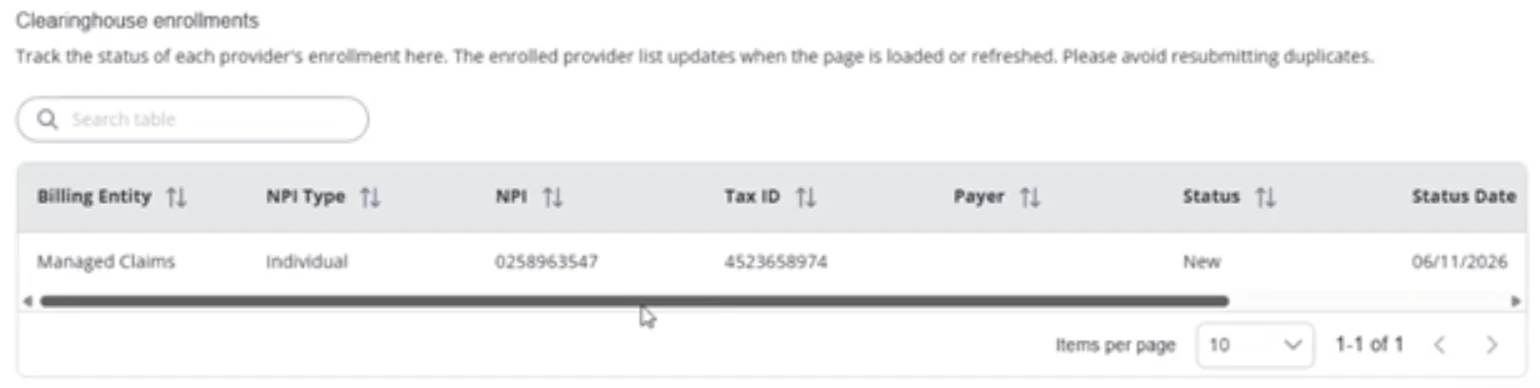
- Your new enrollment request will now show under Clearinghouse enrollments for you to track its status throughout the enrollment process.
- The Clearinghouse Enrollment team will reach out to you within 5 business days of your Enrollment and will then work with you to complete your Enrollments with each Payer. They will also help navigate any payer enrollment rejections.
- Your Enrollments will be delayed if you do not respond when the Clearinghouse Enrollment team contacts you for additional Enrollment information.
- If you fail to provide the information needed by the deadline, the Enrollment project will be closed.
Step 3: Payer Approved
- After the Enrollment has been processed and your Enrollment is verified as Approved, you can begin billing to those Payers in the system. See Claims Process Overview for more information.
Add Additional Enrollments
After you have created your initial enrollment you can add additional enrollments to ensure any new payers and/or new providers can be billable on claims.
- Repeat Step 1 for any additional providers or payers as needed.