



Theranest

Client: Telehealth Pre-Call Test

  • August 13, 2025
  • 0 replies
  • 103 views

Ensora Education Team
Forum|alt.badge.img

We recommend doing a Telehealth pre-call test before your first session Telehealth session. Doing so will help eliminate problems when you start conducting Telehealth session.

This pre-call test checks your system's hardware & software setup, it evaluates connectivity, media access (video and microphone), and quality. Based on the results, it will make recommendations to increase you Telehealth Session audio/video quality.


TIP: To ensure optimal call quality, go to https://video-diagnostics.twilio.com/ to complete a pre-call test before you begin your appointment. A pre-call test is an essential step before your telehealth session to ensure that your device and connection are ready for a smooth and uninterrupted experience. This test helps determine your internet speed, video and audio quality, and any potential issues with access or equipment, allowing you to address them before the session starts.


Run the Pre-Call Test

  1. Join the Telehealth Session.

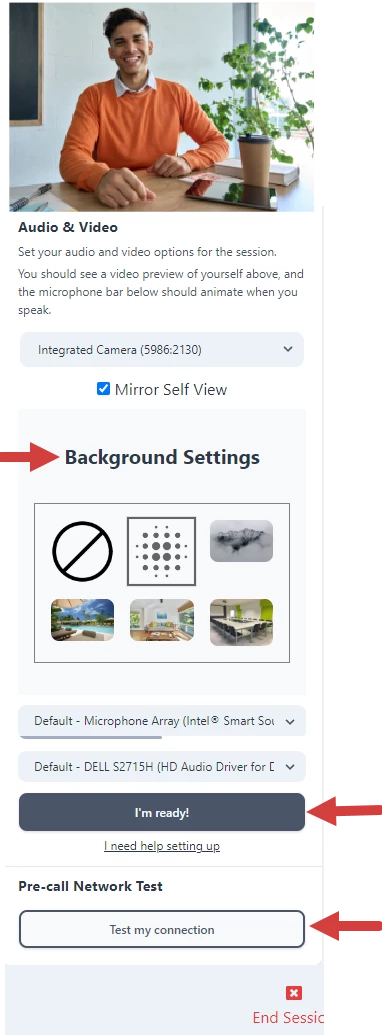
    NOTE: You can select a virtual background to display during the session.

  2. Scroll down and click the Test My Connection button.
  3. When complete, click the I'm Ready button to start the Session.
    rtaImage?eid=ka0QP000000OzGr&feoid=00NDn00000giD2m&refid=0EMDn000002C2GV
This topic has been closed for replies.