


After a Contact has been added to a Client Network, you can edit their information or remove (delete) them from Client Network.
Jump to Section:
Edit Contact
You can only edit Contact information. To edit a Contact who is a Client, you will need to go into their Client Profile and edit their details there.
NOTE: If this Contact is in other Client's Contact Network, their information will be updated for all Clients.
- Locate Client and open Client Profile.
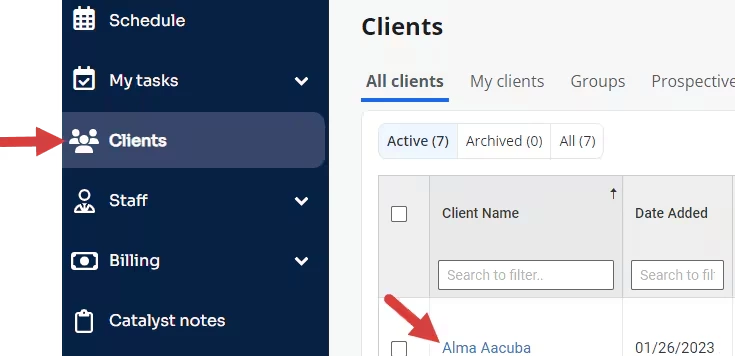
- Click Contact Network tab.

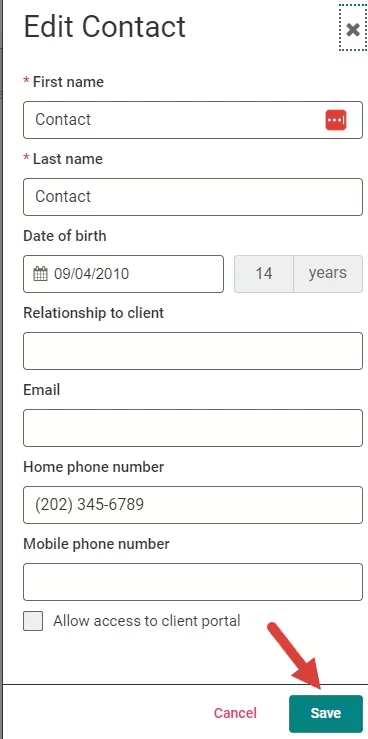
- Click Edit button.

- Make edits and Click Save.
Delete Contact
Deleting a Contact removes them from that Client's Contact Network. Things to note:
- That Contact will only be removed from this Client's Contact Network. They will remain on other Client's Contact Network's until they are manually removed there.
- Deleting a Contact revokes their access to that Client's Portal Account.
- If you delete a Client from a Client's Contact Network, they will be removed as a Contact here but will remain a Client in the system.
- Locate Client and open Client Profile.
- Click Contact Network tab.
- Click Delete button and confirm deletion.
