


PERMISSIONS REQUIRED: Administrator Permissions or higher.
You can add or edit the Group Member List at anytime. Adding a Group Member does NOT add that Group Member to any past Group Appointments.
NOTE: To be considered a Group there must always be at least two members. In order to remove a Client there must be at least three Group members. You will not be able to remove Clients if there are only two members, the remove X will not be available to prevent this. Alternatively, if you want to remove the Group, you can Archive it.
- Click Clients tab in primary navigation bar.
- Click Groups from side navigation.
- Click Details for appropriate Case.

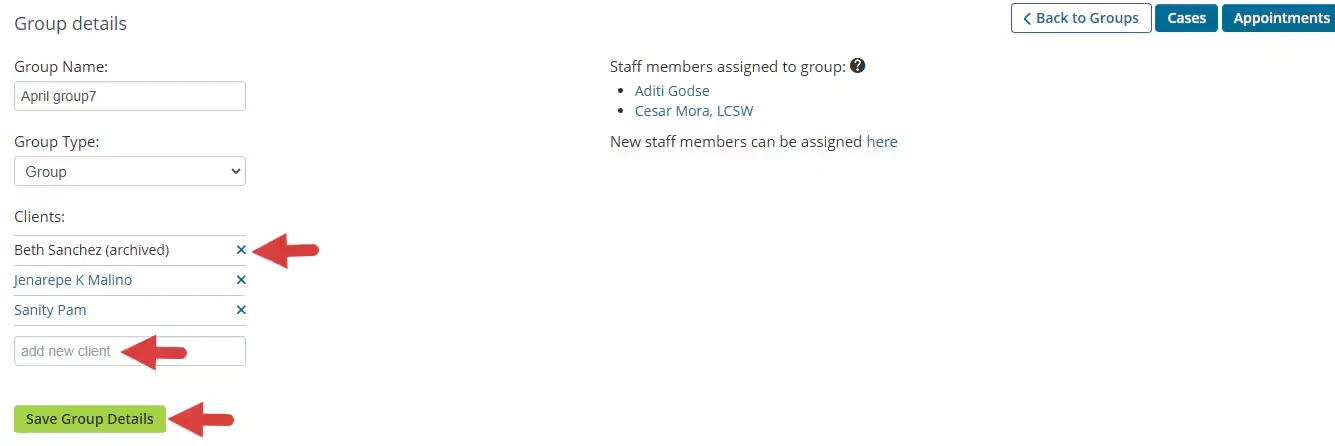
- Add Client's in Add New Client field. Client displays above.
- OR to remove a Client, click the X next to their name.
- Click Save Group Details.
NOTE: Only the assigned staff can see any data related to the case and any files uploaded to the case.