


PERMISSIONS REQUIRED: Users must have billing permissions to manage payment processing.
Decline Rates are monitored by our payments partner. Decline rates with 15% or higher raises red flags for fraud or abusive practices. This can prompt action of your merchant services being suspended or canceled. Repeated attempts on declined transactions increases your decline rate. It's important to follow these best practices and understand more about declines.
Client Credit Card payments can be declined for a number of reasons. When a payment is declined at the time of an attempted charge, a decline message pops up on the top right corner of the screen.
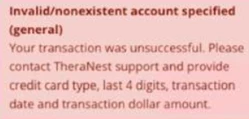
NOTE: If 3 failed attempts to process a credit card charge occur in 10 minutes, the card will be blocked for 24 hours.
Please contact support if you need help resolving an issue with a declined credit card. You will need the following information when contacting support:
- Client initials
- Last 4 of the card number
- Attempted Transaction date
- Attempted Transaction Amount
Jump to Section:
Common Decline Error Messages
Do Not Honor
This is a general decline response from the cardholder's bank. Please ask the cardholder contact their bank for details on why the transaction was declined. This decline reason could be due to:
- A block has been placed from the bank
- Unusual transaction on the account
- Card is canceled, expired or not activated
- Limit reached on the account
Invalid Issuer
This is a decline from the cardholder's bank. Ask the cardholder to contact their bank to request details on why their bank is declining the transaction.
Invalid/Nonexistent Account
This decline error refers to an invalid entry of the card information. Please re-enter the card number and try again.
Expired Card
Card is beyond the expiration date and cannot be used
Insufficient Funds
There are not enough funds to the related account to process the payment
Fraud
The card company/bank has declined the attempted transaction and flagged it a possible fraud
Best Practices
Best Practices for handling decline errors:
- Offer acceptance of alternative payment method.
- Request to collect a back up card on file (via CC consent form) to use if 1st card declines
- Update or remove cards on file to prevent additional attempts. Remember to consider this action in use of Batch Payments.
- Communicate with your clients to collect and update any changes in Billing information.
- Follow proper and regular reconciliation reviews of transactions and accounting.