


PERMISSIONS REQUIRED: Therapist must be subscribed to Wiley Progress Notes in the system.
NOTE: Feature availability depends on your subscription plan.
Before you create a Wiley Treatment Plan you will want to ensure you Create Client Case and Add Client Diagnosis.
NOTE: All Wiley Practice Planners will include the Wiley tag on the list of Notes and Treatment Plans created.
Create a Wiley Treatment Plan
- Locate Client and open Client Profile.
- Click Notes in the left side menu.
- If a Case has not been created for this Client a new one will be created.
- If there are multiple Cases you are assigned to, you will need to select the appropriate Case.
- Click the Wiley Treatment Planner button.

- Select the Problem that is dependent on the Diagnostic Impression entered in the Client's Initial Assessment and click Next.
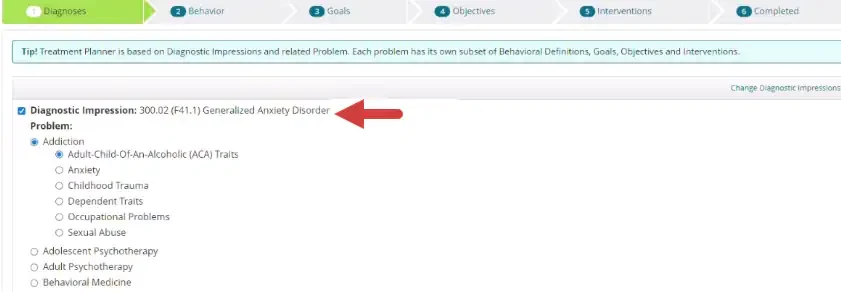
- Select Behavioral Definitions and click Next.
- Select the appropriate Goals. You will choose Objectives for every Goal chosen on the next screen. Click Next.
- Select appropriate Objectives. You will choose Interventions for every Objective chosen on the next screen. Click Next.
- Select appropriate Interventions for each Objective and click Next.
- When finished, click Generate Treatment Plan.
- A Newly generated Wiley Treatment Plan displays. Add any additional note and/or edit as appropriate.
- Click Save.