


The AI Notes Enhancement Feature allows therapists to refine and enhance their notes by requesting AI-generated improvements based on their original writing. When this feature is enabled for the clinic, therapists can review mental-health specific AI suggestions and incorporate them into their notes as needed.
AI Notes Enhancement improves the quality of clinical note-writing by:
- Enhancing language
- Correcting spelling errors
- Replacing common clinical abbreviations (for example, DOB, HX, PT) with a complete word or phrase
- Replacing mental-health specific acronyms (for example, BPD, BD, COPED) with a complete word or phrase
- Replacing ICD-10 codes with a diagnosis
- Converting lists of bullet points into paragraph form
Jump to Section:
Improve Notes with AI Notes Enhancement
When AI Notes Enhancement is enabled for the clinic, note fields have an Improve with AI option, which generates text enhancement suggestions for the therapist.
AI suggestions are available in the following note fields: Paragraph Answer, Participant(s) in Session, Subjective, Objective, Assessment, Plan, Session Focus, Therapeutic Intervention, Additional Notes, & Risk Assessment - Risk Assessment Notes
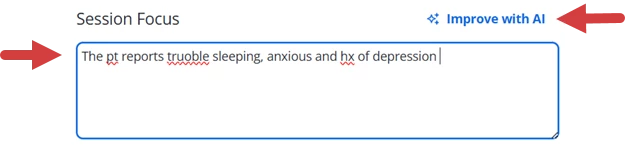
- Enter clinical documentation in the note field.
- Click Improve with AI.
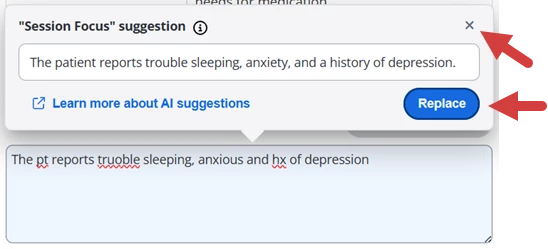
- Review the AI Suggestion:
- Click Replace to pull the suggested text into the note field.
- Click the x in the corner to return to the note without using the suggestion.
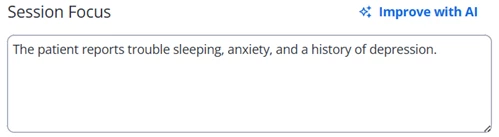
- If you selected Replace, the suggested text displays in the note field.
Enable or Disable AI Notes Enhancement for the Clinic
You can enable or disable AI Notes Enhancement in Settings.
IMPORTANT: AI Notes Enhancement is turned on by default for clinics who began a began a trial or purchased a subscription on or after May 21, 2025. For clinics that began their trial or subscription before this date, AI Notes Enhancement is disabled by default.
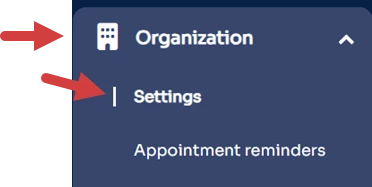
- Click the Organization tab in primary navigation bar.
- Click Settings in side navigation.
- Locate the Disable AI Notes Enhancement in Notes option under the Profile tab.
- Check the checkbox to disable AI Notes Enhancement.
- Uncheck the checkbox to enable AI Notes Enhancement.

- Click Save Changes.
FAQ
Privacy, Consent, & Data Usage
- Will my data ever be used to train an AI model?
- We never use client data to train AI models, ensuring Protected Health Information (PHI) remains secure and confidential. Please see our Responsible and Ethical AI Policy for more information.
- Who has access to my data within Ensora Health?
- Access to your data is tightly controlled. Only a small number of authorized team members can access it through secure systems, and all access is logged. Your data is always encrypted, and it never lives on employee devices.
- Can I export my AI-related data?
- At this time, AI-generated data cannot be exported independent of existing documentation.
- How do I opt out of AI features?
- Most AI features are opt-in by design, and all AI features can be disabled at any time. You can choose when and if to use them, so you're always in control.
Security & Compliance
- What security measures protect my data?
- We follow industry best practices, including data encryption, 24/7 monitoring, and strict access controls. TheraNest is HITRUST certified, meaning an independent, third-party auditor has tested and validated our compliance with HIPAA Security Rule controls. Learn more about our security here: https://ensorahealth.com/security/
- Is the AI feature HIPAA-compliant?
- Yes, our AI features are fully HIPAA-compliant, ensuring that your client’s data is protected according to the highest privacy and security standards. Please see our Responsible and Ethical AI Policy for more information.
AI Features & Customization
- How accurate are the AI-generated notes compared to traditional note-taking methods?
- Our AI-generated notes are designed to be highly accurate and capture the essential details of your sessions. While AI can save you time, you always have full control to review and edit the notes to make sure they perfectly match your style and clinical judgment.
- Can I customize or edit the AI-enhanced notes to match my own clinical style or documentation preferences?
- Yes! After the AI-generated content is added to a field, you can easily edit it within the text editor to align with your preferred style, format, and clinical language. You always have full control to review, edit, and delete AI-generated content prior to signing the note.
- Can I customize or modify the AI model?
- No, the AI model itself can’t be customized. However, you can edit the AI-generated content to fit your style and preferences at any time.
- How often is the AI model updated?
- AI models are regularly improved to stay current with the latest advancements. While we don’t have a fixed update schedule, we continuously work to enhance performance and accuracy to ensure the best experience.
- How can I provide feedback on the AI features?
- For customers participating in an AI Preview Program, issues can be reported within the Preview Program feedback form. As we continue to develop the AI features, a formal feedback mechanism will be introduced for customers to provide feedback or report issues with the experience. As always, new ideas can be requested and voted on in our customer Idea Portal.
Technical Setup & Support
- What technical setup or equipment is required on my end to effectively use the solution?
- No special equipment or setup is needed to use our AI features as they are designed to complement your existing workflows.
- What happens if the AI service experiences downtime—how is my workflow impacted, and what contingency measures are in place?
- In the event of downtime for the AI Notes Enhancement service, you can still enter and review your notes. If AI Notes Enhancement is temporarily unavailable, this will not impede your ability to complete your documentation.
Ethics & Accuracy
- How do I report inaccurate or unexpected AI responses?
- Sometimes, AI tools may generate answers that sound right but are incorrect or not based on real data. This is a known limitation of current AI systems and is something we continue to monitor and improve. For customers participating in an AI Preview Program, issues can be reported within the Preview Program feedback form. As we continue to develop the AI features, a formal feedback mechanism will be introduced for customers to provide feedback or report issues with the experience. We are committed to listening to our users and stakeholders, and we have a process in place to quickly identify and address any concerns. This helps ensure our AI tools remain reliable, safe, and continue to meet the needs of therapists and their clients. We have created an AI governance framework under our Compliance and Security Council that you can contact directly at compliance@ensorahealth.com.
- What steps have you taken to identify, reduce, or eliminate potential bias or inaccuracies in the AI summaries?
- We use ongoing testing and review processes to identify and address potential biases or inaccuracies in our AI summaries. Plus, you always have full control to review and edit the notes before finalizing.