


PERMISSIONS REQUIRED: Org Admin
Locations are a helpful way to stay organized in the system. You can add multiple Locations and assign Staff Members and Clients to those different Locations. It's important to note that the Location is different than the Place of Service. Location Groups may be used if you have multiple locations that use their own Organization NPIs and Tax IDs. See Location, Place of Service & Location Groups and Use Location-Specific Group Settings for more information.
IMPORTANT: The Facility NPI listed (if used) in your first Location, will be the same as the facility NPI on your Organizations Profile. Any changes to the first Location's Facility NPI will change the Organization's Facility NPI and vice versa. This will reflect on your Claims. See Set Up Your Organization's Profile for more information.
Jump to Section:
Add Location
Once a Location has been added you will be able to filter Client Appointments by Location.
- Click Organization in the navigation bar, then select Settings from the drop-down.
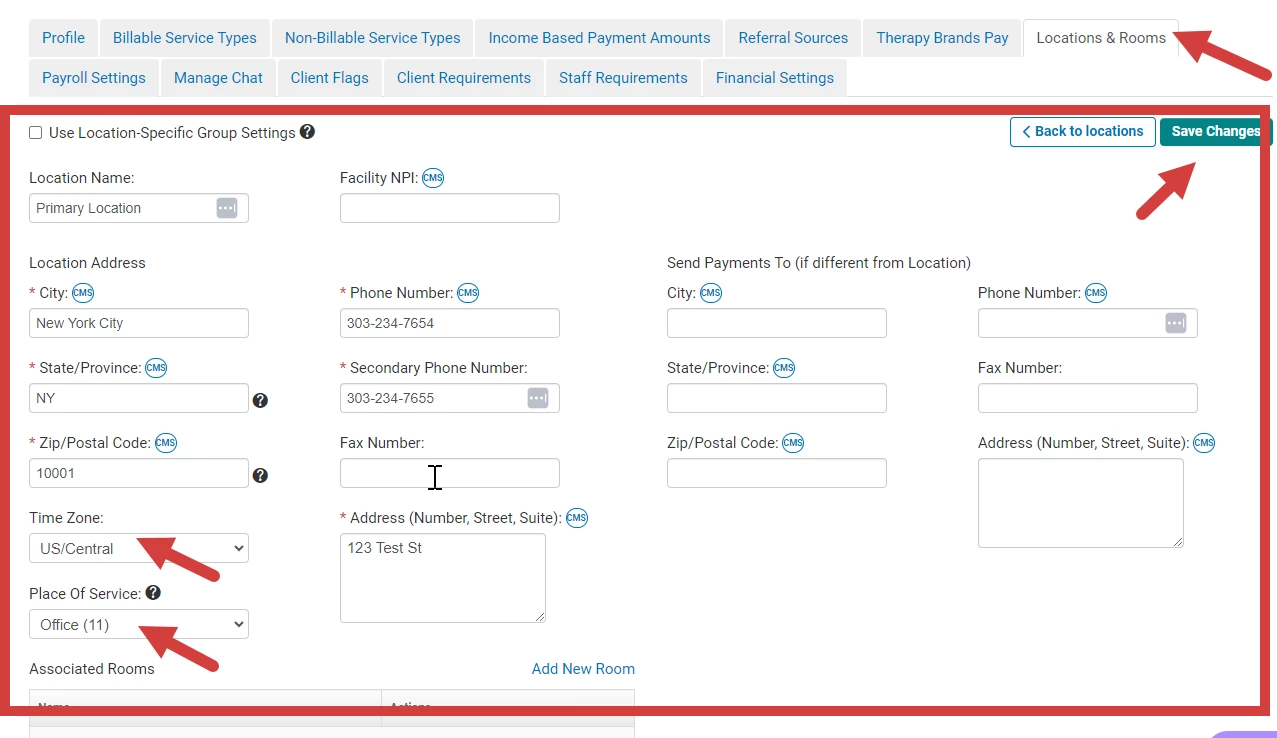
- Click the Locations & Rooms tab.
- Click the + New Location button.
- Enter Location details.
NOTE: Location details (City, State/Province, Zip+4/Postal Code, Phone Number and Address are required) must be completed accurately to support other features.
- Select a Time Zone.
NOTE: The default is the organization's time zone. This time zone selected here is used for appointment times on the client list and signed documentation.
- Click the drop-down menu for Place of Service. The default option is Default Billing Place of Service. Selecting a place of service here will over-ride the default billing place of service in the organization settings.
- Click Save Changes.
Edit Location
Again, any changes to the Facility NPI for your first Location will change the Facility NPI on the Organization's Profile. This will reflect on your Claims.
- Click the Organization tab in the primary navigation bar.
- In Settings, click the Locations & Rooms tab.
- Click the Details button for the location you'd like to edit.
- Edit desired location details.
NOTE: Location details (City, State/Province, Zip/Postal Code, Phone Number, and Address are required) must be completed accurately to support other features.
- Click Save Changes.