Question

Client self scheduling

  • May 2, 2026
  • 1 reply
  • 20 views

I made a test client and when they enter their client portal and attempt to make a new appointment there is nothing in the “select service” drop down so they cannot. I checked my settings and all the service types are entered and my availability is set. Help?


1 reply

LVS
Forum|alt.badge.img+5
  • Community Manager
  • May 6, 2026

Hi ​@brendakelleher, typically when a client is scheduling in the portal, they have to follow certain steps in order so that things populate for them correctly. The steps are:

  1. Client has to log in to their Client Portal and click Appointments in the top navigation.
  2. Click New Appointment button.
    2022-09-21_12-46-26.png
     
  3. The appointment pop-up window opens. Select the following:
    • Provider - who you would like to schedule an appointment with
    • Location - the location of the appointment
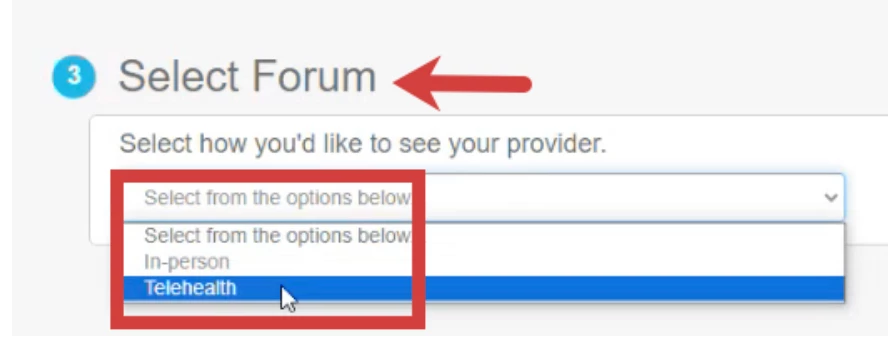
    • Forum - select in-person or telehealth if this setting is enabled

      NOTE: Depending on how your provider has availability set up, you may see a Select Forum field when requesting an appointment. You will need to specify whether you want to request a Telehealth or In-person appointment. 
       

    • Service - based on the selected provider, select the service for the appointment 
    • Availability - see available times based on the selected provider's schedule.
      Double-click and drag in any available space on the calendar to select the date & time for the appointment.

      NOTE: Unavailable times are greyed out on the calendar.


  4. Click Save.
  5. Click Submit New Appointment.
  6. Click View My Appointments to confirm the booking.

IMPORTANT

The services that appear for clients to choose from are determined by the staff member’s settings. Staff must configure which service types are available under:
Profile > Client Portal Settings > Service Types Available for Scheduling