Question

Client self scheduling

  • May 2, 2026
  • 1 reply
  • 7 views

I made a test client and when they enter their client portal and attempt to make a new appointment there is nothing in the “select service” drop down so they cannot. I checked my settings and all the service types are entered and my availability is set. Help?

1 reply

LVS
Forum|alt.badge.img+5
  • Community Manager
  • May 6, 2026

Hi ​@brendakelleher, typically when a client is scheduling in the portal, they have to follow certain steps in order so that things populate for them correctly. The steps are:

  1. Client has to log in to their Client Portal and click Appointments in the top navigation.
  2. Click New Appointment button.
    2022-09-21_12-46-26.png
     
  3. The appointment pop-up window opens. Select the following:
    • Provider - who you would like to schedule an appointment with
    • Location - the location of the appointment
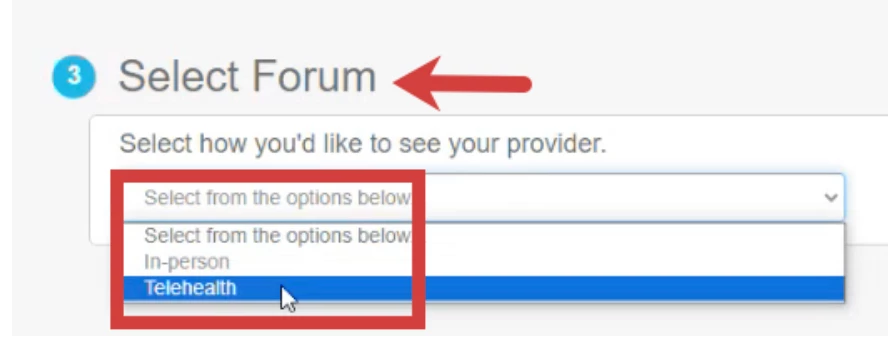
    • Forum - select in-person or telehealth if this setting is enabled

      NOTE: Depending on how your provider has availability set up, you may see a Select Forum field when requesting an appointment. You will need to specify whether you want to request a Telehealth or In-person appointment. 
       

    • Service - based on the selected provider, select the service for the appointment 
    • Availability - see available times based on the selected provider's schedule.
      Double-click and drag in any available space on the calendar to select the date & time for the appointment.

      NOTE: Unavailable times are greyed out on the calendar.


  4. Click Save.
  5. Click Submit New Appointment.
  6. Click View My Appointments to see the new appointment.