


Staff can add and update their own signature. We recommend that you add signatures by trackpad, mouse, mobile device, or touch screen.
NOTE: There is the option to sign via signature pads, though we no longer support signature pads via our Support Center. Follow the Same procedure to update an existing Signature.
- Click My Profile below navigation bar on right side of screen.

- Click on Signature tab.

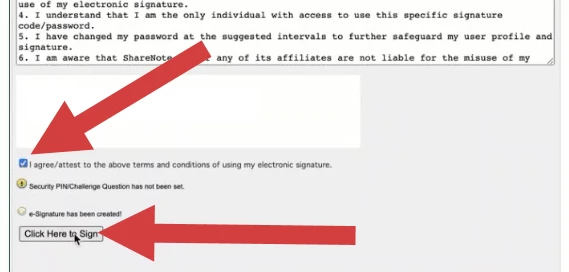
- Click I Agree/Attest to the Terms and Conditions Statement checkbox.
- Click Click Here to Sign (or Click Here to Add/Update Signature).
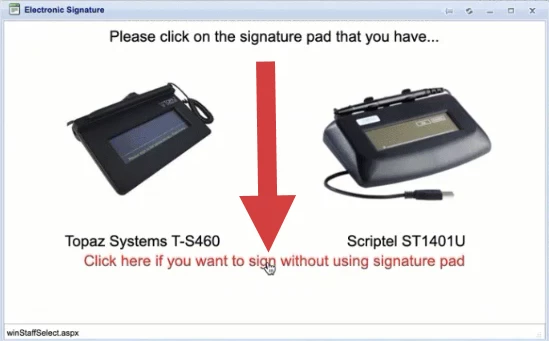
- Click Sign Without a Signature Pad link.
- Input your Signature via trackpad, mouse, mobile device, touchscreen, or signature.
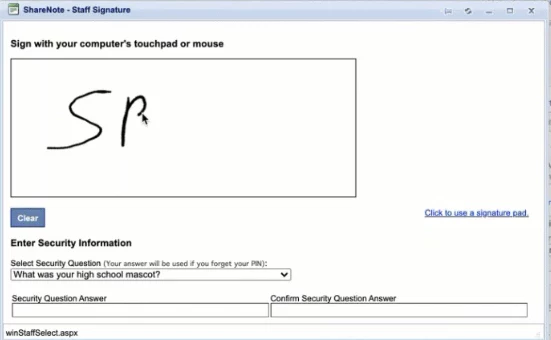
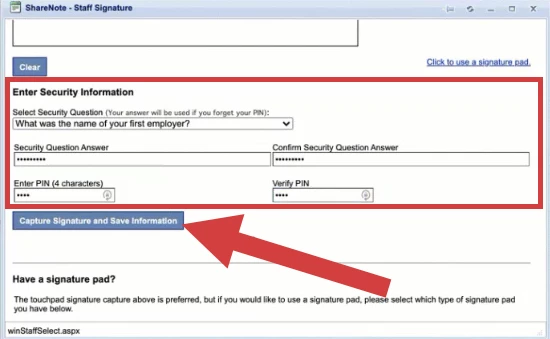
- Click the drop-down to Select Security Question.
- Enter and Confirm your Security Question Answer.
- Create and Verify your PIN Number.
- Click Capture Signature and Save Information.
- Your signature will display in Signature tab.