


PERMISSIONS REQUIRED: You must have Organization Administration Permissions.
NOTE: When the plan is changed, it is changed for all subscribed staff.
- Go to Organization and click Manage Subscription on the side menu.
- Click Telehealth tab.
- Scroll down and choose desired Plan in Telehealth Subscription dropdown.
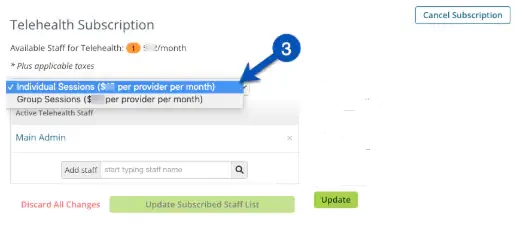
- Confirm Changes in window that displays.
- Click Update Subscription.
NOTE: If you switch to a different plan, you will be credited for unused time and charged the difference for the remaining time. Do not cancel the subscription if you just need to switch to a different telehealth plan. Cancelling ends your subscription, and when you re-subscribe to start a new plan, you will not be credited/pro-rated.