


The 1564 and 1565 reports provide visibility into all electronic payments processed through Stripe (Ensora Payments). Both reports provide additional details to support reconciliation needs and are available for export.
- The 1564 report includes only the payments your agency processed and saved in the system at the time of processing.
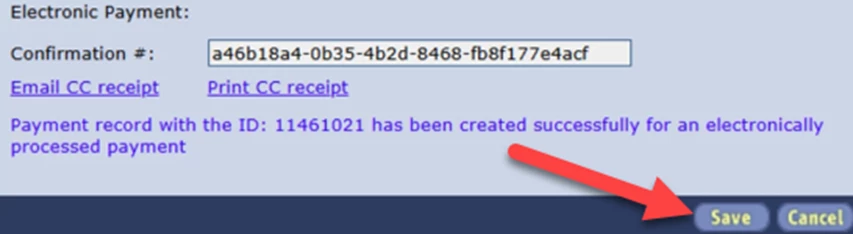
- The 1565 report includes all payments processed, whether or not they were saved in the system.
To view the reports:
- Go to the Staff module > Role tab > Edit Roles.
- In the search for permissions field, enter Stripe.
- Check the box for 1564 Stripe ePayment Report and/or 1565 Stripe Transaction Report.
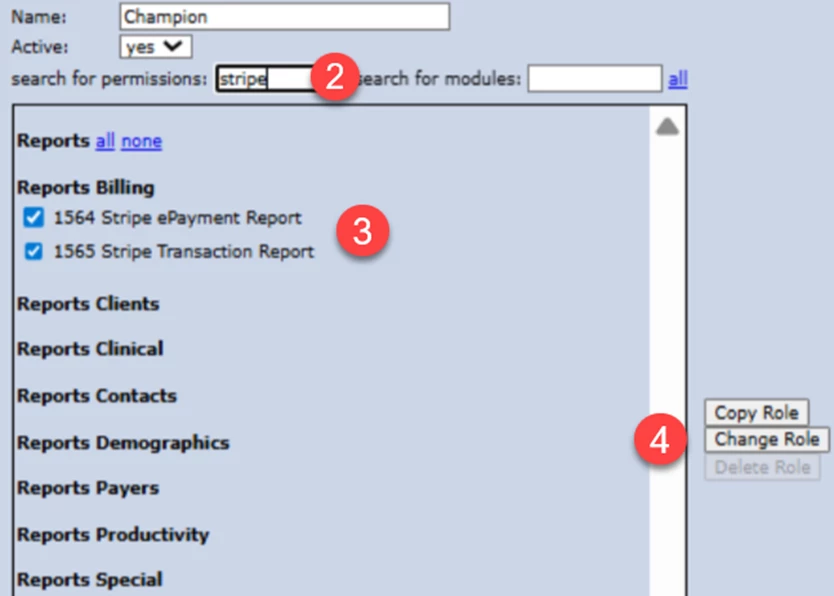
- Click Change Role.
Both the 1564 and 1565 Reports can be filtered by Date Range.
Reporting data includes:
- Client/Payer
- Date Posted
- Date Created
- Amount
- Per Transaction Amount
- Rate
- Total Fee
- Net Amount
- Payment Created By
- Payment Reference
- Electronic Confirmation #
- From Appointment?
- Allocated?
NOTE: For payment-related questions, please contact the payments team at 1-877-288-5583 (select option 2, then option 6) or at payments.support@ensorahealth.com.