PERMISSIONS REQUIRED: Billing Permissions are needed to access the report.
The Vantage Payments Report shows all Client payments made in the system that are tied to Credit Card transactions using the merchant processor Vantage. It allows you to quickly see the fees for each transaction, and net deposit amount after processing fees. This Report includes Archived Clients. System administrators can also void pending charges and refund settled charges from this report. See How Does the System Process My Payments? for more information.
Jump to Section:
Run Report
- Click Reports tab in primary navigation bar.
- Select Vantage Payments under Billing section.
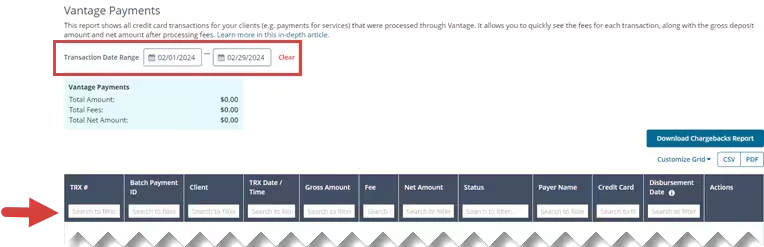
- By default, the Report pulls in the current month's transactions. Adjust the Transaction Date Range to see additional dates.
- Filter Report by clicking column headers to sort data ascending or descending; type in search fields to narrow search results.
The Vantage Payments Report/Credit Card Charges Report reflects your individual transactions and net amount, per transaction. Your bank account will reflect a gross sum of transaction deposits, fees, and refunds (when applicable) as separate lump sum transactions. Fees are debited from your bank account one to three business days after the gross deposit has settled.
The daily Net sum deposited into you bank account will reflect all successful transactions processed before 4 PM, CST. Any successful charges after that time will be lumped with the following day's transactions. Corresponding fees will also be lumped for all successful transactions processed before 4 PM, CST.
Read the Report
- TRX # - Transaction Number associated with Credit Card Transaction (payment).
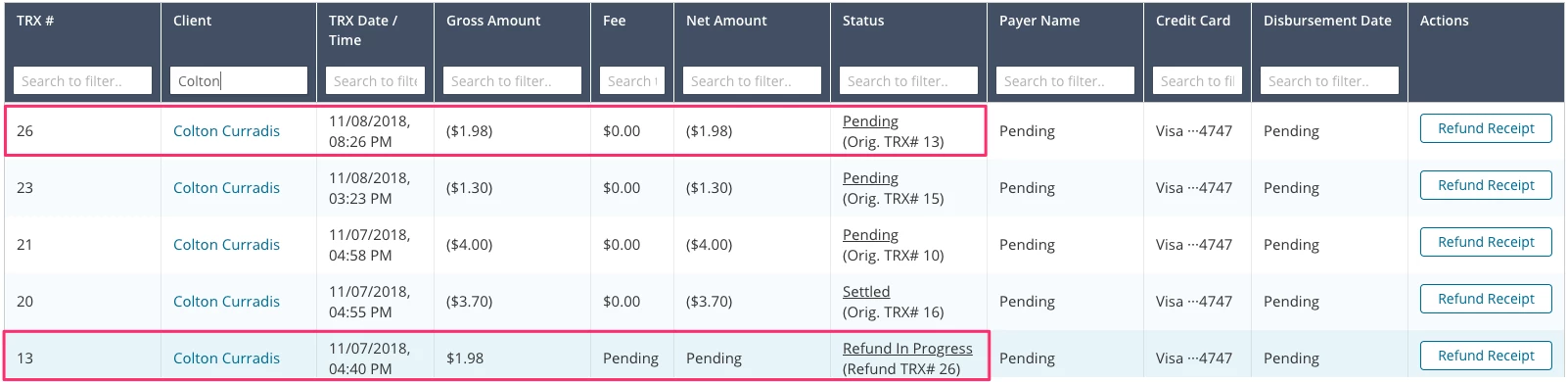
NOTE: If a transaction is refunded a new transaction number will display. Each transaction will reference the partner transaction.
- TRX Date/Time - Date and time Credit Card Transaction (payment) took place.
- Gross Amount
- Fees: Total Fees calculated for settled items.
NOTE: Reflects the total fee for each individual transaction
- Total Amount: Pending and settled transactions are included in this total gross amount of transactions for the report date range.
- Total Net Amount: Pending items are not included as they don't yet have a Net amount (fees are not yet known).
- Status -
- Pending/Submitted: A Pending transaction that has been authorized but not yet settled.
- Authorized: An Authorized transaction is an approved transaction.
- Settled: A Settled transaction has been batched or completed. The merchant (you) will be funded and the transaction will post to the cardholders account (Client).
- Refund: Funds that were returned to a Cardholder's account.
- Disbursement Date: The date that the Payment was released to your bank account.
IMPORTANT: The Disbursement Date is different than the actual Bank Deposit Date. Payment may be released on a Monday (Disbursement Date) but your bank may register the Payment on Tuesday (Deposit Date). may be next day.