Practice Chat is used to quickly and effectively communicate within your practice. Add a Profile Picture to show off your smile!
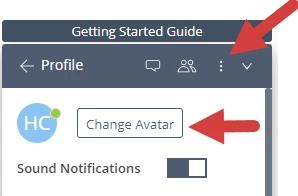
- Click the three vertical dots and select Profile.
- Click Change Avatar and upload desired picture.
Related Articles:


 +1
Practice Chat is used to quickly and effectively communicate within your practice. Add a Profile Picture to show off your smile!
Related Articles:
Enter your E-mail address. We'll send you an e-mail with instructions to reset your password.