This guide explains how the fields in the system populate the CMS 1500 claim form.
Click each section to see the details.
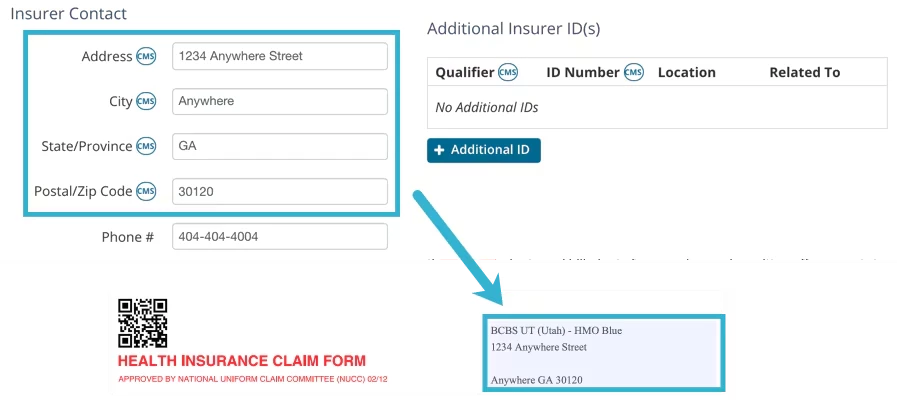
Carrier Block
The Carrier block is filled with the Insurance Organization's name and address from the Insurer Details page.
Billing > Insurers > Edit Insurer
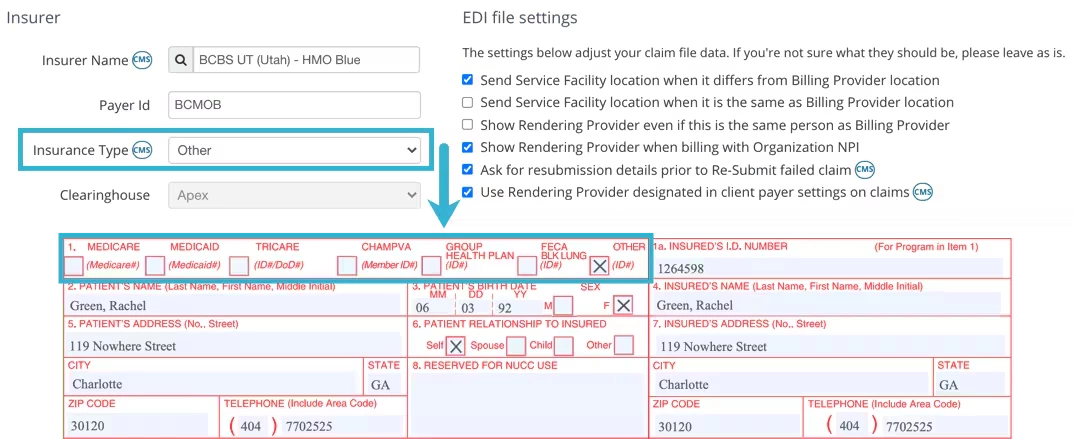
Box 1
Current Insurer's Insurance Type from Insurer Details page.
Billing > Insurers > Edit Insurer
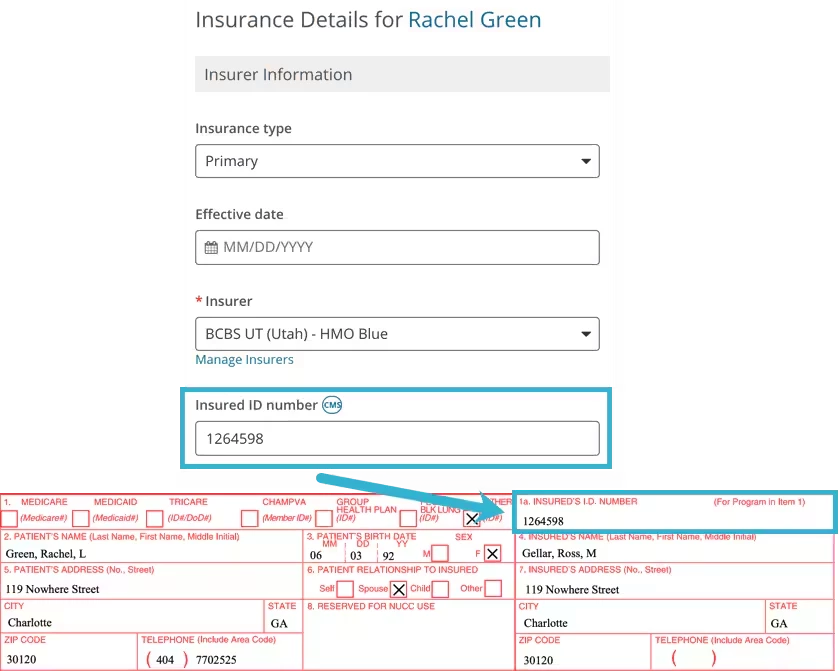
Box 1a
Insured’s ID Number from Client's Bill To & Insurance Info page.
Open appropriate Client > Bill To & Insurance Info Tab
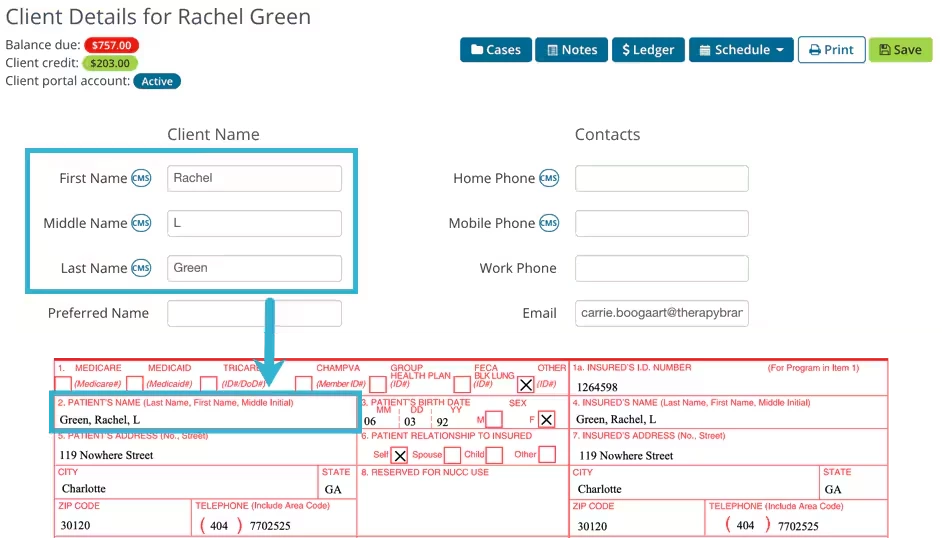
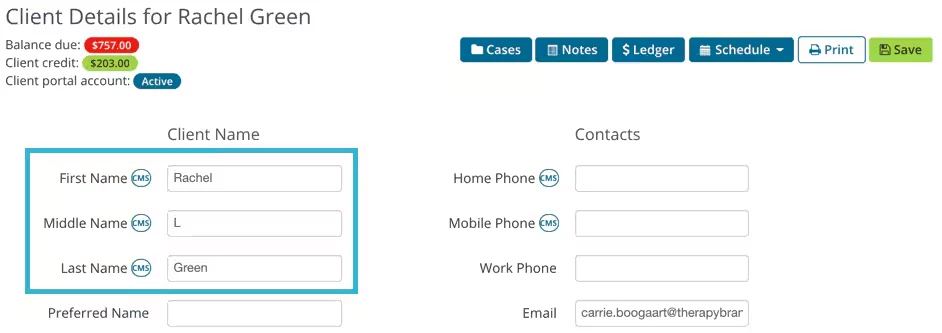
Box 2
Client's Name in the format: Last Name, First Name, Middle Initial, e.g. "Doe, John, F"
Open appropriate Client > Details Tab
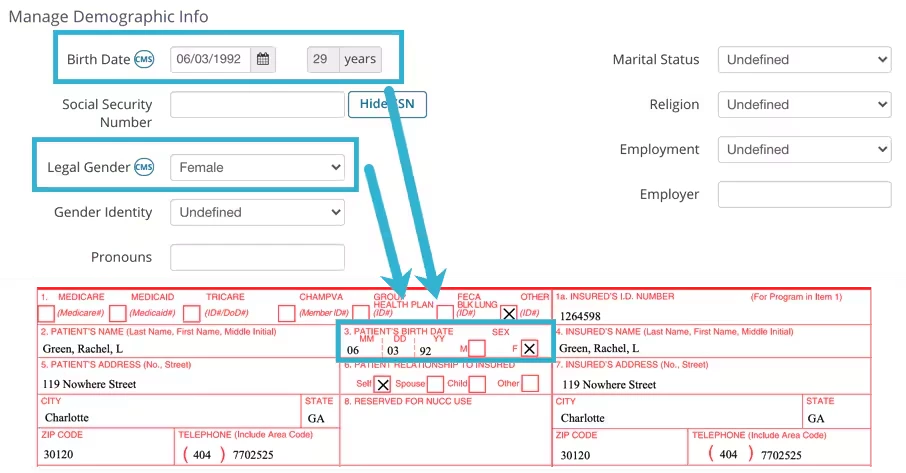
Box 3
Client's DOB and Gender from the Client Details page.
Open appropriate Client > Details Tab > Scroll to Manage Demographic Info Section
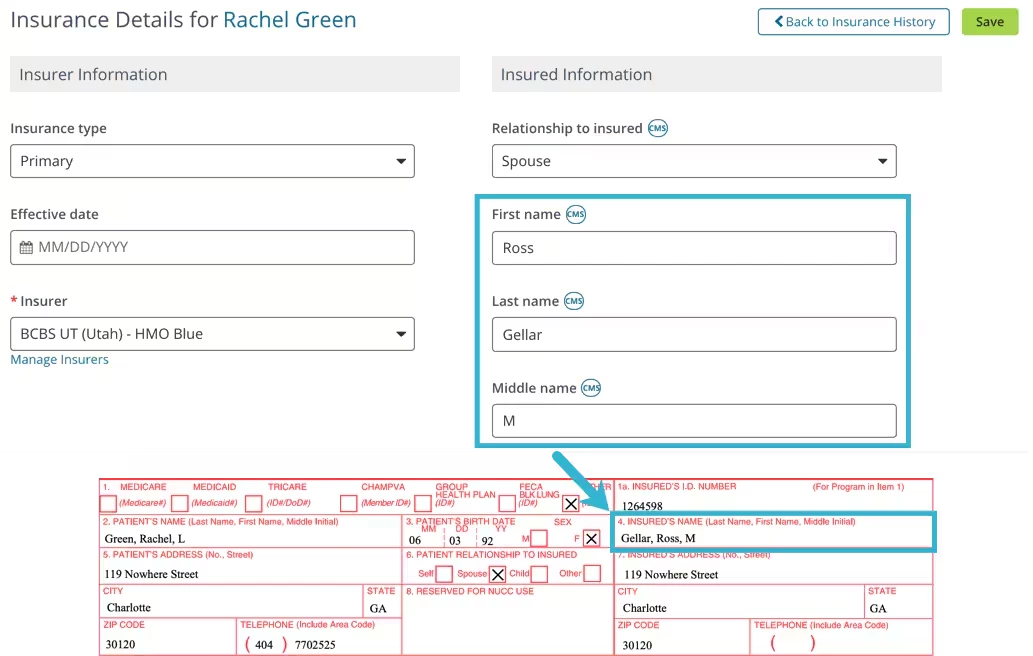
Box 4
Insured's name in the format: Last Name, First Name, Middle Initial, e.g. "Doe, John, F".
Relationship to the Insured is "Self", then the data is taken from the Client Details page. Open appropriate Client > Details Tab
OR, if not "Self", then data is taken from the Info About Insured section. Open appropriate Client > Bill To & Insurance Info Tab > Edit Insurer > Insured Information.
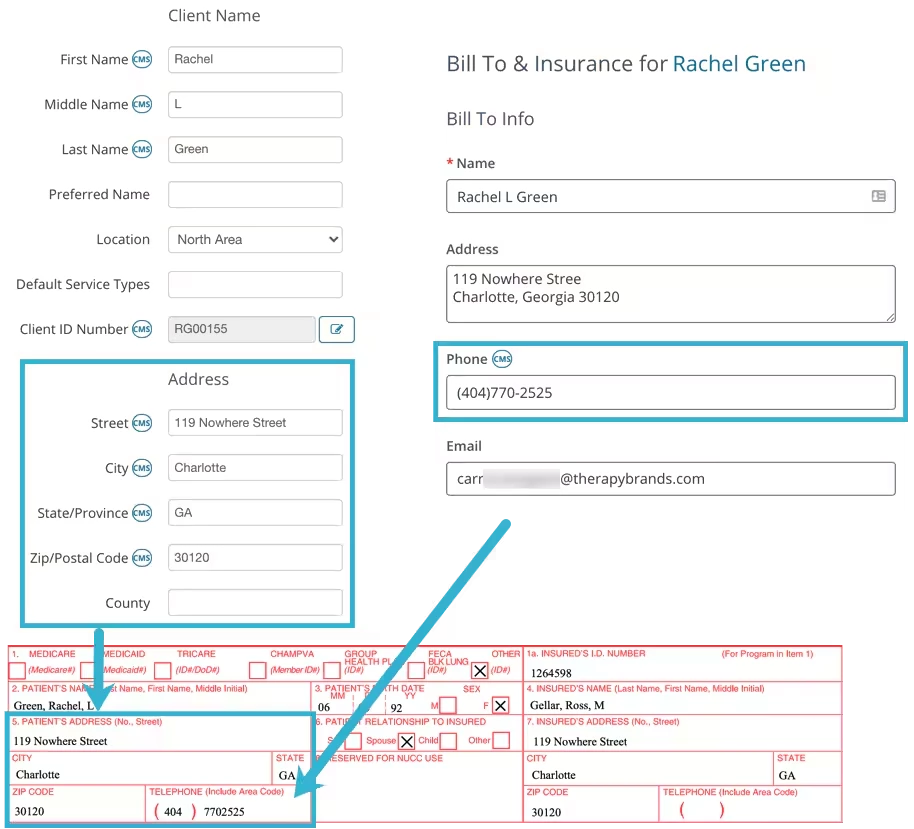
Box 5
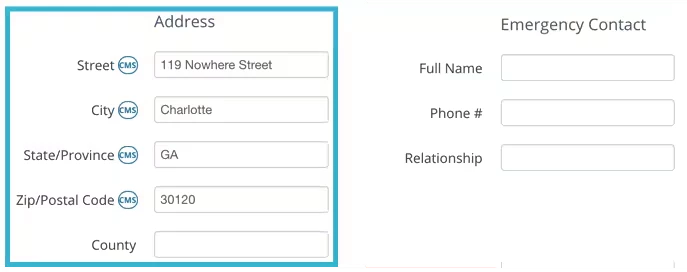
Box 5 contains the Client Address and Telephone Number.
The system will use the Phone Number listed on the Bill To & Insurance Info tab. If no number is listed here, the system will then use the Mobile or Home Phone Number from the Client Details tab.
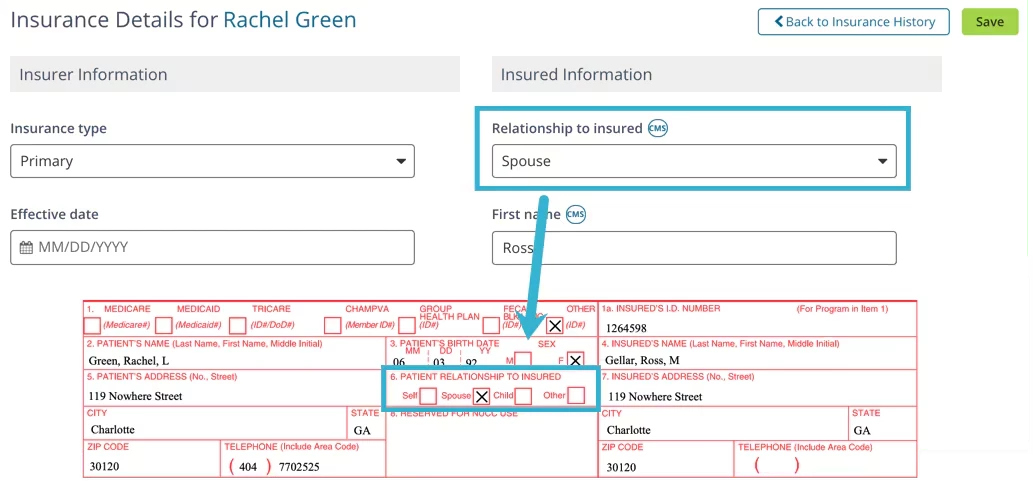
Box 6
Relationship to Insured from Bill To & Insurance Info page.
Open appropriate Client > Bill To & Insurance Info Tab > Edit Insurance
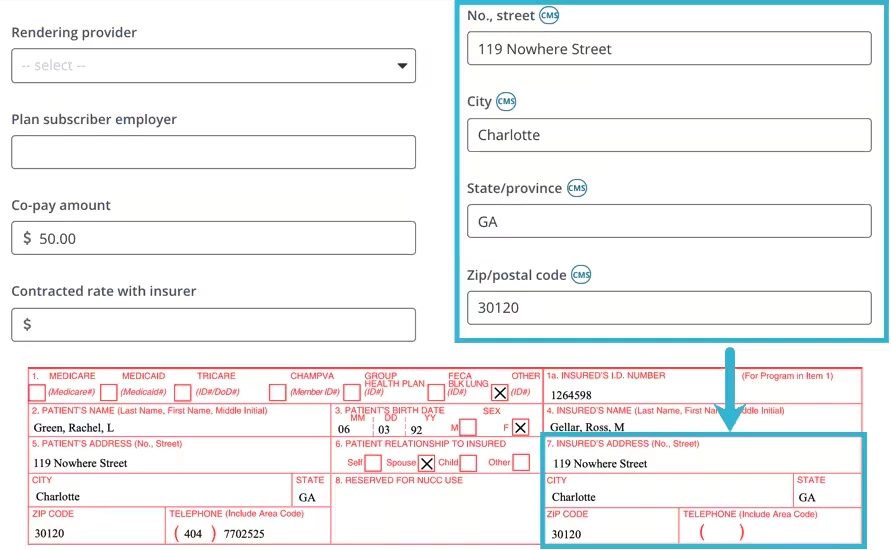
Box 7
Insured's address from Bill To & Insurance Info page.
Relationship to the Insured is "Self", then the data is taken from the Client Details page. Open appropriate Client > Details Tab
If not "Self", then data is taken from the Info About Insured section. Open appropriate Client > Bill To & Insurance Info Tab > Edit Insurer > Insured Information.
Box 8
Is not filled in.
Box 9
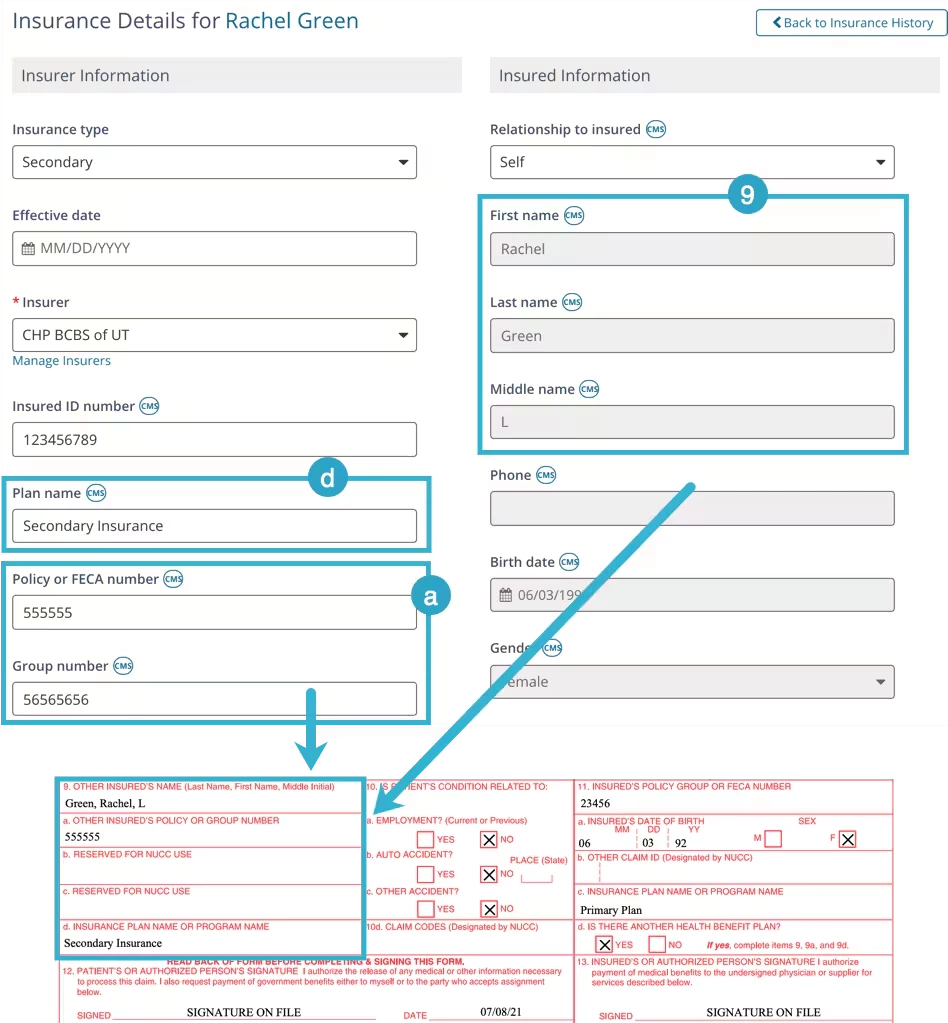
Box 9 indicates that there may be another Client Insurance listed that may cover the Client. If Box 11d is marked Yes, information will be listed here.
Other Insured Name (9), Other Insured Policy or Group Number (9a), and Insurance Plan Name or Program Name (9d) are filled from the Client's Insurance information.
NOTE: If the Secondary Insurance is used for CMS1500 is typed as Medicare, then this box is left blank.
Open appropriate Client > Bill To & Insurance Info Tab > Edit Secondary Insurer
Insured Name (Box 9) comes from the Insured information of Bill To & Insurance Info tab.
Other Insured Policy or Group Number (9a) comes from the Policy or FECA Number if listed. If not listed, this value is taken from the Group Number field on the Bill To & Insurance Info tab.
Box 9b and 9c are not filled by the system.
Insurance Plan Name or Program Name (9d) is taken from the Plan Name field on the Bill To & Insurance Info tab.
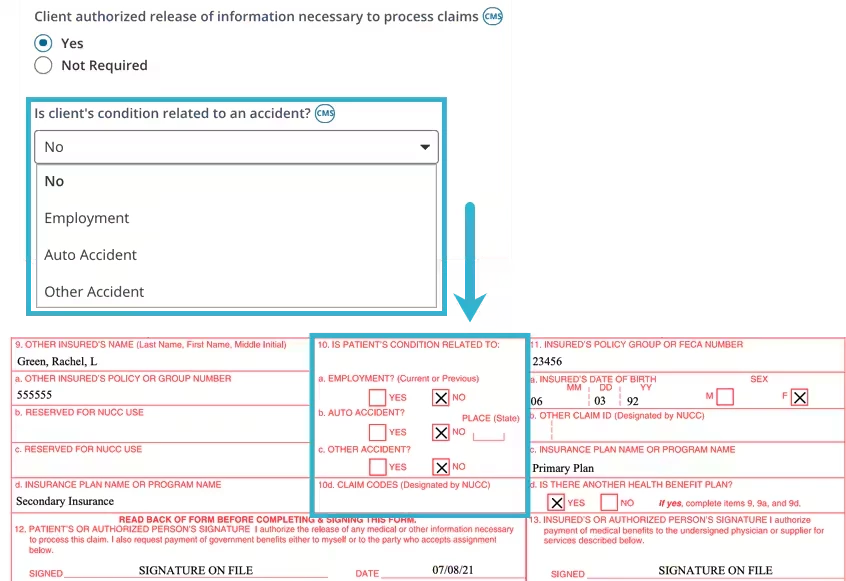
Box 10
This is filled based on the answer listed within the Client Insurance details for the question Is Client's Condition related to an Accident?
Open appropriate Client > Bill To & Insurance Info Tab > Edit Insurer
If Employment, Auto Accident, or Other Accident is selected, you will be prompted to enter more information. This information is used to populate boxes 10a-10c.
If NO is selected, then No will be marked for boxes 10a-10c.
Box 10d is not filled by the system.
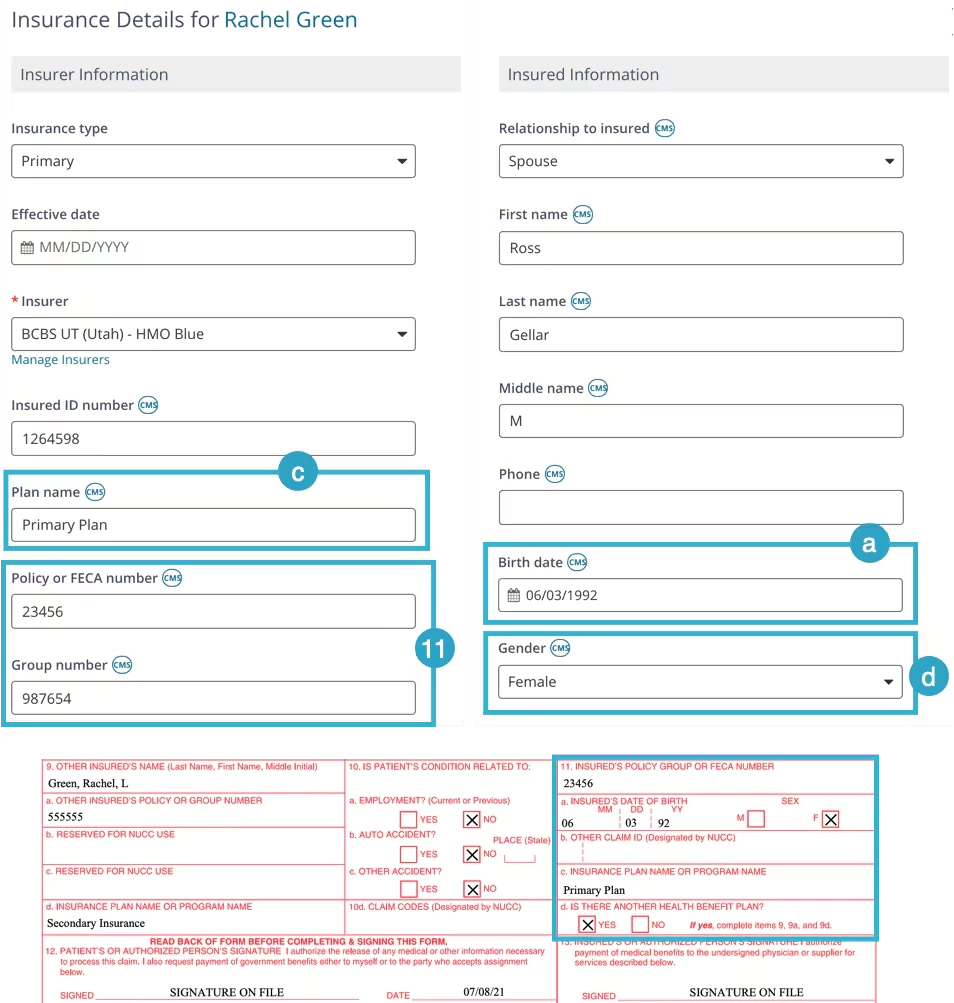
Box 11
Box 11 information comes from the Insurer you selected to submit to. Typically this will be the Primary Insurance unless you selected to bill the Secondary Insurance.
NOTE: If the selected insurance is secondary and its type is Medicare, then these values are taken from Primary Insurance.
Policy or FECA Number (box 11) - or Group Number if the Policy/FECA Number field is empty. Open appropriate Client > Bill To & Insurance Info Tab > Edit Insurer
Insured Person's DOB (11a)
IF, Relationship to the Insured is "Self", then the data is taken from the Client Details page. Open appropriate Client > Details Tab
IF, Relationship to the Insured is NOT "Self", then data is taken from Info About Insured section. Open appropriate Client > Bill To & Insurance Info Tab > Edit Insurer > Insured Information.
Box 11b is not filled by the system.
Insurance Plan Name (11c) comes from the Client's Insurance Details section. Open appropriate Client > Bill To & Insurance Info Tab > Edit Insurer
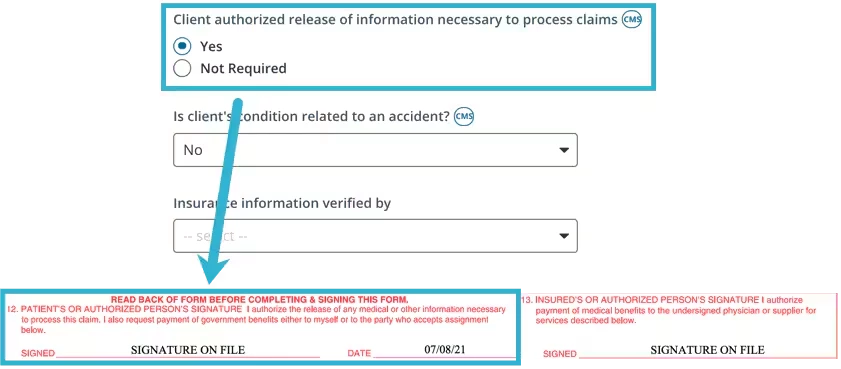
Box 12
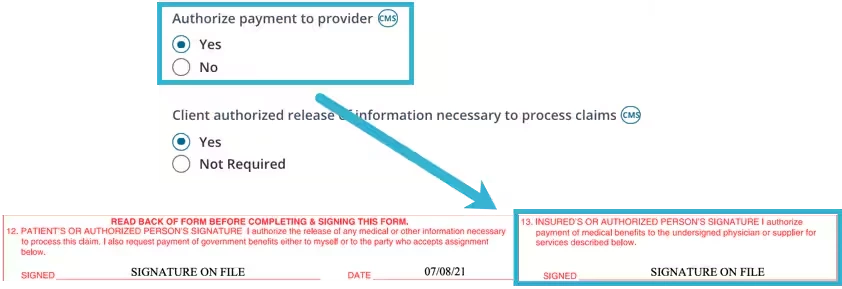
If Client Authorized Release of Information Necessary to Process Claims is marked as YES then box 12 will enter SIGNATURE ON FILE. Date is the date the form was created.
NOTE: If marked Not Required, this field box 12 will be empty.
Open appropriate Client > Bill To & Insurance Info Tab > Edit Insurer.
Box 13
If Authorize Payment to Provider is marked YES, then box 13 will enter SIGNATURE ON FILE.
NOTE: If marked Not Required, this field box 12 will be empty.
Open appropriate Client > Bill To & Insurance Info Tab > Edit Insurer
Box 14, 15, 16
Is not filled by the system.
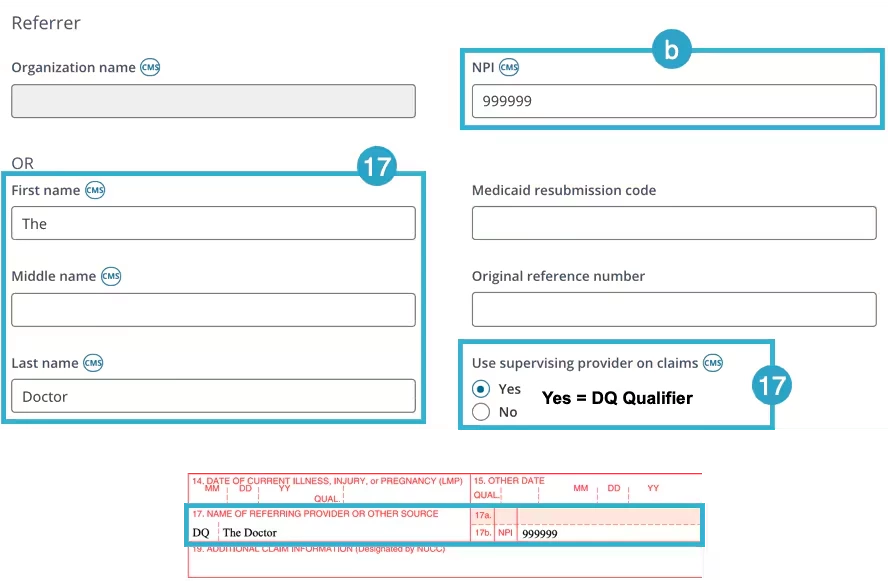
Box 17
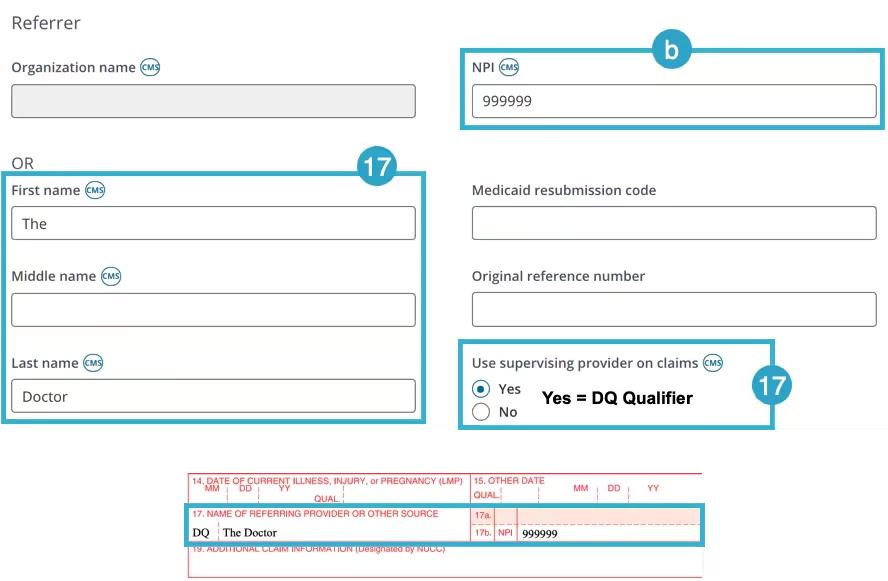
Box 17 is populated from Referrer section on the Bill To & Insurance Info tab.
Open appropriate Client > Bill To & Insurance Info Tab
Box 17 - The Referring Provider Name must be entered on Bill To & Insurance Info tab.
Box 17 - Qualifier:
DN displays if Referrer Name has value, otherwise it's empty (both Name and Qualifier depend on Referrer NPI).
DQ displays when Use Supervising Provider on Claims is marked YES. You can only toggle YES when the Referring Provider's full Name and NPI is populated.
Box 17a is not filled by the system
Box 17b is Referrer's NPI.
Box 18, 19, 20
Is not filled by the system.
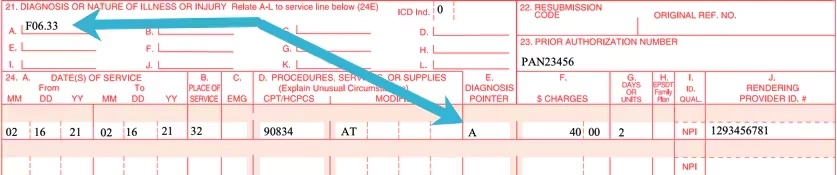
Box 21
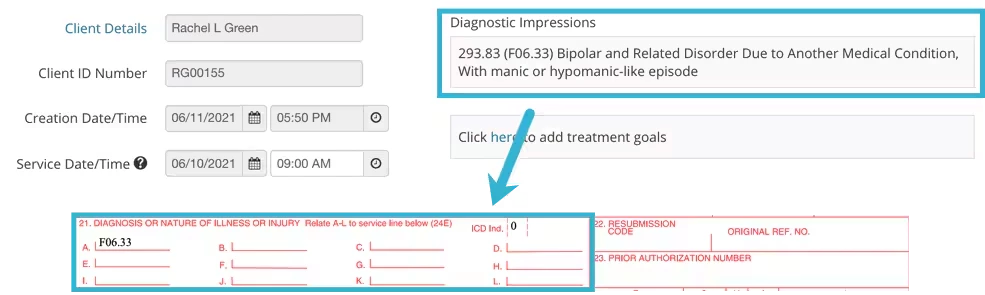
Diagnoses for Services billed. Diagnosis Codes are taken from Initial Assessment of Cases that contain Progress Notes related to Services billed.
Codes Legend:
ICD Version: ICD-9 = 9 NOTE: ICD-9 is used only for Services performed before October 1, 2015.
ICD 10 = 0
Open appropriate Client > Notes > Cases > Progress Note for desired Service Date
Box 22
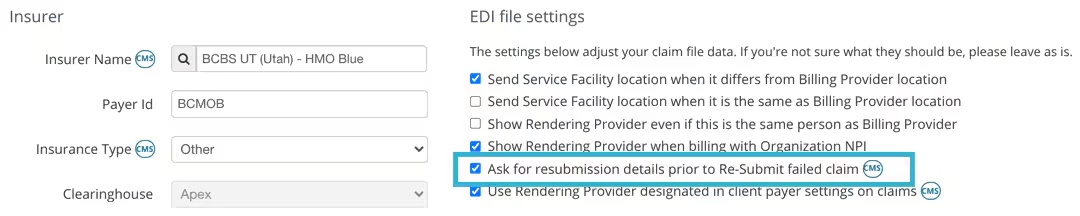
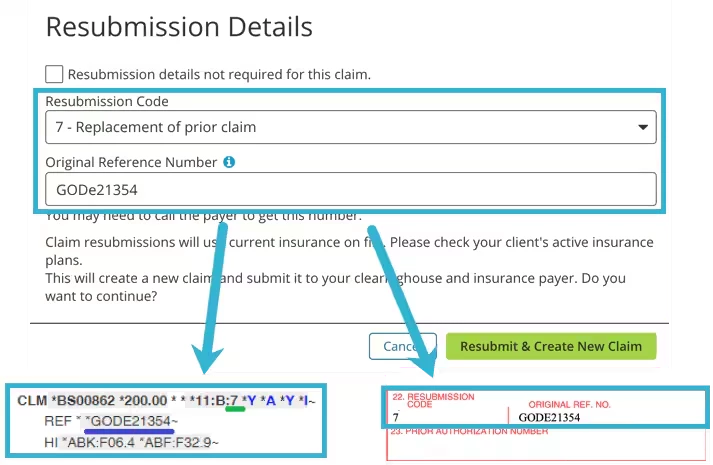
Box 22 populates when Ask for resubmission details prior to Re-Submit failed Claim is selected in the Insurers EDI File Settings.
Original Reference Number aka the Payer Number - You may need to call the Payer to get this information.
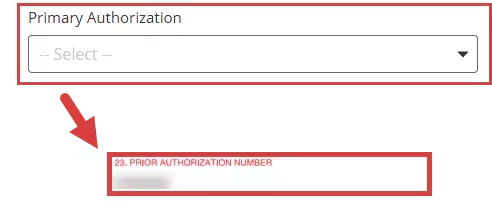
Box 23
Prior Authorization Number from the patient's Invoice.
Open appropriate Client > Ledger > Invoice
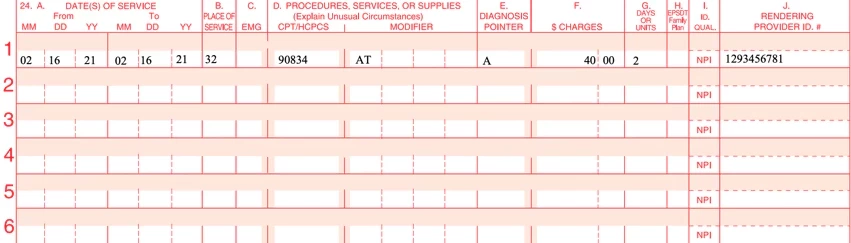
Box 24
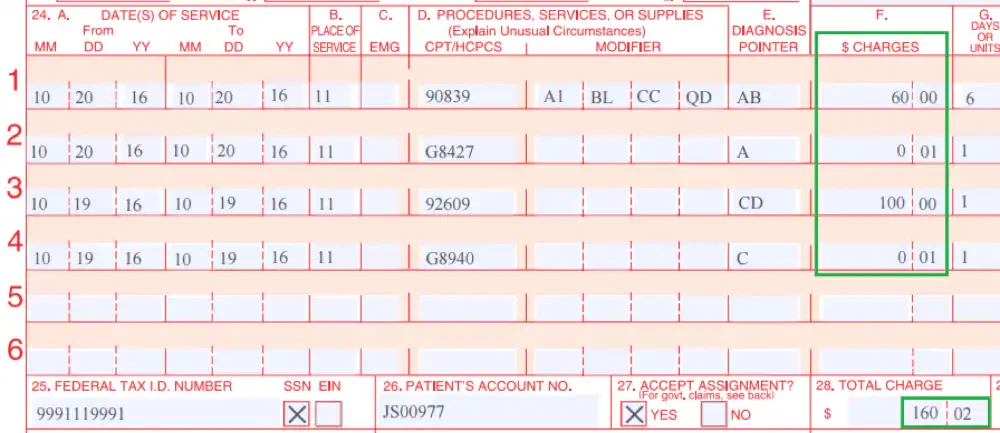
Billed services.
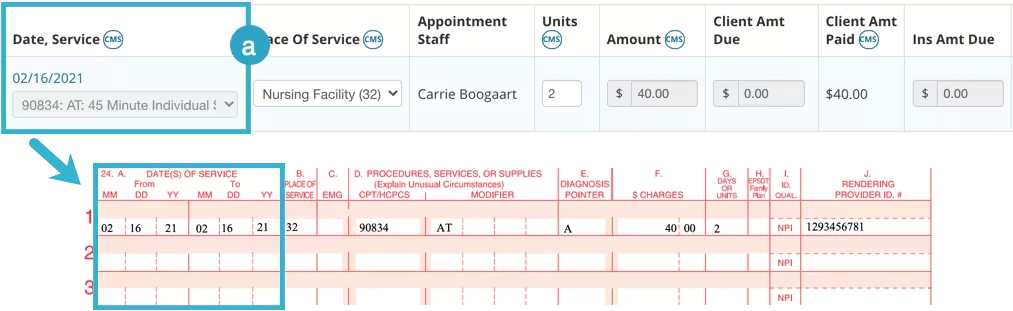
Column A - Date(s) of Service
Date of Service is taken from the Start and End Date and Time for the Appointment. Found on Invoice.
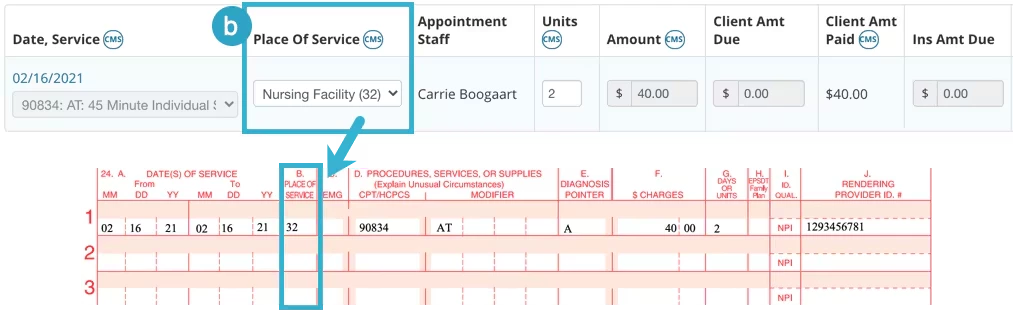
Column B - Place of Service
Place of Service is pulled from the Invoice. The dropdown suggests standard values, the default value is Office (code 11).
Column C is not filled in.
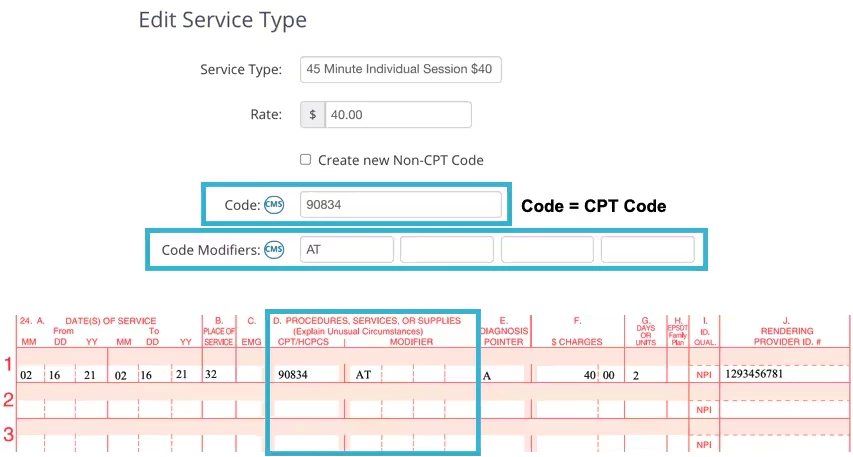
Column D - Procedures, Services, or Supplies
This is listed on the Invoice, but the information the Invoice pulls from lists the Service Type details.
Organization > Service Types > Edit Service Type
Column E - Diagnosis Pointer
The Diagnosis Pointer is the Letter field of the Diagnosis in Box 21.
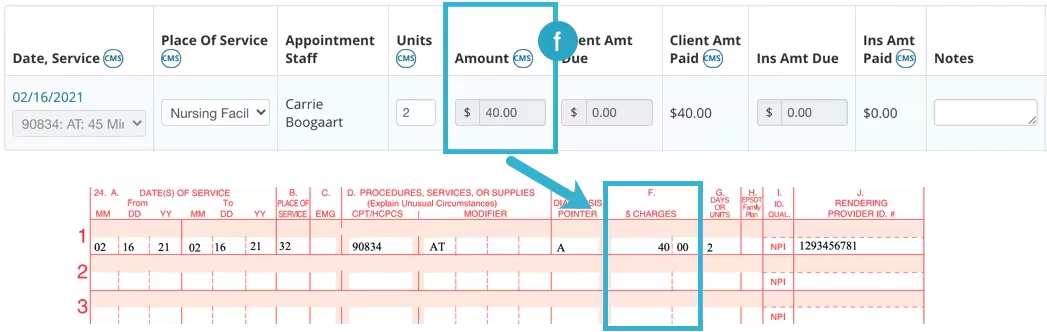
Column F - Charges
Amount Billed for Services pulled from the Invoice.
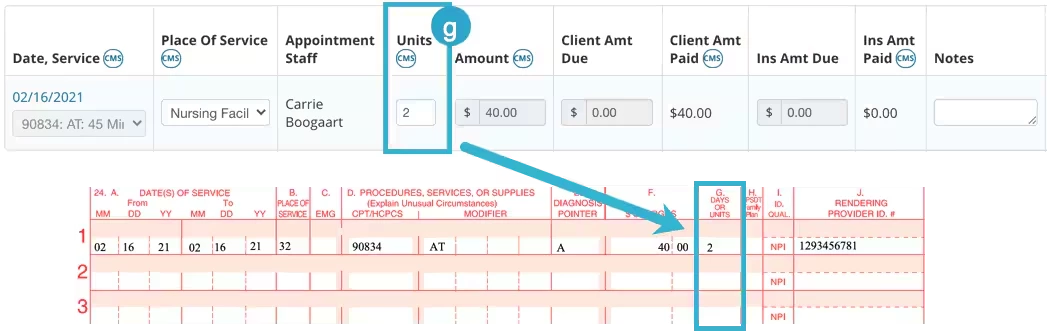
Column G - Days or Units
This is pulled in from the Invoice.
Column H displays services covered under specific plans
Family Planning - select Y (Yes) or N (No)
Reason Codes - use these codes when adding or editing insurance information
AV - Available - Not Used
S2 - Under Treatment
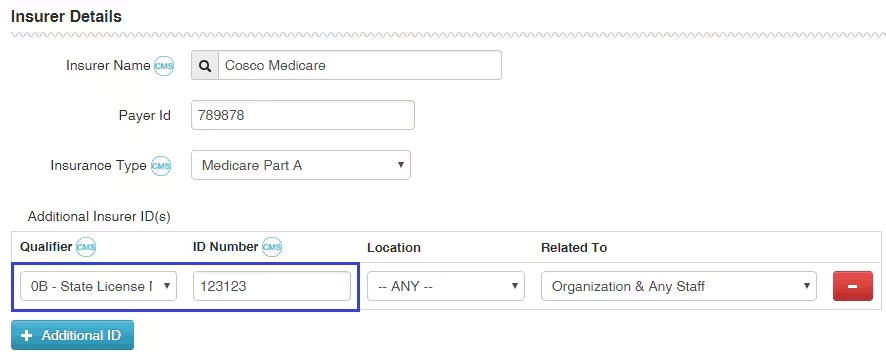
Column I - ID Qualifier of Additional Insurer ID
Valid additional IDs for box 24I must meet the following conditions. Valid qualifier values are:
0B State License Number
1G Provider UPIN Number
G2 Provider Commercial Number
LU Location Number
ZZ Provider Taxonomy.
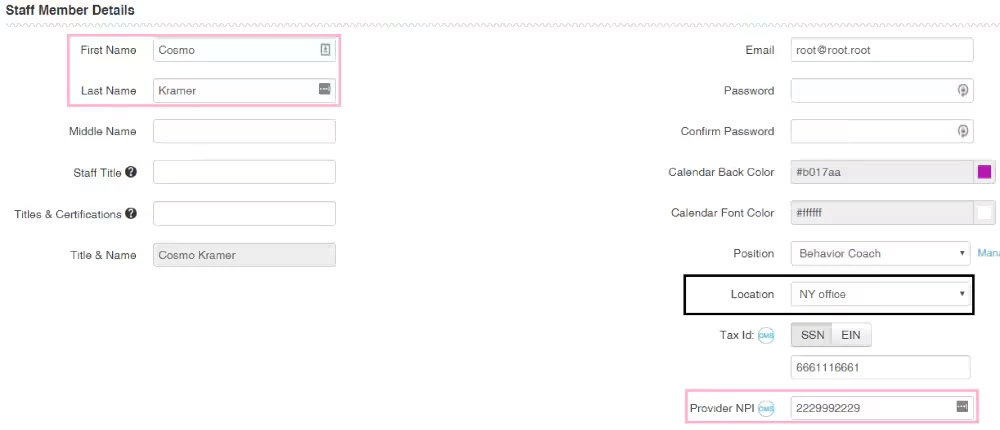
Column J - Rendering Provider ID #s
Top Line - Is populated with ID Number of Insurer's Additional ID from box 24I.
Bottom Line - Is populated with Rendering Provider NPI of the "Staff Member" on the invoice.
If PQRS is used, PQRS measures are also put into box 24 after the corresponding service.
QDC codes are placed in column D, diagnosis pointer points to one of the diagnoses of parent service.
Charged sum is $0.01.
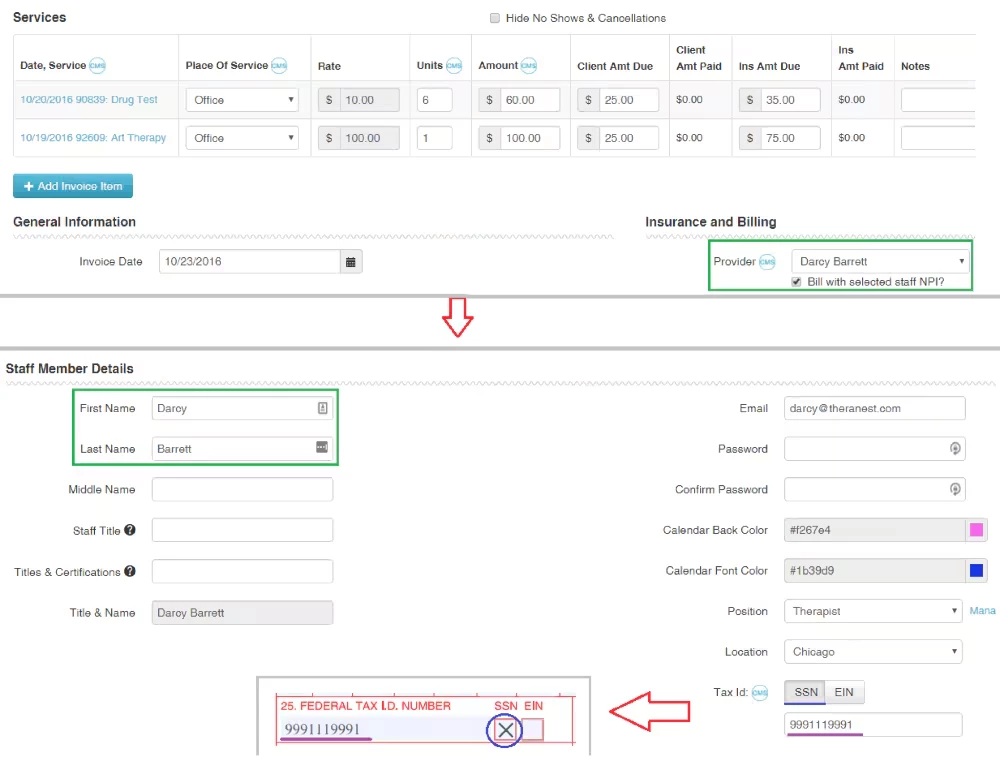
Box 25
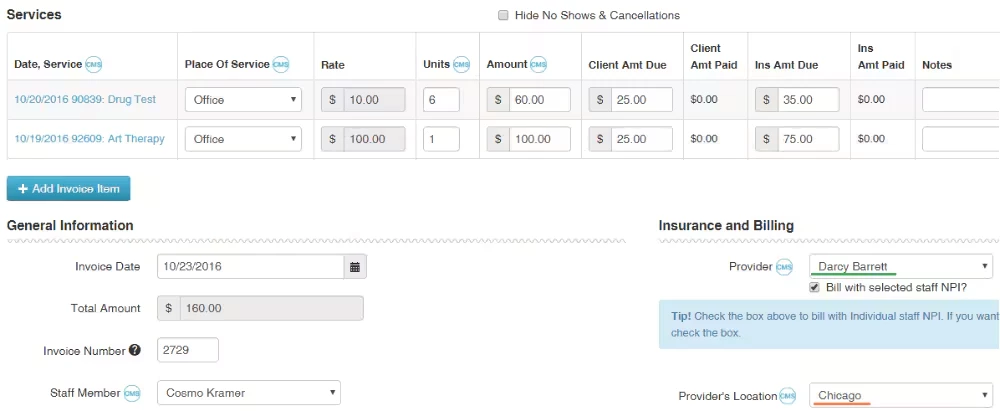
Depends on the Billing Provider specified in the invoice. If the "Bill with selected staff NPI?" box is checked, the Tax ID of the selected Provider is used. Otherwise, the Tax ID of the Organization is used.
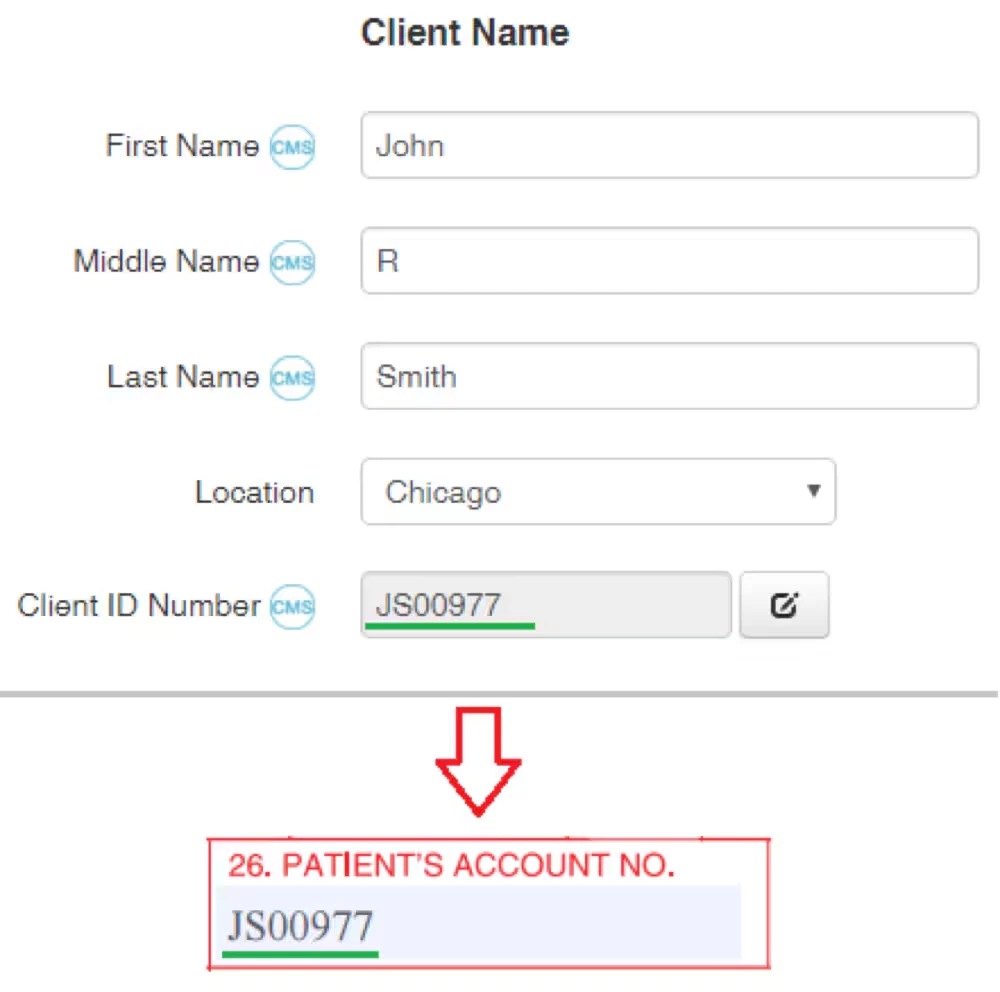
Box 26
Client ID Number on the Client Details page.
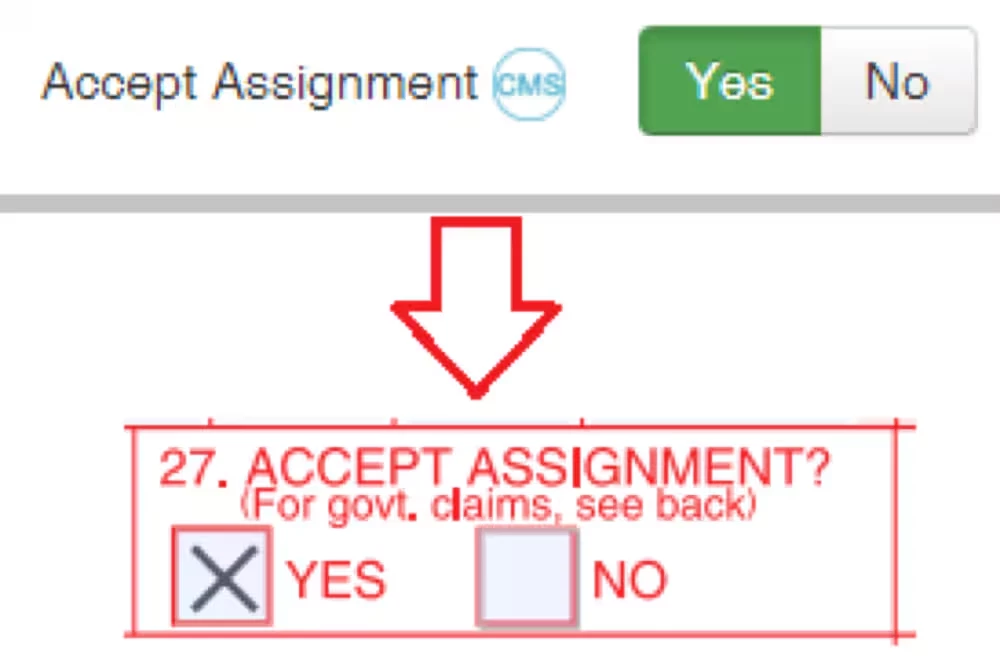
Box 27
Value of Accept Assignment flag on Bill To & InsuranceInfo page.
Box 28
Sum of charges for all services.
Box 29
Is not filled by the system.
Box 30
Is not filled by the system.
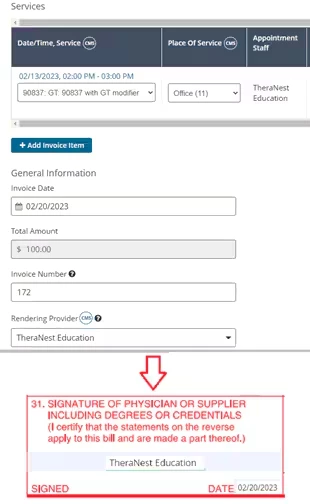
Box 31
Rendering Provider associated with the invoice.
If no staff is associated with an invoice, then "SIGNATURE ON FILE" is printed.
Date of form creation.
Box 32
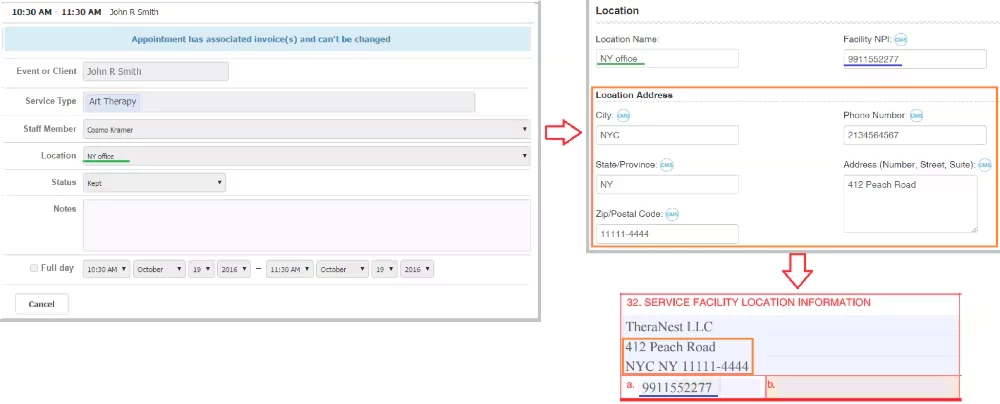
Contains several lines:
Line 1 - Facility Name, i.e. Organization's legal name. Line 2 - Location Address: Number, Street, Suite. Line 3 - Location Address: City, State, Zip. If the invoice's service item has an associated appointment, the Location is pulled from the appointment. Otherwise, it's pulled from the Client Details page.
Box 32 a
Box 32.a is facility NPI of Location. If it's not specified, then Facility NPI of the organization is used.
Box 32 b
Box 32.b. is not filled by the system.
Box 33
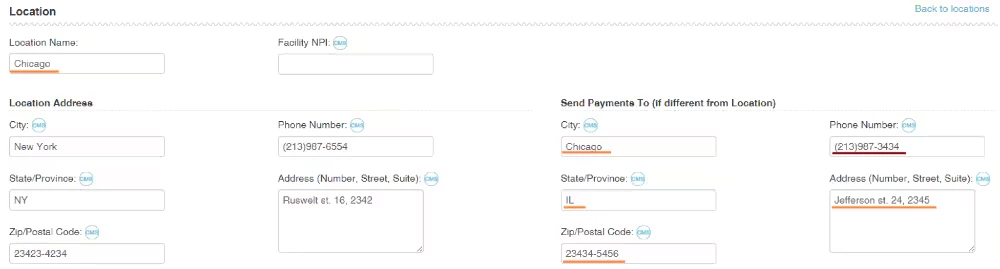
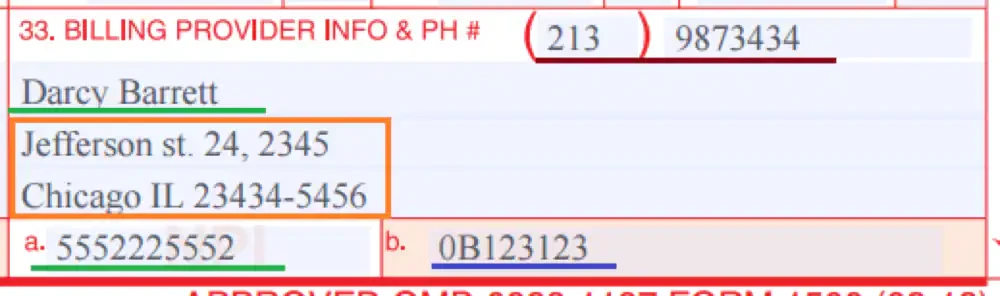
The box content depends on the Billing Provider and the Provider's location that are specified on the invoice page:
1) Billing provider address values and Phone Number are taken from the "Send Payments To (if different from Location)" section, and if it's empty (i.e. all fields of the section are empty), then values from the "Location Address" section are used.
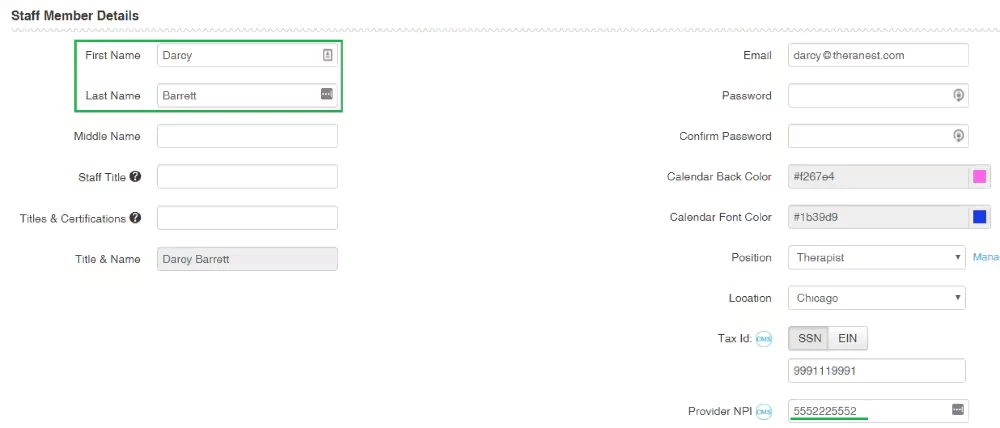
2) Billing Provider Name: if "Bill with selected staff NPI?" box is checked and Provider is selected, then this Provider's name is used. Otherwise Organization's legal name is used.
Box 33 a
Contains Billing Provider's NPI. Otherwise, the organization's NPI is used.
Box 33 b
The field is constructed from the qualifier and ID Number of the first valid Additional ID of the current Insurer.
The allowed qualifiers for box 33.b are:
0B State License Number
G2 Provider Commercial Number (currently only prints on the physical CMS-1500. It is not sent in the electronic file)
ZZ Provider Taxonomy
If Provider is a used: The first additional ID is taken that matches the following conditions:
its qualifier belongs to allowed qualifiers.
its location is "Any" or matches the Provider's location specified in the invoice
The "Related To" field is "Organization & Any Staff" or Billing Provider's name.
If Provider is Organization:
The first additional ID is taken that matches the following conditions:
Its qualifier belongs to allowed qualifiers.
Its location is "Any" or matches the Provider's location specified in the invoice.
The "Related To" field is "Organization & Any Staff" or "Organization".
This topic has been closed for replies.
Community Spotlight
Acceptance in Action: Neurodiversity in Care
This month, we’re shining a spotlight on another essential part of high-quality care: putting acceptance into action for neurodivergent patients and families.