



PERMISSIONS REQUIRED: You must have Billing Permissions with the ability to "Submit Claims to Clearinghouse" enabled.
In order to use the system to process Claims, manage your subscriptions to add Claims and then enroll your Payers. If you have not done that, you will not be able to see all the tabs described below.
Jump to Section:
There are five steps in the Claims Process:
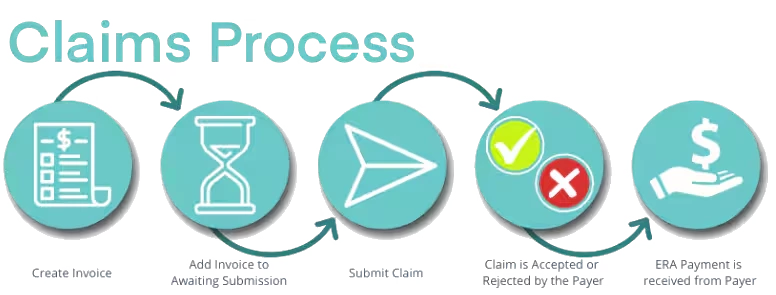
The Start of the Claim Lifecycle
Create an Invoice, do a basic Claim Scrub, and Submit the Claim to Insurance.
- Create an Invoice.
- Add the Invoice to the Awaiting Submission - The Invoice becomes a Claim and sits in the Awaiting Submission queue. All Claims in Awaiting Submission are sent each business day. See Submit Electronic Claims for more information.
- While you Claims are Awaiting Submission, you can perform a general Claim scrub. Claims can be checked for common errors such as Date of Birth, Gender, Address, Diagnostic Code, etc. If a Claim has no errors can be submitted to Ensora Clearinghouse.
- Claim is submitted to Ensora Clearinghouse. Here it is checked again for errors.
The End of the Claim Lifecycle
Process Accepted or Rejected Claims, and Process ERA payments.
- Claim is Accepted or Rejected.
- If the Claim is Accepted, it will move to the Accepted tab.
- If the Claim is Rejected, it will move to the Rejected/Denied tab where you can view the rejection codes/reasons and resubmit.
- ERA Received.
- Process ERA Payments and update the status updates to paid.
Notes on how invoice lines combine on a single claim
Many ABA services can be broken up among more than one therapist for delivering therapy to a client on the same day, especially for sessions that last several hours. However, these services still need to be combined under one claim line and need to all be under the same Rendering Provider in most situations.
For multiple appointments/multiple invoice line items to combine the units and charges under one claim line, and under the same rendering provider, there are several requirements that must be met:
- All services that are expected to be combined should all be under the same Invoice number
- The EDI file setting for the insurer: Use Rendering Provider designated in client payer settings on claims should be checked.
- The EDI file setting for the insurer: Send aggregated claims on different claim lines should be unchecked
- Invoice line items will only combine if the following are all the same:
- Date of service
- Service type
- Place of service code
If all these conditions are met, then the invoice line items will combine into one claim line regardless of rather or not the “Group all appointments into single claim” setting is checked. Having this additional setting checked will combine appointments that took place on other days into the same claim when checked but appointments on same day, same service, same place of service will still combine into one line if all requirements are met above.