


NOTE: These features are available in the Ensora Data Collection App (version 20240111.2).
For those that have an integration established with Ensora Data Collection, the status of appointments that are assigned to a staff member can be viewed within the Catalyst App. Staff also have the ability to update the status of an appointment from the Ensora Data Collection App to send back the latest updates to ABA Therapy.
What statuses can be seen in Ensora Data Collection?
- Refer to this article to see how the integrated calendar looks on the Ensora Data Collection app and how appointment statuses display as well as how to make edits to the appointment statuses within the Catalyst app. Integrated Calendar with ABA Therapy.
NOTE: Appointments where the status changed to Canceled or Late Canceled on ABA Therapy will appear with a Canceled icon in the integrated calendar. Appointments where the status is changed to No Show will appear with a No Show icon in the integrated calendar.
How will status updates appear in ABA Therapy if a user updates the status of an appointment in Ensora Data Collection?
- Users in Ensora Data Collection will only have the ability to update an appointment that is in an Upcoming status to either Canceled or No Show in Ensora Data Collection. They also can only make these updates to appointments where they have been assigned as the staff member.
- If a user updates an appointment in Ensora Data Collection to Canceled or No Show you will see this update in ABA Therapy in several ways:
- There will be an indicator icon next to the appointment of either Canceled or No Show just like how it would be shown if the status was changed within ABA Therapy.
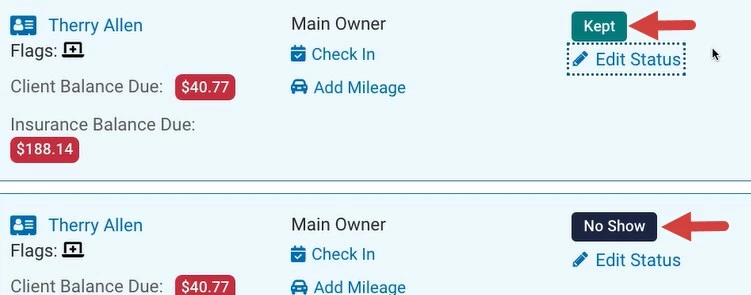
- The reason field for the status change will be filled in automatically to say, Updated via Ensora Data Collection Integration"

- This will also be reflected in the activity log when searching for Appointment Status Changed€ options and will reflect that the changes occurred via Ensora Data Collection integration.
- The appointment statuses will also reflect in any reports that take into consideration different appointment statuses just as they would if the appointment statuses were made within ABA Therapy.
- There will be an indicator icon next to the appointment of either Canceled or No Show just like how it would be shown if the status was changed within ABA Therapy.
How often are changes to appointment statuses in Ensora Data Collection checked and updated in ABA Therapy?
- This will be checked every 10 minutes for any updates made to appointment statuses within Ensora Data Collection so this can be reflected in ABA Therapy quickly as well.
What if my ABA Therapy appointment already has a signed progress note and/or invoice attached to it and a user in Ensora Data Collection tries to update the appointment status to Canceled or No Show?
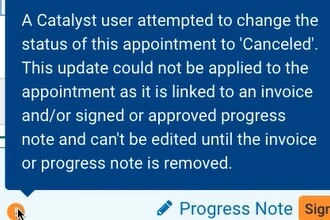
- ABA Therapy will not allow the status of the appointment to automatically change in these scenarios. However, there will be an alert icon next to the Edit Status button on the Agenda page and the Status dropdown on the appointment model that when hovered over will give you information that the user in Ensora Data Collection attempted to change the status of the appointment to Canceled or No Show but was prevented from doing so due to appointment being locked. If appropriate steps are taken to make the status of the appointment editable again, the status of the appointment can then be manually updated to reflect the corrected status if needed.
Who has permission to make these ABA Therapy appointment status updates in Ensora Data Collection?
- Users in Ensora Data Collection will only see the ABA Therapy appointments that they have been assigned to as the Staff Member delivering that appointment. Therefore, when they sign into their Ensora Data Collection app only the statuses of appointments assigned to them within the past 14 days, the current day, and the next 14 days will be able to be edited by them.