Jump to Section:
Chat with Ensai Support
Ensai Support is our AI-powered chatbot and the first place to go when you need help. Ensai Support is available to quickly answer common product questions and guide you to helpful resources; no waiting required.
If Ensai Support cannot fully resolve your issue, you will have the option to continue the conversation with a live support agent (during live chat hours) for additional assistance, or submit a support case.
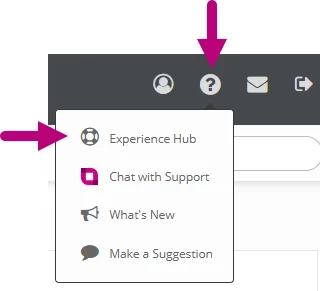
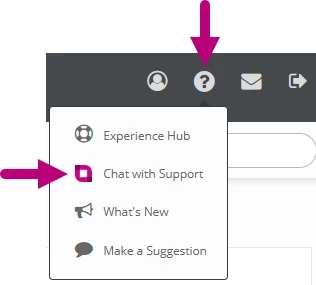
- Click the Ask Ensai button from the toolbar in the upper right corner, or click the Help Menu icon, then select Chat with Support.

- Review the topics under Suggested for You, or type your question in the chat window.
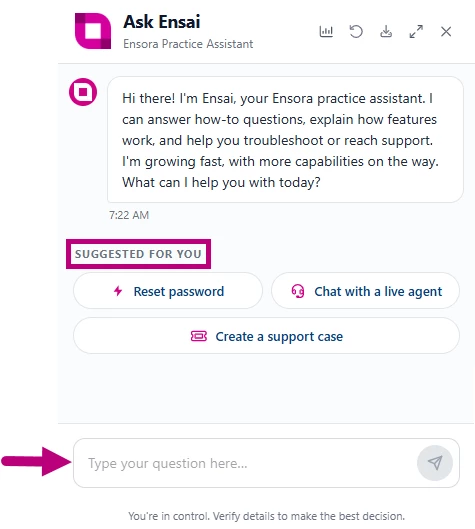
- Review the response and any recommended knowledge hub articles.
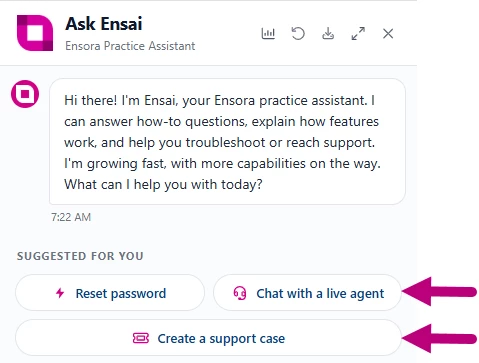
- If you need additional assistance, select one of the following options:
- Chat with a live agent
- Create a support case
- Enter the required information:
- Subject
- Description
- Business Impact
- Phone Number
- Submit your request. Your account information is automatically associated with the case, so you do not need to enter your clinic or user details manually.
NOTE: If you are chatting with a Support Team member and close Ensai Support by clicking the X, then reopen Ensai Support, you will be returned to the same chat, provided it is still active. This allows you to test workflows provided by the support team without starting a new chat.
- If a live agent is unavailable, such as after business hours, the system creates a support case for you.
Email the Support Team
Email the Support Team: fusion.support@ensorahealth.com
If you have a question or support request, please describe your situation and include as much detail as possible. If you have any attachments that may help (screenshots, etc.) please attach them to your email. Do not include PHI in the email or screenshots.
You will receive a confirmation email that your Support Request has been received.
Call the Support Team
Call the Support Team: 877-288-5583 option 2 option 3 option 1.
Submit a Request Via the Support Hub
Use the Support Hub to submit and check the status of support requests.
See Submit a Support Case Request for more information.
View Help Articles or Ask the Community
Click the Help Menu icon in the upper right corner, then select Experience Hub.
See Post a New Question or Start a Discussion Thread in the Community Hub for more information.