


Quickly access a list of common prescriptions using the Quick Rx List.
Before you Begin: Add & Manage Quick Rx
- Click on the Quick Rx button from the Compose Rx tab. You can also select Insulin from the drop-down menu for a list of common insulin drugs and supplies. The Quick Rx List opens.
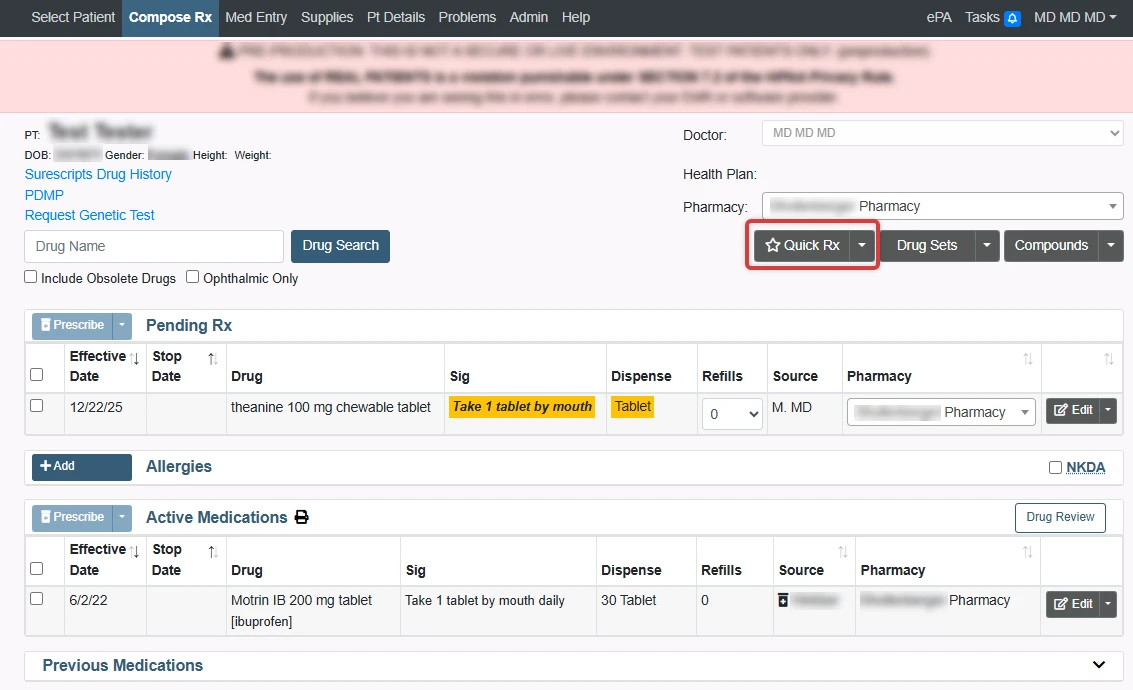
- Click the Checkbox next to the Quick Rx prescription. (You can prescribe more than one Quick Rx prescription at the same time. Use the checkboxes to select all the prescriptions you need to prescribe.)
NOTE: If a Quick Rx prescription is displayed in Red, this indicates that the Sig or Dispense Form is invalid and the Quick Rx should be edited.
- Click the Prescribe button. (Clicking the blue sig instructions will add the medication to the patient's Pending Rx list.)

- Review the prescription and click Transmit.
NOTE: The Sig and Dispense Information must be complete in order to transmit the prescription to the pharmacy.
