


Drug sets are lists of drugs that can be organized and prescribed as a group. You must create a drug set before you can prescribe it.
Before you Begin: Add & Manage Drug Sets
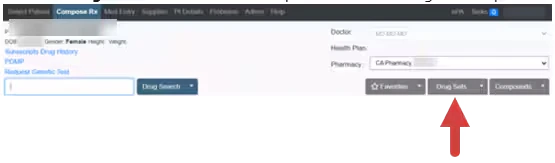
- Click the Drug Sets button from the Compose Rx tab. The drug set list opens.
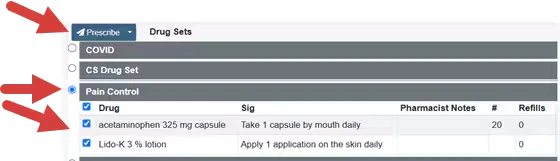
- Click the Radio Button next to the desired drug set. The drug set list opens to display all the drugs in the set.
- Click the Checkboxes next to the drugs you with to prescribe.
NOTE: Drug Sets may be configured to select all or none by default.
- After you have finished making your selections, click the Prescribe button.
- Review Interactions if applicable.
- Review the selected Pharmacy and click Transmit.

NOTE: To select a different pharmacy for a prescription, click the Pharmacy field in the Pharmacy column to open the drop-down, then click on a pharmacy to select that pharmacy.