


The Compounds button allows you to select a previously built compound or create a new one. You must create a compound before you will be able to prescribe it.
Before you Begin: Add the compound you wish to prescribe to your Compound List.
- Click the Compounds button from the Compose Rx tab. The Compounds list opens.
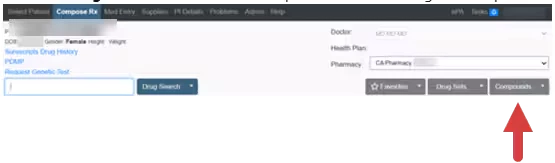
NOTE: If you have not already created the compound, it will not display in Compounds list. Click the caret next to the Compounds button and select Add Compound to create a new compound or edit an existing compound.
- Click the Radio Button next to the desired compound.
- Click Prescribe.

- Click Transmit.
