


Customize clinical options from the Clinical Options page under the Admin tab. This is especially useful if you're receiving more alerts than necessary.
Jump to Section:
Access Clinical Options
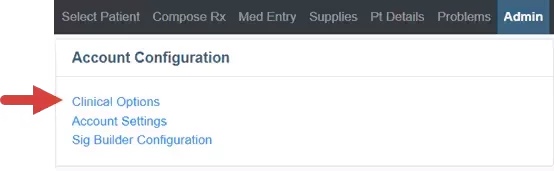
- Click Clinical Options from the Admin tab.
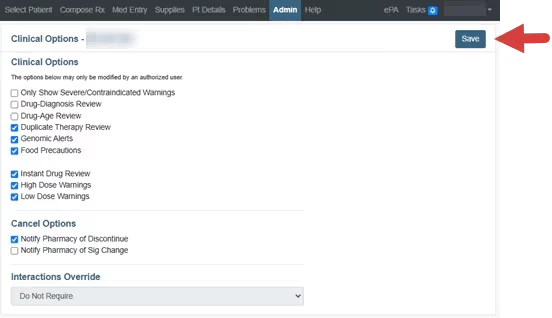
- From here, you can customize settings for various reviews, alerts, notifications and warnings.
- Click Save when you are finished configuring clinic options.
Clinical Options Functions
Clinical Options
Only Show Severe/Contraindicated Warnings: Hide mild and moderate interaction warnings. Drug-Diagnosis Review: Display drug-diagnosis interactions. Drug-Age Review: Display drug-age interactions. Duplicate Therapy Review: Display duplicate therapy alerts. Genomic Alerts: Display genomic alerts. Food Precautions: Display drug-food alerts. Instant Drug Review: Interrupt the prescribing of a drug with severe or contraindicated interactions alerts. High Dose Warnings: Display alerts when a prescription exceeds normal dose ranges. Low Dose Warnings: Display alerts when a prescription is below normal dose ranges.
Cancel Options
Notify Pharmacy of Discontinue: Initiates the cancel process when an active medication is discontinued and has refills on file or was sent today. Notify Pharmacy of Sig Change: Initiates the cancel process when sig directions are modified for an active medication. NOTE: Cancel Options determine the triggers to attempt to transmit a cancel message to the pharmacy. Cancel messages will only be attempted if they are supported by the pharmacy.
Interactions Override
Interactions Override is set to Do Not Require. This gives prescribers the option to Select a Drug Review Override Reason for a drug that has an identified interactions alert. Override reasons are not required and do not affect the ability to transmit the prescription to the pharmacy. | 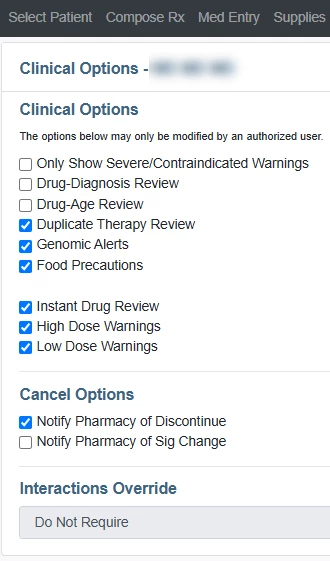
| |
| NOTE: Clinical Options affect the prescriber and can only be edited by Advanced Practice Providers and Physicians.
| ||