


Create multiple, consecutive prescriptions at the same time using the Additional Scripts link in the sig builder. After entering sig instructions and dispense information, you can add additional prescriptions for the same medication with future effective dates and transmit them to the patient's pharmacy all at once. This is useful if the prescription is for a controlled substance and does not permit refills, or if the patient wants to pick up a 30-day supply from their retail pharmacy immediately, but intends to have their 90-day supply from their mail order pharmacy afterwards.
Additional Scripts Feature
- From the Compose Rx tab, locate the medication and click on the appropriate Medication Form to open the sig builder.
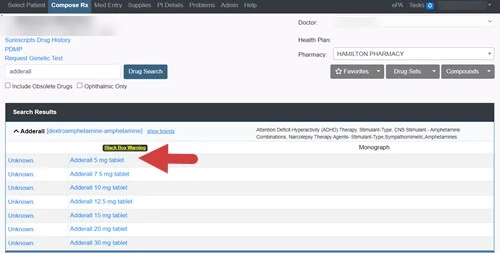
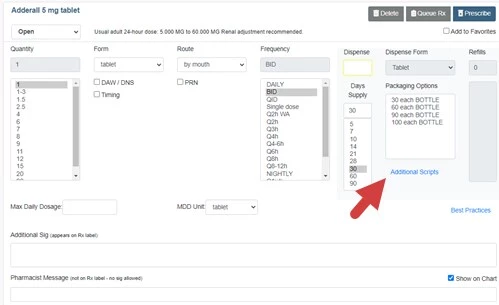
- Enter Sig Instructions and Dispense Information, then click the Additional Scripts link.
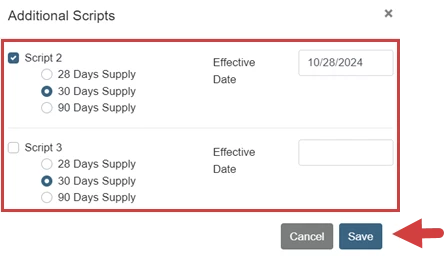
- Click the Script 2 and Script 3 Checkboxes to create a second and third additional prescription.
NOTE: You have the option to modify the Days Supply and the Effective Date of each additional prescription. Additional Scripts default to a 30-day supply with an effective date that is 25 days after the previous prescription.
- Click Save.
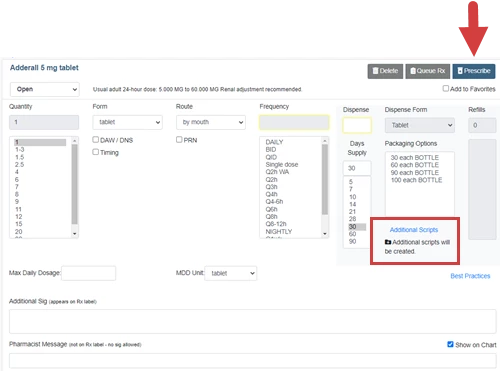
- The sig builder indicates that additional scripts will be created. Click the Prescribe button.
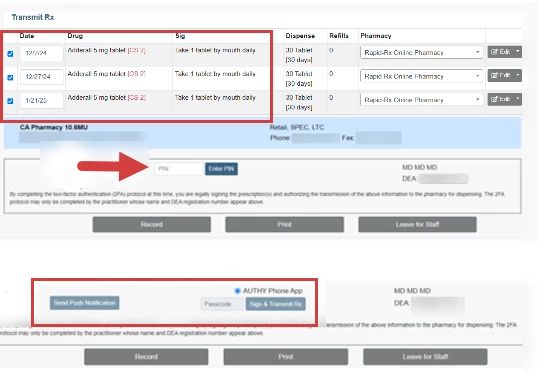
- The Transmit Rx page displays the Consecutive Prescriptions and Dates. Click the Transmit button transmit the prescriptions to the pharmacy.
- Complete the Two-Factor Authentication Process (Enter EPCS PIN and passcode or authorize via Push Notification) if you are prescribing a controlled substance.
- The Rx Receipt page displays an individual receipt for each prescription.