PERMISSIONS REQUIRED: You need the Docs permission to change a patient's goals.
A goal's mastery status indicates whether or not a patient has met their goal yet. You can manually set a goal's mastery status or set up conditions for the goal to be mastered automatically. Setting up automatic goal mastery adds a trend line to the goal's graph to help you see how the data is changing over time.
When a goal is mastered:
- It will display as "mastered" on printed evaluations, progress notes, re-assessments, and discharges.
- It will still appear when entering goal data in a daily note. If you want to stop entering data for a mastered goal, you can archive it.
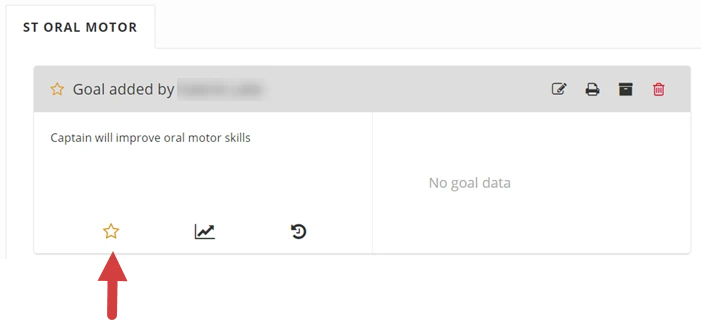
- It will still appear in the Docs tab for the patient, but the gold star below that goal will be filled in.
- When a long-term goal and all the short-term goals associated with it are mastered, the gold star above the long-term goal will be filled in.
Set a Goal's Mastery Status
- Click the Docs tab at the top of the screen.
- Click Patients and Goals in the menu on the left.
- Click the Name of the patient you are setting the goal mastery status for.
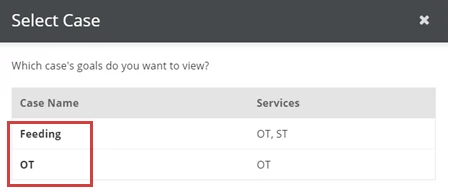
- If your patient has more than one patient case, the Select Case window will appear. Click the Case Name to select the case that has the goal you are setting mastery status for.
- If your patient has one patient case, that patient case will open by default. You will skip this step.
- If your patient has one patient case, that patient case will open by default. You will skip this step.
- Click the Mastery Options icon below the goal.
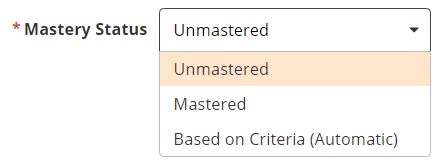
- Select the Mastery Status.
- Unmastered: The goal has not been mastered by the patient.
- Mastered: The goal has been mastered by the patient
- Based on Criteria (Automatic): The goal should be mastered automatically based on criteria.
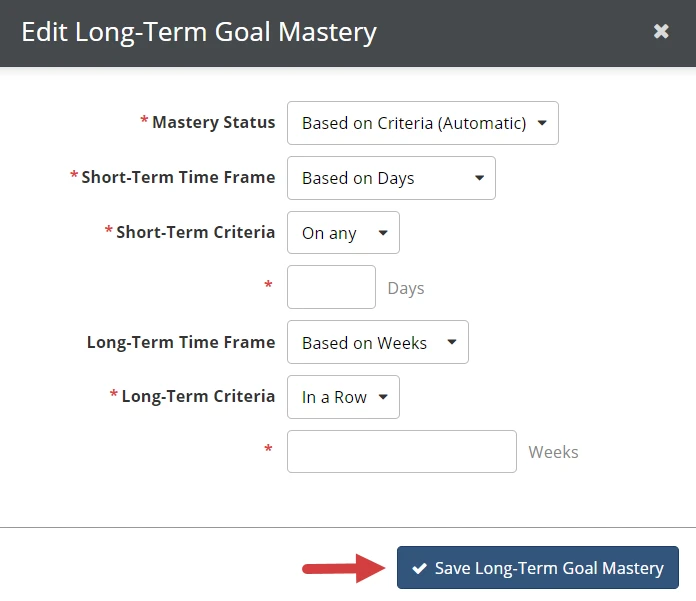
- If you selected Based on Criteria (Automatic), you will be prompted to enter additional criteria.
Field Description Short-Term Time Frame Determines whether automatic goal mastery will be based on days, a percentage, or the cumulative total. Short-Term Criteria - Out of indicates the goal's target must be met for a certain number of days within a set period of time.
- In a Row indicates the goal's target must be met for a certain number of consecutive data points.
- On any indicates the goal's target must be met for a certain number of days, whether or not they are consecutive.
- On Average indicates the average of all the goal's data points must reach the goal's target.
- Specific Percent indicates the goal's target must be met for a certain percentage of all the goal's data points.
Long-Term Time Frame Determines whether automatic goal mastery will be based only on the short-term criteria or on aggregated data for a period of weeks, months, or through a specific end date. Long-Term Criteria - None indicates that goal mastery is only based on the short-term criteria.
- Out of indicates the short-term criteria must be met for a certain number of weeks or months within a set period of time.
- In a Row indicates the short-term criteria must be met for a certain number of consecutive weeks or months. Only weeks or months that contain goal data are considered.
- End Date indicates the goal cannot be mastered until this date. Once this date is reached, the short-term criteria will be evaluated.
- Click the Save Long-Term Goal Mastery Button.