Users can discharge a patient when that patient will no longer receive the course of therapy in one of their active patient cases. When a patient is discharged from a patient case, the goals associated with that patient case will be archived automatically, so make sure their other documents have been completed first. When all of a patient's cases are discharged, the patient's status is changed to discharged.
NOTE: When a discharge is completed, all future appointments associated with that patient case will be deleted. You can reactivate the patient case for the patient by scheduling a new appointment with that patient case.
Jump to Section:
Discharge with a Document
To discharge a patient with a document, users can either Write a Discharge Summary document or Create a Document without an appointment. When the discharge summary is signed, the patient will be discharged from the patient case associated with the document.
Discharge Without a Document (Quick Discharge)
If a patient did not receive treatment or was activated by accident, users can discharge the patient without a document.
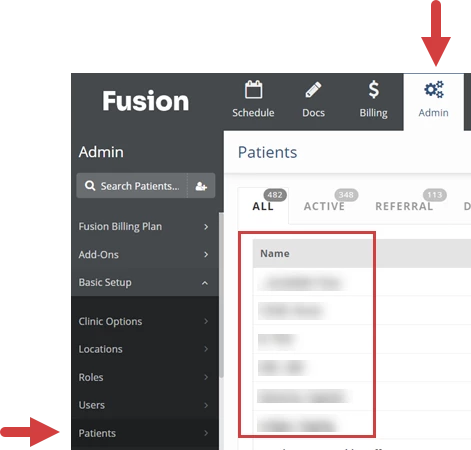
- Locate the patient in Patients and Goals (Therapists) or on the Patient List (Admins).
Therapists: Click the Docs tab at the top of the screen, click Patients & Goals in the menu on the left, then select the patient. Admin: Click the Admin tab at the top of the screen, click Patients in the menu on the left, then select the patient. 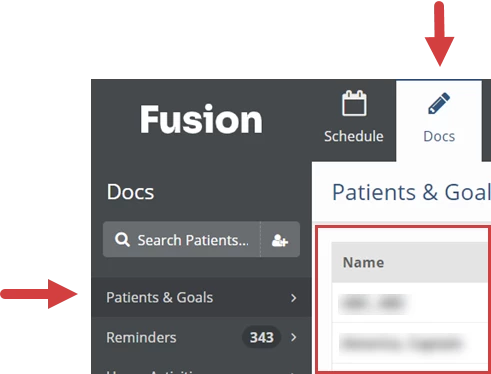
- Click the Discharge icon for the patient.

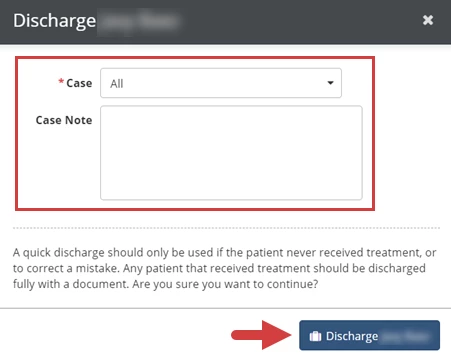
- Click the Case drop-down to select the patient case(s) to discharge.
- Select the All checkbox to discharge all cases for the patient. When all of a patient's cases are discharged, the patient's status is changed to discharged.
- Optional: Enter a Note.
- Click the Discharge button.