


The Payer Mappings tab allows an agency to map NPIs, Taxonomy codes, or payer-specific Provider Numbers using Defined Filters.
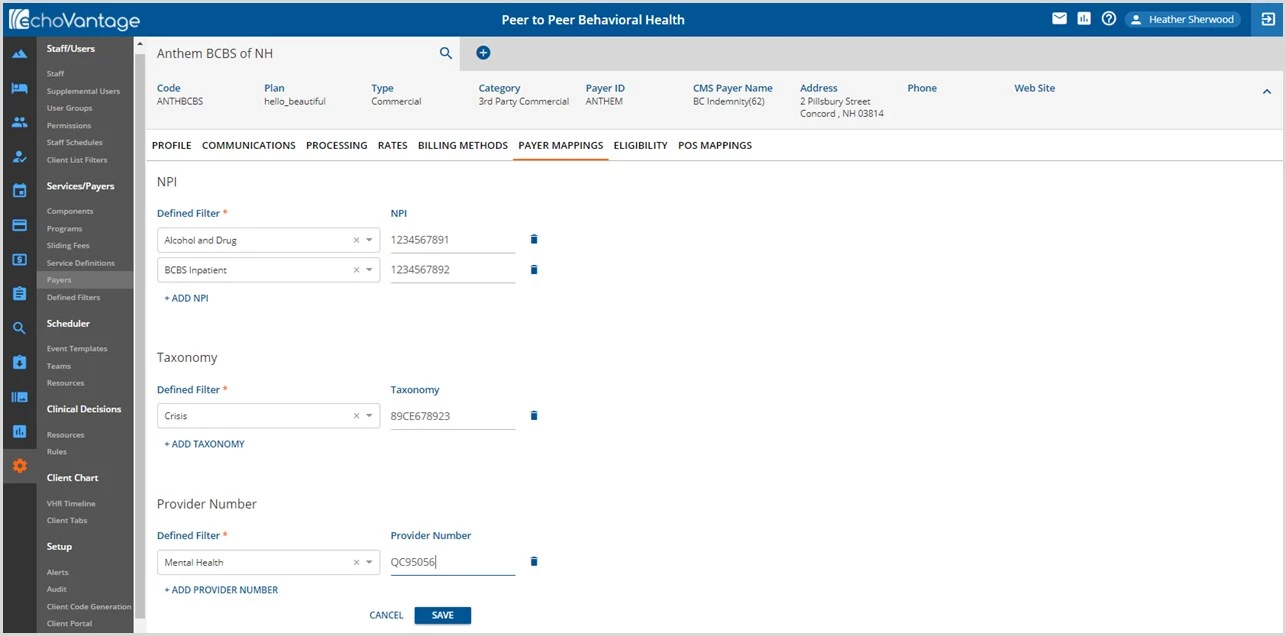
- Use the drop-down listing in any section to select a Defined Filter.
- Then enter the corresponding NPI, Taxonomy, or Provider Number.
- Click SAVE to preserve new entries or record changes.
- Use the delete icon (blue trash can) to remove entries no longer needed.
During the Create Bills Process
When a Service matches a Defined Filter mapped to an NPI or Taxonomy Number AND the Report Organization Taxonomy (Loop 2000A, PRV) checkbox is selected on the 837 Billing Methods Configuration:
- The Payer-specific NPI and Taxonomy codes are reported on the 837P, and the Payer-specific NPI is only reported on the 837I.
- If there are no Payer Defined Filter NPI/Taxonomy mappings, the NPI and Taxonomy from the Organization are reported on the 837P, and the Organization NPI is only reported on the 837I.
- If there are no Payer Defined Filter or Organization NPI and Taxonomy codes, nothing is reported in the Loop 2000A.
When a Service matches a Defined Filter mapped to a Provider Number, it is reported on the 837 in Loop 2010BB.