


Additional Insights for clinical data may be added and maintained by the agency by navigating Configuration - Setup > Insights. A search box is available and the list below displays the five Insights that are standard with the system. These five may not be edited and clicking on the Insight will display this message along with the Insight Name and Description.
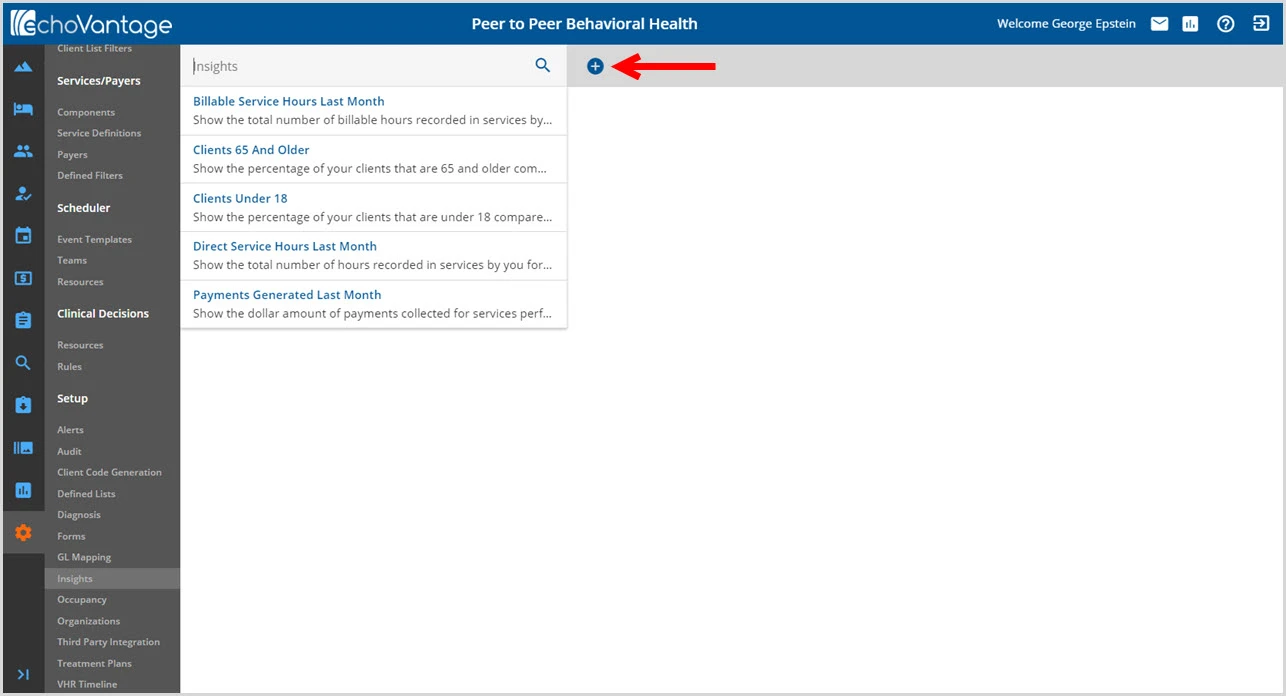
Click on the blue plus "+" to add a new Clinical Insight. The following Insight setup screen displays.
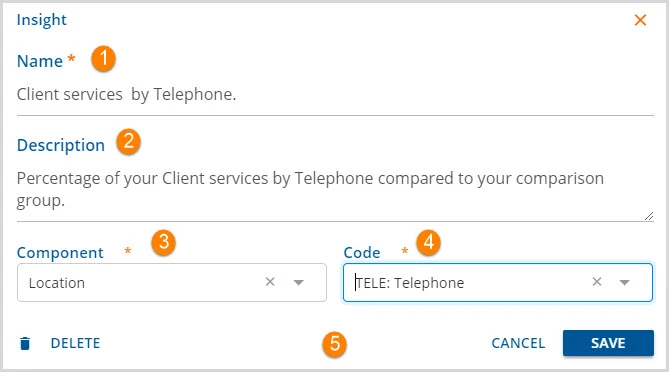
1. Name - An Insight name is required. This is the name displayed on the card on the Insight tab in the Vantage Point menu option.
2. Description - An optional description may be added to give more information about the Insight that is being added.
3. Component - A Component is required to be selected from the drop-down list. This is the list of Components defined in Configuration - Services/Payers > Components.
4. Code - A Code is required to be selected from the drop-down list. These are the Codes that were assigned to the Component during setup in the Configuration - Services/Payers > Components screens.
5. Action Buttons
- Remember to click SAVE to add the new insights or record any edits.
- CANCEL exits the Insight screen without saving any additions or edits.
- DELETE removes the Insight. It is only available on the Insights defined by the Agency.