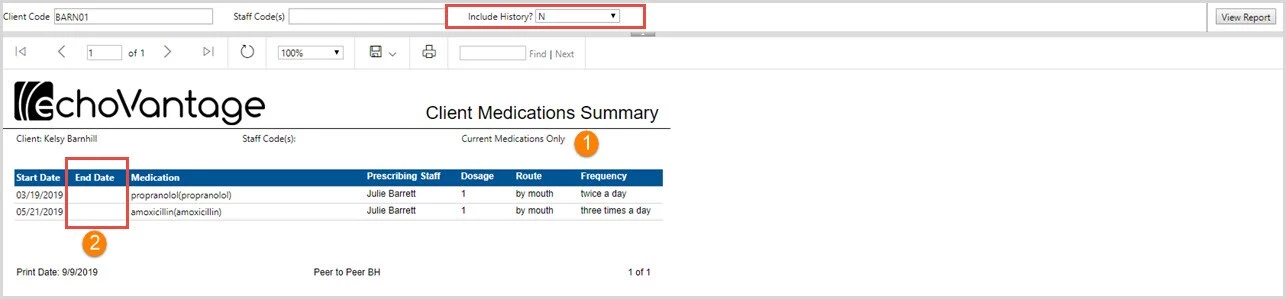
The Client Medications Summary lists basic medication information for the selected client. Like the Client Medication Detail, selecting "Y" in the Include History dropdown listing will include medications with an End Date prior to the current report date.
1. The report parameters:
-
Require the user to enter the client code
-
Allow the report to be limited by a staff code or codes
-
Allow the user to specify whether or not the history should be included
2. The report header area displays the parameter selections made.
-
The Client Name
-
Staff Code(s) specified, blank is for all
-
The Include History? dropdown selection was "Y" so the header displays Current and History
3. The summary information includes:
-
Start Date
-
End Date
-
Medication
-
Prescribing Staff
-
Dosage
-
Route
-
Frequency
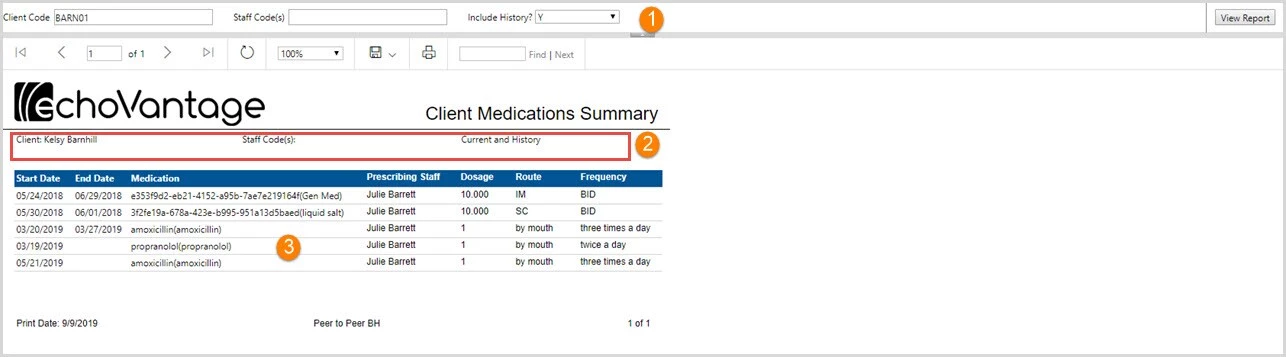
The report is run again for the same client. This time "N" is selected in the Include History dropdown selection.
-
The report Header now shows Current Medications Only.
-
The three medications that had End Dates prior to the current report date of 9/9/2019 are now no longer listed.