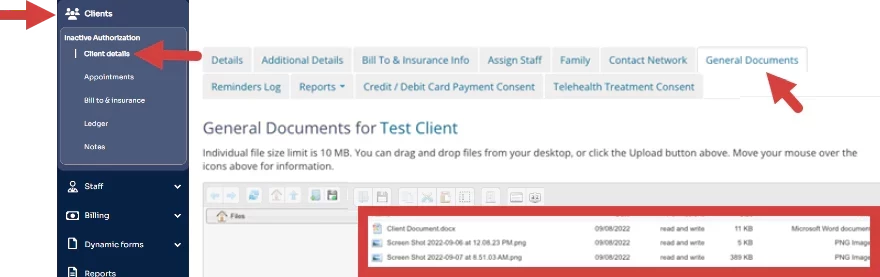
Permissions Required: Therapist can upload Documents for their assigned Cases, Administrators or higher can upload Documents for all Cases.
You can upload any file type up to 50mb. Documents uploaded under General Documents are visible to everyone. Whereas, Clinical Documents are visible to Staff who are assigned to the Case or Administrators.
When uploading documents, you can choose from a wide variety of file types. Below is a list of all the supported formats, organized by category:
- Document files (.pdf, .doc, .docx, .xls, .xlsx, .ppt, .pptx, .txt, .csv, .rtf, .json, .xml)
- Image files (.jpg, .jpeg, .png, .gif, .bmp, .tiff)
- Audio files (.mp3, .wav)
- Video files (.mp4, .mov, .avi, .mkv)
- Other supported formats (.zip)
NOTE: Documents may take a moment to load and will appear blank until they are fully loaded. Allow Document to fully load. Try clearing your cache to speed up the load time.
If you attempt to copy a folder into another folder with the same name, you will see an error message before you confirm to replace it.
- Locate Client and open Client Profile.
- Click General Documents tab.
- You can drag and drop files or click the floppy disc icon to upload manually.
NOTE: You must use the Upload Files button for .html files. Do not drag and drop.