Permissions Required: You must have Billing Permissions.
Only the Staff Member(s) assigned to the Client will receive the Authorization reminders.
IMPORTANT: If you are a Biller or Administrator and you are not assigned to the Client then you will not receive the reminder notification.
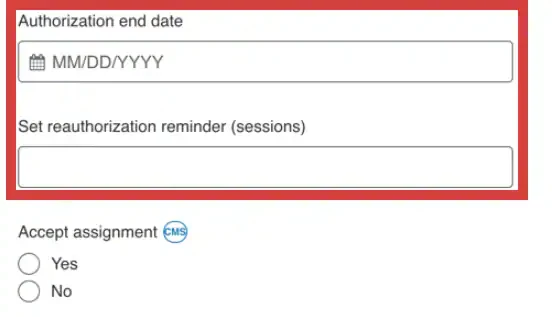
The reauthorization reminder can be set by Date, specific number of kept session, or both.
- Kept Sessions - The reauthorization reminder counts down the number or KEPT Sessions from the day you enter in the number. So, if the Client was authorized for 10 sessions and you've already had one session, enter in the number 9 to not count that initial session in the reminder.
- By Date - You can enter a date the Authorization expires. You will receive a notification or email 7, 30, and 60 days out from the Authorization expiration. One last notification will be sent when the current Authorization expires. It will be sent at 5:00 A.M. your local time.
Jump To Section:
Ensure You're Setup to Receive Alerts
- Click your Name in top right corner and select My Profile.
- Click on Preferences tab.
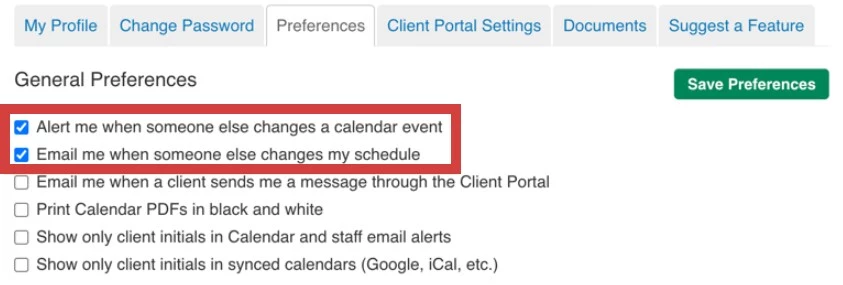
- In the General Preferences, select:
- Alert me when someone else changes a calendar event
- Email me when someone else changes my schedule
NOTE: Although these mention Calendar changes, they also apply to Reauthorization Reminders.
- Click Save Preferences button.
Enter in Authorization Information
- Locate Client and open Client Profile.
- Click Bill To & Insurance Info tab.
- IF no Insurance is listed, Add Insurance.
- Click Edit for appropriate Insurer.
- Scroll down and enter appropriate Authorization end date.
- OR enter Set reauthorization reminder (session).
- Click Save button.