


You can apply a Payment that you received outside of KASA, such as cash, check, or credit card payment processed with a third-party system. You can then print a receipt for the Client.
NOTE: You do not need to add a charge for copay/coinsurance, the patient's responsibility will post once the claim completes processing and the insurance remittance is posted.
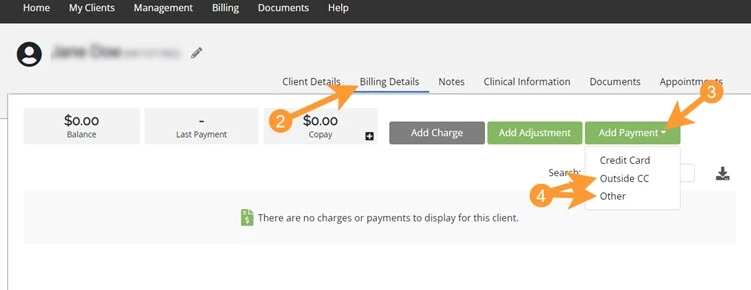
- Click My Clients in the navigation bar and select the appropriate Client.
- Click the Billing Details tab.
- Click the Add Payment drop-down.
- Select Outside CC OR Other.
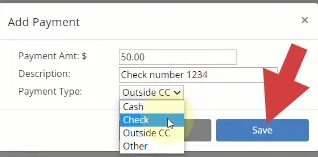
- In the Add Payment Window:
- Add Payment Amount.
- Enter the Payment Description (see your Administrator for your Organization's workflow).
- Select Payment Type.
- Click Save.
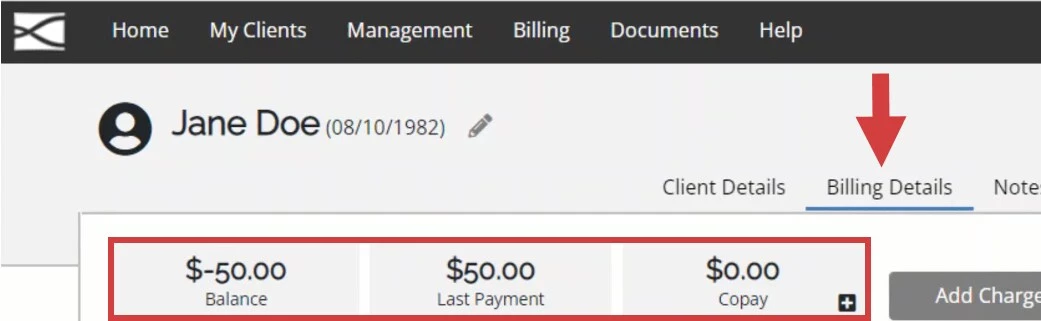
- Payment will be displayed in the Client Ledger.
- If desired, click the Print icon to print a receipt for the Client.
