


PERMISSIONS REQUIRED: You must have Organization Administrator level permissions to void the payment.
If a client's payment has not yet been settled, the transaction can be voided. If the client's payment has already been processed, you still have the option to Refund a Payment.
The system processes payments using Ensora Payments with Stripe.
NOTE: For payment-related questions, please contact the payments team at 844-311-2570 or payments@therapybrands.com.
Void a Payment: Ensora Payments
Transactions using Ensora Payments are settled almost immediately, so most of the time, when you cancel a payment it will be processed as a refund, rather than a void. For this reason, the Ensora Payments report has a Cancel Payment button that performs both refunds and voids. If you Cancel Payment before the charge as settled, it will be voided. If you Cancel Payment after the charge has settled, it will process as a refund.
IMPORTANT: If you are processing payments using Ensora Payments, NEVER cancel a payment using the Stripe dashboard. Cancelled payments processed in the Stripe dashboard will not be reflected in the system.
- Click on the Reports tab in the menu bar.
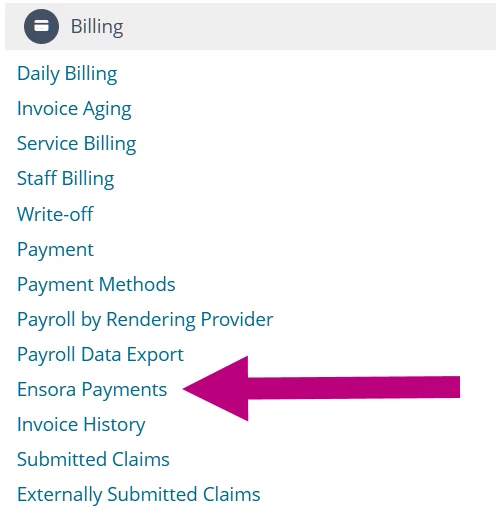
- Click on the Ensora Payments report in the Billing section.
- Enter the Transaction Date Range to search for the appropriate transaction.
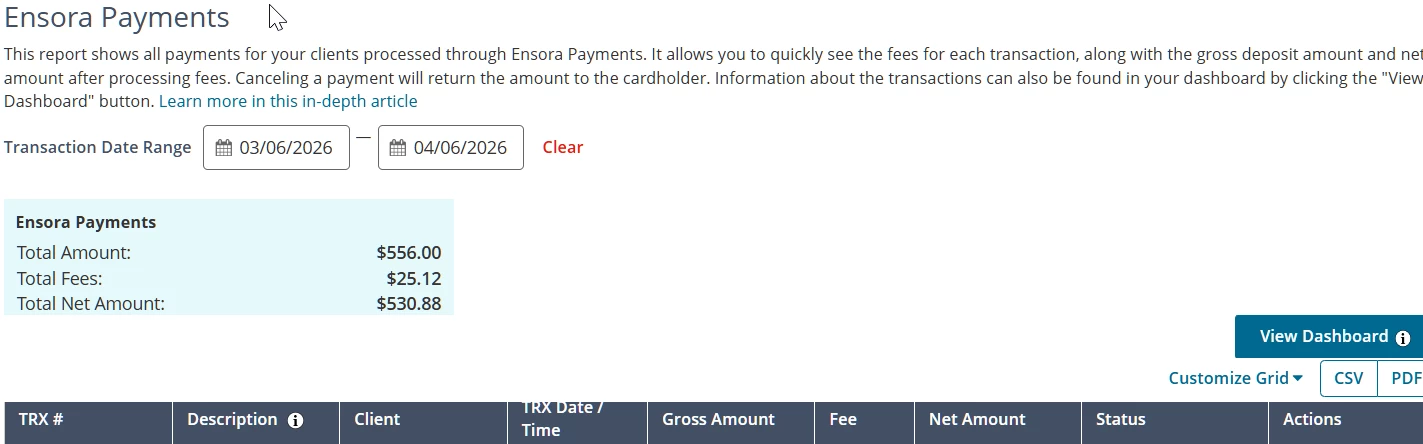
- Click a Column Header to sort the report according to that column's ascending or descending order, or use the Search to Filter field in the column header to narrow results.
- Optional: Click the Customize Grid drop-down to hide or show report columns.
- Locate the appropriate transaction and click the Cancel Payment button.
NOTE: If the payment has been processed, this will process a refund for the transaction. Since payments with Ensora Payments process almost immediately, most cancelled transactions process as refunds.
- Click Confirm on the Cancel Payment window.
- Click Void in Actions column
- Confirm that you want to void the transaction.