


PERMISSIONS REQUIRED: You must have Billing Permissions.
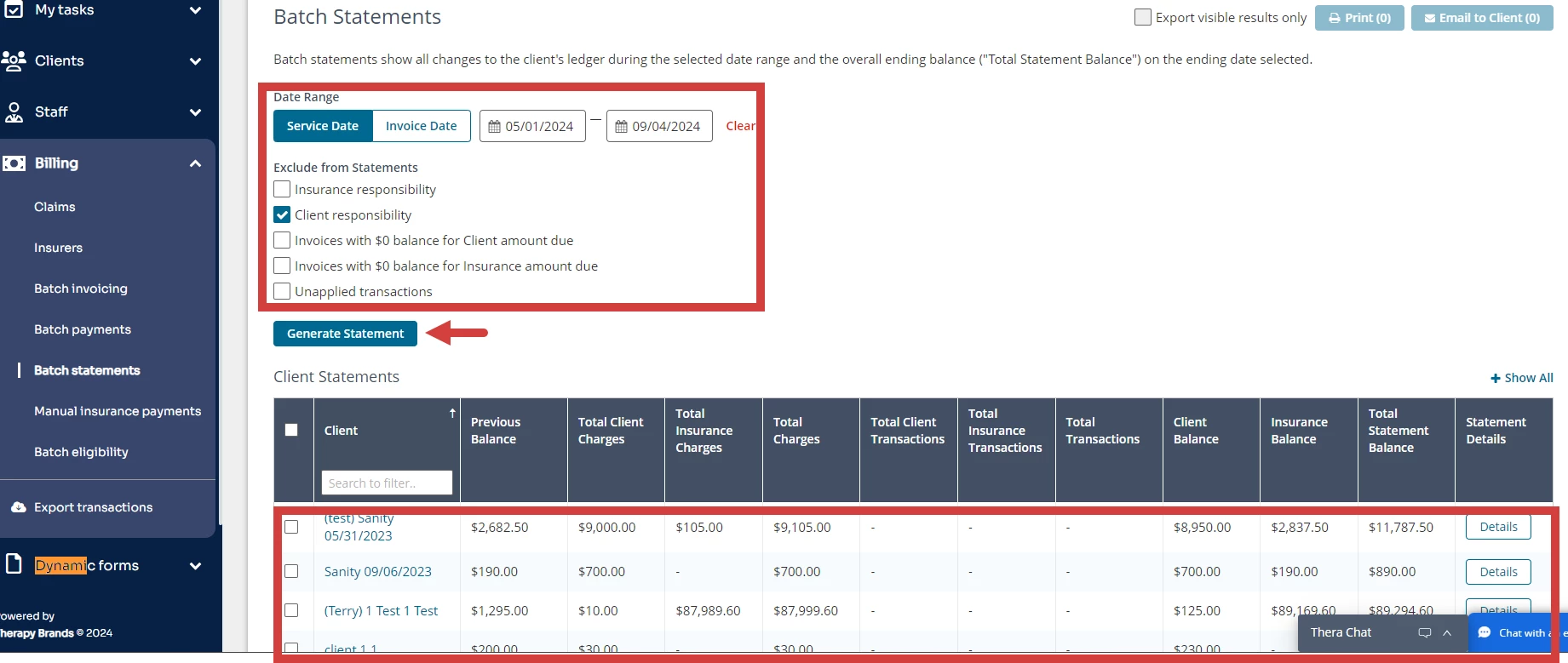
Client Statements show all Invoices created and payments collected in the set Date Range. You can choose to filter your Statements by Service Date or Invoice Date.
Client Statements can be created individually or in batches across multiple Clients.
NOTE: My Clients Plus 3.0 printed Statements are designed to fit #10 Window Envelopes (4 1/8 x 9 1/2).
Create Statement
- Click Billing tab in primary navigation bar.
- Click Batch Statements from side navigation.
- Set desired Date Range and set appropriate Exclusions.
- Click Generate Statement button.
- Select appropriate Statements to print.
- Click Print or Email to Client button.
- Select appropriate customizations by selecting or deselecting check boxes.
- Add Footnote if desired.
- Click Print or Email Statement button.