



PERMISSIONS REQUIRED: You must have Administrator Permissions or higher.
After a Note or Document is signed, it cannot be edited by Therapists. Only users with Administration level Permissions can remove Signatures from certain Notes and Initial Assessments. Signatures must be removed in order to edit or delete a document. On some documents a Signature cannot be removed regardless of your permissions.
IMPORTANT: If you're a Supervisor and you've already approved a colleagues Note or Assessment you will not be able to remove that Signature. Learn More: Assign Supervisor to review initial assessments, treatment plans & notes
Jump to Section:
Remove from Progress Notes
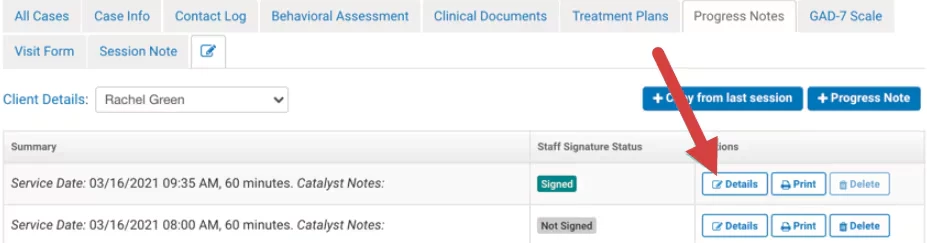
- Locate appropriate Progress Note.
- Click Details button.
- Click Remove All Signatures at the top of the note to remove the electronic Signature.
- Click Yes I'm Sure to confirm removal.
NOTE: If you remove a client signature from a progress note then it will also be removed from the Parental Verification Form for the associated appointment unless there is also a Guardian Verification Signature that was collected for the same appointment, in which case the signature will remain.
See Parental Verification Form and Guardian Verification Signature for more information.
Remove from Behavioral Assessment Form
- Click Behavioral Assessment Codes tab in the Client's Case.
- Click Remove All Signatures at the top of the Note to remove the electronic Signature.
- Click Yes I'm Sure to confirm removal.
Remove from Document
As mentioned above, Signature cannot be removed regardless of permissions for:
- Contact Log Notes
- Addendums
- Treatment Plans
- Dynamic Forms
If you need a signature removed from one of these, you may contact Support and open a ticket to have it removed.