


| Permissions Required:Â Therapist must be subscribed to Wiley Progress Notes in My Clients Plus. |
SUBSCRIPTION REQUIRED: Wiley Treatment Planner & Progress Notes are an additional subscription. Once the Therapist is subscribed, they can create Wiley Treatment Plans.
Wiley Practice Progress Notes is an additional My Clients Plus subscription. Once the Therapist is subscribed, they can create Wiley Treatment Plans.
Before you create a Wiley Treatment Plan you will want to ensure you have created a Client Case and added a Client Diagnosis.
NOTE: All Wiley Practice Planners will include the Wiley tag on the list of Notes and Treatment Plans created.
- Locate Client and open Client Profile.
- Click Notes in left side menu.
- If a Case has not been created for this Client a new one will be created.
- If there are multiple Cases you are assigned to, you will need to select appropriate Case.
- Click Treatment Plans tab.
- Click Wiley Treatment Planner button.

- Select the Problem that is dependent on the Diagnostic Impression entered in the Client's Initial Assessment and click Next.
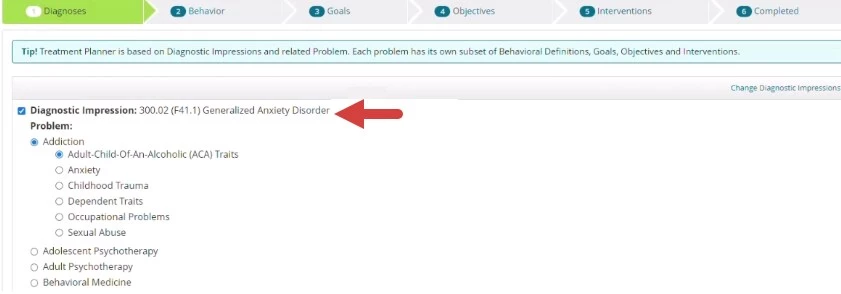
- Select Behavioral Definitions and click Next.
- Select the appropriate Goals. You will choose Objectives for every Goal chosen on the next screen. Click Next.
- Select appropriate Objectives. You will choose Interventions for every Objective chosen on the next screen. Click Next.
- Select appropriate Interventions for each Objectives and click Next.
- When finished, click Generate Treatment Plan.
- A Newly generated Wiley Treatment Plan displays. Add any additional note and/or edit as appropriate.
- Click Save.