


The AI Notes Enhancement Feature allows therapists to refine and enhance their notes by requesting AI-generated improvements based on their original writing. When this feature is enabled for the clinic, therapists can review mental-health specific AI suggestions and incorporate them into their notes as needed.
AI Notes Enhancement improves the quality of clinical note-writing by:
- Enhancing language
- Correcting spelling errors
- Replacing common clinical abbreviations (for example, DOB, HX, PT) with a complete word or phrase
- Replacing mental-health specific acronyms (for example, BPD, BD, COPED) with a complete word or phrase
- Replacing ICD-10 codes with a diagnosis
- Converting lists of bullet points into paragraph form
Jump to Section:
Improve Notes with AI Notes Enhancement
When AI Notes Enhancement is enabled for the clinic, note fields have an Improve with AI option, which generates text enhancement suggestions for the therapist.
AI suggestions are available in the following note fields: Paragraph Answer, Participant(s) in Session, Subjective, Objective, Assessment, Plan, Session Focus, Therapeutic Intervention, Additional Notes, & Risk Assessment - Risk Assessment Notes
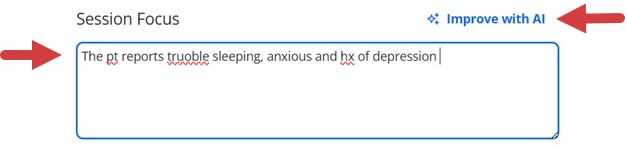
- Enter clinical documentation in the note field.
- Click Improve with AI.
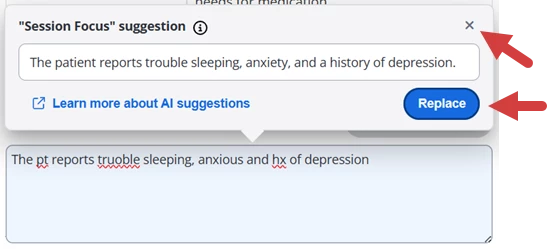
- Review the AI Suggestion:
- Click Replace to pull the suggested text into the note field.
- Click the x in the corner to return to the note without using the suggestion.
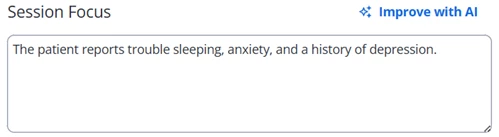
- If you selected Replace, the suggested text displays in the note field.
[Back to Top]
Enable or Disable AI Notes Enhancement for the Clinic
You can enable or disable AI Notes Enhancement in Settings.
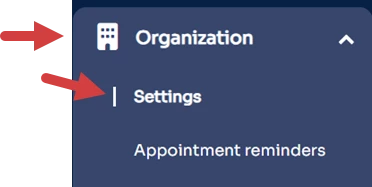
- Click the Organization tab in primary navigation bar.
- Click Settings in side navigation.
- Locate the Disable AI Notes Enhancement in Notes checkbox under the Profile tab.
- Check the checkbox to disable AI Notes Enhancement.
- Uncheck the checkbox to enable AI Notes Enhancement.

- Click Save Changes.