


You can save payment information in the client portal before making a payment. This payment information can be used for future payments you make within the portal, or by the clinic when billing for future appointments and services.
Jump to Section:
Important Notice About Saving Payment Cards
When a payment card is saved for future use, it becomes accessible to all associated parties, including the client, client representative, and agency staff. This means any of these parties can:
- Charge the saved card for future transactions
- Manage or update the saved payment method
This applies whether the card is saved:
- By the client or client representative through the portal, or
- By agency staff in the system
If you do not want a card to be accessible to one or more of these parties, do not select the option to save the card for future use.
Save Payment Information
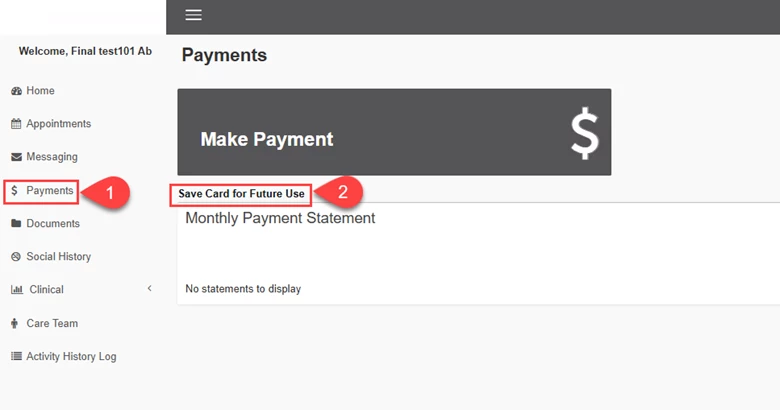
To save payment information in the Client Portal, navigate to the Payments section.
- Click Payments on the navigation menu on the left.
- Click Save Card for Future Use.
- Enter and Submit/Save your payment information.