PERMISSIONS REQUIRED: You need the Admin permission to set up Automatic Eligibility Requests.
NOTE: It's a good idea to submit a few individual eligibility requests to make sure your clinic understands how the process works and the information that will be returned before turning on automation
Once an administrator has Enrolled in Eligibility Requests and Turned On Eligibility Requests for your clinic, an administrator can set up eligibility requests to be sent automatically.
When automatic eligibility requests are set up, the system performs an automatic daily check to see which patients qualify to have eligibility requests sent to their insurers. Automatic eligibility requests will be sent for any patient who has an appointment scheduled within the next 30 days but has not yet had an eligibility request submitted within the timeframe (frequency) set up by the administrator.
You can View a list of all Eligibility Requests, including requests that have been sent automatically, on the eligibility requirements tab of the verification reminders page.
Jump to Section:
Set Up Automatic Eligibility Requests
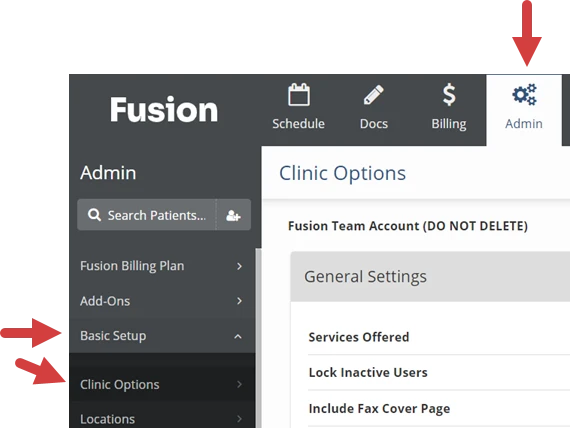
- Navigate to the Admin tab.
- Click Basic Setup.
- Click Clinic Options.
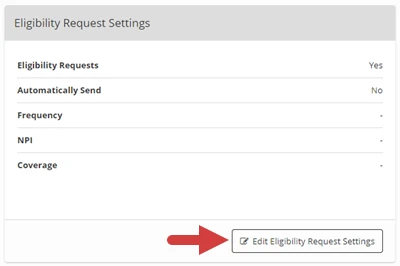
- Scroll down to the Eligibility Request Settings card.
- Click the Edit Eligibility Request Settings button.
- Make sure the Eligibility Requests field is set to Yes, Allow Eligibility Requests.
- Select Yes, Automatically Send Eligibility Requests in the Automatically Send field.
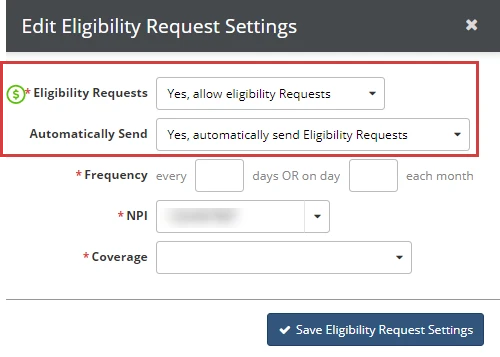
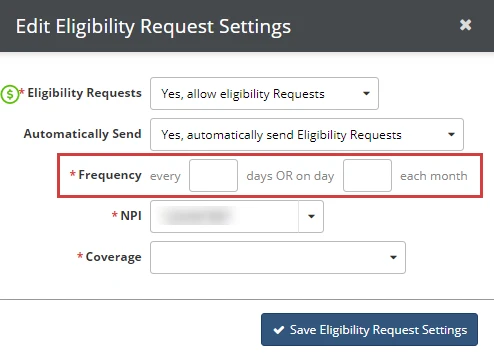
- Enter the Frequency at which automatic eligibility requests should be sent. You can set the frequency to be a certain number or days or on a specific day of the month.
NOTE: Only patients with appointments scheduled within the next 30 days may qualify for automatic eligibility requests.
- If a patient has an appointment scheduled within the next 30 days, and an eligibility request for that patient has not been sent within the timeframe defined in the Frequency field, an eligibility request will automatically be sent for that patient.
- If a patient has an appointment scheduled within the next 30 days, and an eligibility request for that patient has already been sent within the timeframe defined in the Frequency field, an eligibility request will not be sent for that patient until that timeframe has passed.
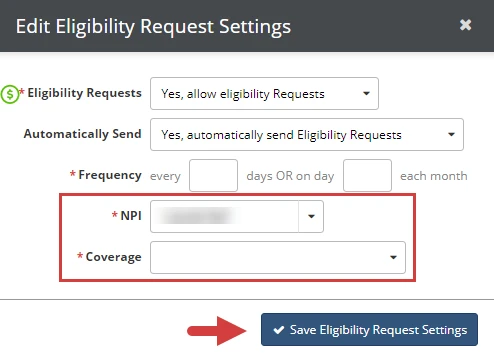
- Select the NPI that the automatic eligibility requests will be sent under in the NPI field.
- Indicate if automatic requests will be sent for the Primary Payer, Primary and Secondary Payer, or Primary, Secondary and Tertiary Payer in the Coverage field.
- Click the Save Eligibility Request Settings button.
Turn Off Automatic Eligibility Requests
When you turn off automatic eligibility requests, users in your clinic will still have the option to manually send eligibility requests as long as Eligibility Requests is still set to Yes on the Eligibility Request Settings card.
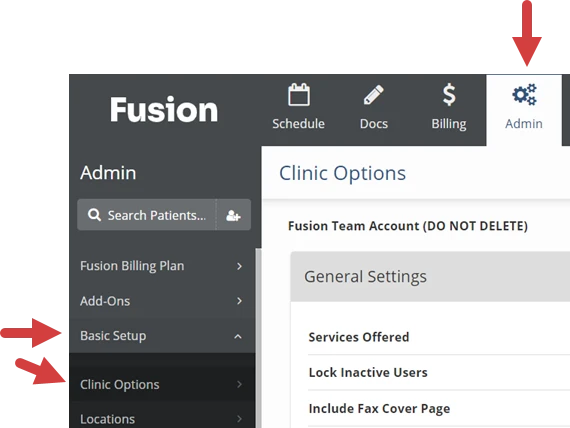
- Navigate to the Admin tab.
- Click Basic Setup.
- Click Clinic Options.
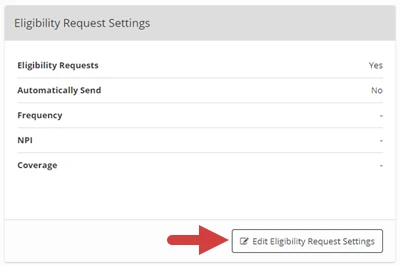
- Scroll down to the Eligibility Request Settings card.
- Click the Edit Eligibility Request Settings button.
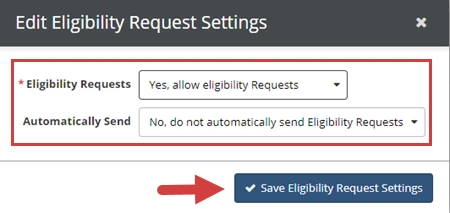
- Make sure the Eligibility Requests field is set to Yes, Allow Eligibility Requests.
- Select No, Do Not Automatically Send Eligibility Requests in the Automatically Send field.
- Click the Save Eligibility Request Settings button.