PERMISSIONS REQUIRED: You need the Insights permission to use Reports.
Emailed Invoice Transactions Report: Ensora Payments & Stripe
Clinics processing payments using Ensora Payments & Stripe can use pre-built reports in New Insights. The Emailed Invoice Transactions Report will display a list of payment processing transactions submitted from emailed invoices. If a client made a payment via a click-to-pay invoice they received by email, it will display in this report.
NOTE: For payment-related questions, please contact the payments team at 877-288-5583 opt 2 opt 6 or payments.support@ensorahealth.com.
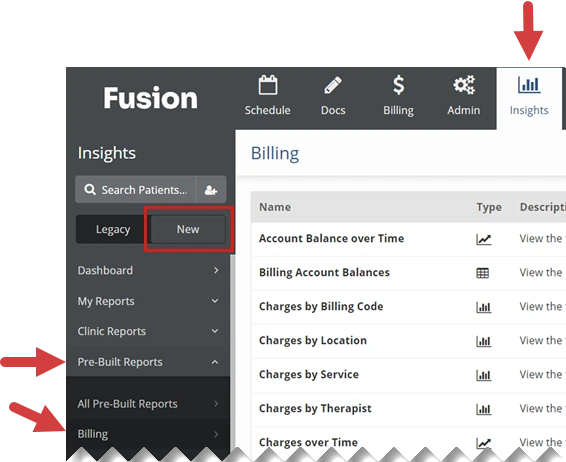
- Click the Insights Tab at the top of the screen.
- Click the New button in the menu on the left.
- Click Pre-Built Reports.
- Click Billing.
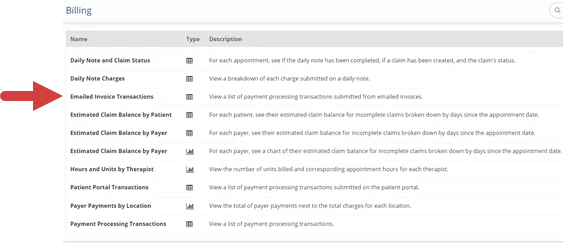
- Select Emailed Invoice Transactions.
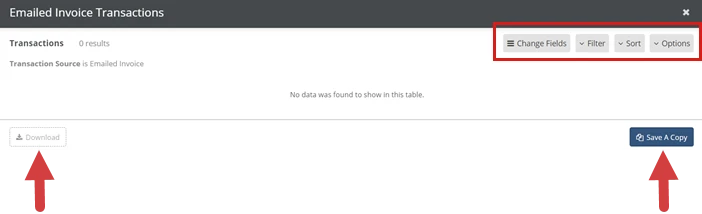
- The Emailed Invoice Transactions Report displays.
- Click the Change Fields button select or reorder to fields the report will display.
- Click the Filter button to filter the report by transaction time and date range or select additional filters.
- Click the Sort button to sort a column by a column by ascending or descending order.
- Click the Options button to display or hide a Total Row at the end of the report.
- Click the Download button to download the report.
- Click the Save a Copy button to save a copy of the report to your My Reports section.