


The control Labeled List Input is commonly used on our stock evaluation forms for Interventions. This functions as a drop-down list.
To modify Labeled List Input:
- Select the Labeled List Input box on the form (in Form Designer) that you want to edit.
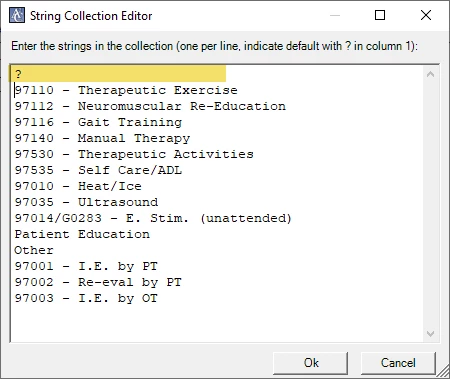
- Then in the Properties panel on the right, under Data select ListItems and then click the ... (3 dots) to bring up the String Collection Editor.
- Enter each item you want in your drop-down list on a new line.
- To default to an item on the list, put a "?" in front of it.
Note: You can only have one default (?) on your list. (In the above screenshot, "97110 - Therapeutic Exercise" would be the default.)
- To default to a blank line, you would put the "?" in front of a blank line. (See below)
- When you are done, you can click OK
- Don't forget to Save as you go!
Note: IF you are only adding internal data to existing Labeled List Input Boxes, you won't need to change your rollups or any tags, or form controls.