


To enable your clinic’s integration with Wibbi Remote Therapeutic Monitoring (RTM), an administrator must generate a unique license code from Fusion’s Add-Ons section and provide that code to Wibbi. Once Wibbi processes the license code, the integration is activated and the RTM is enabled for the clinic.
NOTE: If your clinic has already set up a Wibbi integration for HEP, the same code can be used for RTM.
Generate Wibbi License Code
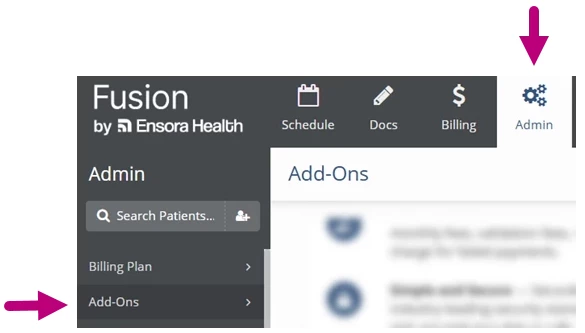
- Click the Admin tab at the top of the screen.
- Click Add-Ons in the menu on the left.
- Scroll down to the Remote Therapeutic Monitoring card to get your License Code.
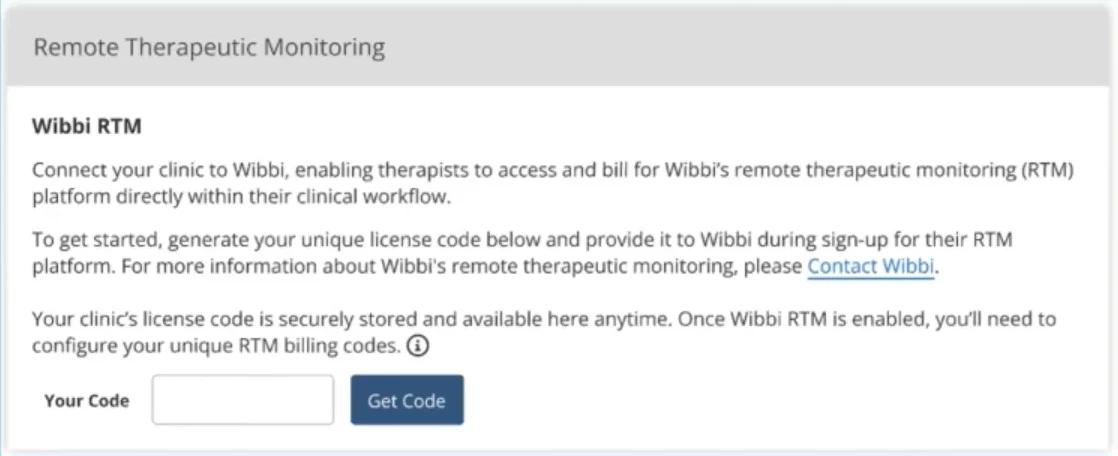
- Contact Wibbi and provide this license code during sign-up for RTM.